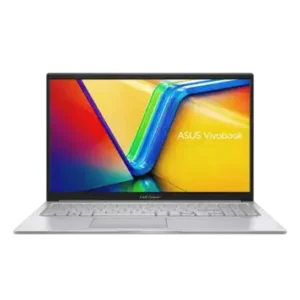
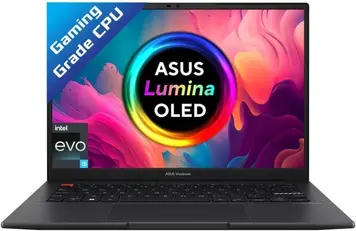


Home Laptop ReviewsAsus Vivobook S14 OLED S3402ZA-KM502WS Review: Best OLED Laptop Under Rs. 80,000?

Asus Vivobook S14 OLED S3402ZA-KM502WS Review: Best OLED Laptop Under Rs. 80,000?

8.6 /10 Great Value

Best display in its price range, solid H-series performance, and genuinely portable at 1.5 kg. Battery life is average. No dedicated GPU. A strong buy if display quality is your top priority.

Processor

12th Gen Intel Core i5-12500H processor

Display

14 " 3K 90 Hz

Graphics

Intel Iris Xe Graphics

Webcam

HD (720p)

Battery

70 wh Li-ion

OS

Windows 11 Home 64-bit

RAM

16 GB DDR4

Storage

512GB SSD

Category Ratings

Design & Portability 8.5/10
Display Quality 9.5/10
Performance 8.5/10
Graphics 6.5/10
Keyboard & Input 8.5/10
Battery Life 7.0/10
Connectivity 8.0/10
Value for Money 8.5/10

Pros

  • Stunning 2.8K 90Hz OLED display with DCI-P3.
  • Powerful 12th gen Core i5 H-series processor.
  • Lightweight 1.5kg laptop with Thunderbolt 4 connectivity.

Cons

  • No dedicated GPU for heavy AAA gaming.
  • Lacks SD card reader and Ethernet port.
  • RAM partly soldered, only one upgradeable slot.

Who Should Buy This?

Best For

  • Content Creators & Photographers
  • Students
  • Business & Remote Professionals
  • Everyday Power Users

Not Ideal For

  • Heavy Gamers
  • Frequent Travellers
  • Users Who Need All-Day Unplugged Use

Asus Vivobook S14 OLED S3402ZA-KM502WS Laptop (12th Gen Core i5/ 16GB/ 512GB SSD) Prices

Amazon
₹89,999 Out of Stock
View Price
Flipkart
₹91,200 In Stock
View Price
Price Disclaimer: Prices are subject to change and may vary from the actual price at the store. We cannot guarantee the accuracy of the prices shown. Please check with the retailer before purchasing.

Introduction

If you are looking for the Asus Vivobook S14 OLED S3402ZA-KM502WS Review, you are probably drawn in by one thing: that gorgeous 2.8K OLED display. Launched in 2022, this laptop still holds its own in 2026 thanks to a combination of Intel Evo certified performance, Thunderbolt 4 connectivity, and a stunning anti-glare OLED screen that most rivals in this price range simply cannot match.

Powered by the Intel Core i5-12500H processor — a high-performance H-series chip — and backed by 16GB DDR4 RAM and a fast PCIe Gen 4 NVMe SSD, the Vivobook S14 OLED is built for students, working professionals, and content creators. At its best price of Rs. 70,990 on Flipkart, it competes directly with newer IPS laptops that cost the same but offer far less visual quality.

However, this is not a flawless laptop. The battery life falls short of what you might expect from an all-day device, and the lack of a dedicated GPU rules it out for heavy gaming or 3D rendering. This review looks at every aspect of the laptop based on verified specifications and user feedback — so you can make a confident buying decision.

Check out the complete Asus Vivobook S14 OLED specifications
Asus Vivobook S14 OLED S3402ZA-KM502WS — Design, Build Quality & Portability

The Asus Vivobook S14 OLED S3402ZA-KM502WS measures 316.4 × 224.5 × 18.9 mm and weighs just 1.5 kg. For a laptop powered by an H-series processor — which normally demands a thicker cooling system — this is an impressive form factor. You can carry it comfortably in a backpack all day.

The chassis comes in Indie Black with a geometric panel design. The build quality is sturdy with minimal lid flex. Asus has borrowed design elements from its higher-end Zenbook range to give this laptop a premium, polished look at a mid-range price. The slim 18.9 mm profile makes it noticeably sleeker than most competing H-series laptops.

The keyboard features a notable design touch: a neon orange ESC key and a striped Enter key. The palm rest carries a Vivobook branding tag. The keyboard also includes an antibacterial coating — a useful hygiene feature that Asus highlights for everyday shared or public use.

There is no IP water or dust resistance rating on this model. This is standard for laptops at this price point, so handle it with care around liquids. The hinge opens flat to 180 degrees, which is convenient for sharing your screen across a table.

Explore other Asus laptops in India.

Asus Vivobook S14 OLED — Display Quality & Visual Experience

The display is the main reason to buy this laptop. The 14-inch OLED NanoEdge panel delivers a 2.8K resolution (2880 × 1800 pixels) in a 16:10 aspect ratio, with a 90Hz refresh rate and 600 nits of peak brightness. According to the official specifications, the display also achieves a 0.2ms response time — one of the fastest available on any laptop screen.

The OLED technology provides true blacks and an effectively infinite contrast ratio. Colors are vivid and lifelike in a way that IPS LCD panels at this price simply cannot replicate. The 100% DCI-P3 color gamut coverage, backed by PANTONE Validation, means color accuracy is at a professional grade — useful for photo editors, graphic designers, and video content creators.

Asus describes this as an anti-glare OLED display, which reduces reflections compared to standard glossy OLED panels. The 85% screen-to-body ratio and slim 6mm NanoEdge bezels give it an immersive, modern look. The three-sided NanoEdge design allows a smaller footprint — Asus fits this 14-inch screen into what is closer to a 13-inch chassis.

OLED displays can raise concerns about burn-in over time. However, Asus includes OLED care features in the MyASUS software — including pixel refresh, pixel shift, and screen timeout settings — to help manage long-term display health. This is worth being aware of if you tend to leave static images on screen for long periods.

Asus Vivobook S14 OLED S3402ZA-KM502WS — Performance & Processing Power

Processor Performance

The laptop runs on the Intel Core i5-12500H — a 12th Generation, Alder Lake H-series processor. This is an important distinction: H-series chips are performance-focused, unlike the lower-power U-series chips found in most thin laptops. The i5-12500H has 12 cores (4 Performance-cores + 8 Efficient-cores), 16 threads, a base speed of 2.5 GHz, and a boost speed up to 4.5 GHz, backed by 18MB of Intel Smart Cache.

The hybrid architecture routes demanding tasks to the 4 high-power Performance-cores while background processes run on the 8 Efficient-cores. This means the laptop handles heavy multitasking well without draining the battery unnecessarily during lighter tasks. The result, according to user feedback, is smooth performance across coding, productivity, light video editing, and browsing with many tabs open simultaneously.

This laptop is also Intel Evo certified. Intel Evo is a verification standard that ensures the laptop meets minimum thresholds for performance, battery, fast charging, instant wake, and connectivity speed. It is a meaningful quality benchmark — not just a marketing label.

RAM & Storage

The 16GB DDR4 RAM runs at 3200 MHz. The memory configuration is a hybrid setup: 8GB is soldered directly to the board (non-removable), and 8GB occupies a single SO-DIMM slot. The SO-DIMM slot allows a future upgrade up to a maximum of 24GB total. For most users, 16GB is sufficient — but those running virtual machines or heavy creative software may eventually want to upgrade.

The 512GB storage uses a PCIe Gen 4 NVMe M.2 SSD, delivering read speeds of up to 3.5 Gbps — significantly faster than PCIe Gen 3 or SATA-based SSDs. Boot times, app launches, and large file transfers all benefit from this speed. There is no second SSD slot confirmed in the specifications, so plan your storage needs carefully at the time of purchase.

Asus Vivobook S14 OLED — Graphics & Gaming Capabilities

The Asus Vivobook S14 OLED S3402ZA-KM502WS uses Intel Iris Xe integrated graphics, which shares system RAM. There is no dedicated GPU on this model. This is the single biggest limitation of the laptop for any buyer interested in gaming or GPU-intensive creative work.

For light gaming, the Iris Xe is capable. Casual and less demanding games — Minecraft, Stardew Valley, Among Us — run without issue. eSports titles like Valorant and CS:GO are playable at medium-to-low settings at 720p to 900p. The i5-12500H’s H-series CPU headroom gives the integrated graphics more breathing room than equivalent U-series setups.

AAA gaming titles such as GTA V at higher settings, open-world games, or recent releases are not practical. Frame rates will be too low for a comfortable experience. Buyers who want gaming alongside a great display should consider laptops with dedicated GPUs in the Rs. 75,000–90,000 range, though these typically weigh more and offer lower display quality.

For creative work, Iris Xe handles Lightroom, Photoshop, and basic Premiere Pro 1080p editing adequately. Rendering times will be slower than on a discrete GPU setup. 3D applications and CAD work will also face limitations. On the output side, the dual Thunderbolt 4 ports support external displays at up to 4K — useful for a dual-monitor productivity setup at a desk.

Asus Vivobook S14 OLED S3402ZA-KM502WS — Keyboard, Trackpad & Input

Keyboard

The keyboard is a full-size chiclet-style layout with 1.4mm of key travel and backlit keys. Feedback from users is consistently positive — the typing experience is comfortable and responsive for extended sessions. The keys do not flex during normal use, which is a good quality indicator at this price range.

A few design touches stand out: the orange-coloured ESC key, the hazard-stripe accent on the Enter key, and the Vivobook branding on the palm rest. The keyboard carries an antibacterial coating, added as a hygiene feature across several Vivobook models. The fingerprint scanner is built into the power button — a clean design that enables Windows Hello biometric login without a separate module.

Trackpad & Webcam

The trackpad uses a clickpad design with full multi-touch gesture support. Windows 11 gestures — three-finger and four-finger swipes for switching windows and virtual desktops — work smoothly. User reviews describe the trackpad as large and responsive.

The 720p HD webcam includes a physical privacy shutter — a slider that physically blocks the lens when not in use. AI-powered noise cancellation for the microphone is available through the MyASUS software. While 1080p webcams are becoming more common in 2026, 720p remains functional for video calls on Zoom, Teams, or Google Meet.

Asus Vivobook S14 OLED S3402ZA-KM502WS — Battery Life & Charging

The battery specification confirms a 70Wh 3-cell Lithium-Ion pack. On paper, 70Wh is a reasonable capacity for a 14-inch laptop. In real-world use, however, the OLED display’s power draw and the H-series processor’s performance appetite mean battery life is more limited than many buyers expect.

Based on verified user reviews from Flipkart and Amazon India, most buyers report 5 to 7 hours of mixed use — browsing, coding, document work, and some video. Lighter tasks at lower brightness can push toward the upper end of that range. Heavier workloads — sustained video rendering or running development tools — will drop the laptop to around 4 to 5 hours. This is an honest assessment: the Vivobook S14 OLED is not an all-day unplugged laptop.

Charging uses a 90W AC adapter included in the box. The dual Thunderbolt 4 ports also support USB-C Power Delivery charging, so a compatible USB-C charger or power bank can top it up on the go. Asus mentions fast-charge capability as part of its Intel Evo certification, though the exact recharge time is not confirmed in the specifications.

Using the laptop at 50–60% brightness instead of maximum will meaningfully extend battery life, since OLED displays consume more power at higher brightness levels.

Asus Vivobook S14 OLED — Ports, Connectivity & Expansion

Ports

The port selection is well-thought-out for a 1.5 kg thin-and-light device. The confirmed ports are: 2 × Thunderbolt 4 USB-C (40 Gbps, DisplayPort Alt Mode, and USB-C charging), 1 × USB-A 3.2 Gen 1, 1 × USB-A 2.0, HDMI 2.0 output, and a 3.5 mm combo audio jack (headphone + microphone).

The dual Thunderbolt 4 ports are a significant advantage at this price. Each port supports data transfer at 40 Gbps, connection to 4K external displays, and USB Power Delivery charging. You can connect a Thunderbolt dock to this laptop and instantly expand to multiple monitors, Ethernet, and additional USB devices using a single cable — a clean desk setup for home or office.

Two things are missing: an SD card reader and a built-in Ethernet port. Content creators who shoot on camera cards will need a USB-C card reader adapter. For wired networking, a USB-A or USB-C to Ethernet adapter is required. These omissions are common trade-offs on ultra-slim designs but are worth noting if you rely on either regularly.

Wireless Connectivity

The wireless specification confirms Wi-Fi 6E (802.11ax), the latest mainstream Wi-Fi standard. Wi-Fi 6E adds the 6 GHz band to the standard 2.4 GHz and 5 GHz bands, delivering faster speeds and lower interference in crowded network environments — particularly useful in apartments, offices, or campus networks.

Bluetooth 5.2 is confirmed, offering improved range, lower energy consumption, and better stability with wireless peripherals compared to Bluetooth 4.x.

Asus Vivobook S14 OLED — Thermal Management & Cooling

The cooling system is ASUS IceCool thermal technology, built around dual heat pipes and a single IceBlade fan. This architecture channels heat away from the i5-12500H efficiently while keeping fan noise at a manageable level during standard use.

Asus rates the system at under 38 dBA in Standard mode — quiet enough for library or meeting room use. During everyday tasks like browsing, document editing, or video calls, the fan is barely audible. It spins up more noticeably during sustained processor-heavy tasks such as compiling code, exporting video, or running multiple virtual machines.

Some user reviews mention that the base of the laptop gets warm under heavy workloads. This is expected for an H-series processor in an 18.9 mm thin chassis — the cooling design is optimised for the balance between performance and portability, not for extreme sustained loads. For the typical student or professional use case, thermal management is adequate.

If you plan to run intensive tasks for long periods, placing the laptop on a hard flat surface (rather than a bed or sofa that blocks vents) will help airflow and keep temperatures in check.

Audio & Webcam Quality

The speaker system consists of dual downward-firing stereo speakers with Dolby Audio certification. Initial user impressions suggest the sound is better than expected for a slim laptop — clear mids with enough volume for personal use in a quiet room. However, as several reviewers note, the sound can feel thin at maximum volume without audio software adjustments.

Enabling the Dolby Audio or Windows Spatial Sound settings in Windows 11 makes a noticeable improvement. With those settings active, music, podcasts, and video calls sound considerably fuller. For watching movies or YouTube solo, the speakers are adequate.

The Dolby Audio certification ensures that the speakers are tuned to a defined audio quality standard.

The built-in microphone supports AI-powered noise cancellation through the MyASUS software — a useful feature for video calls in noisy environments. The webcam is 720p HD with a physical privacy shutter. For 2026 standards, a 1080p webcam would be preferable, but 720p is functional for everyday video conferencing.

Who Should Buy the Asus Vivobook S14 OLED S3402ZA-KM502WS?

Best For

  • Content Creators & Photographers: The 2.8K OLED with 100% DCI-P3 and PANTONE Validation makes this one of the most colour-accurate displays available under Rs. 80,000. Photo editing in Lightroom and Photoshop benefits directly from this accuracy.
  • Students: The lightweight 1.5 kg build, included Microsoft Office 2021, Windows 11 Home, and strong multitasking performance make it an excellent academic laptop for college or university.
  • Business & Remote Professionals: Intel Evo certification, Thunderbolt 4 for docking, Wi-Fi 6E, and Windows Hello biometric login check all the boxes for a professional productivity machine.
  • Everyday Power Users: The i5-12500H handles simultaneous browser tabs, office applications, video streaming, and light creative work without breaking a sweat.

Not Ideal For

  • Heavy Gamers: No dedicated GPU means AAA gaming is not viable. eSports titles work at low settings, but this is not a gaming laptop.
  • Frequent Travellers Without Adapters: The missing SD card slot and Ethernet port require carrying extra accessories — a minor but real inconvenience.
  • Users Who Need All-Day Unplugged Use: Battery life of 5–7 hours in mixed use means you will likely need a charger for a full workday.

Asus Vivobook S14 OLED S3402ZA-KM502WS vs Competitors

In the Rs. 65,000–85,000 segment in 2026, most laptops still ship with Full HD IPS LCD panels. The Vivobook S14 OLED’s 2.8K anti-glare OLED display with 100% DCI-P3 is a clear visual upgrade over every IPS competitor at this price. If display quality is your primary criterion, the Vivobook S14 OLED wins its segment.

Laptops with dedicated entry-level GPUs in this budget typically weigh 1.8–2.2 kg, have thicker chassis, and use standard 60Hz Full HD displays. They win on gaming and GPU-accelerated rendering, but lose on portability, display quality, and overall build refinement. The trade-off is clear and depends entirely on your priorities.

Within the Asus lineup, the newer Vivobook S14 OLED models (S5406 series with Intel Lunar Lake) offer better battery life but cost more. The S3402ZA-KM502WS remains the best value OLED option if you can find it at its discounted 2026 price of around Rs. 70,990.

Compared to Windows alternatives at similar prices, very few match the combination of a 2.8K OLED display, dual Thunderbolt 4, Wi-Fi 6E, and a sub-1.5 kg chassis simultaneously.

Use our Compare Tool to run a detailed side-by-side comparison with similar laptops.

Asus Vivobook S14 OLED S3402ZA-KM502WS — Pros and Cons

Pros

  • Outstanding 2.8K Anti-glare OLED Display: The 90Hz, 600 nit, 100% DCI-P3 OLED panel with PANTONE Validation is the best display available in this price bracket in India. It is sharper, more vibrant, and more colour-accurate than any IPS LCD alternative at the same price.
  • Powerful Intel Evo H-Series Processor: The i5-12500H is a high-performance chip with 12 cores and 4.5 GHz boost — well above the level of U-series chips in most rival thin-and-light laptops. Intel Evo certification adds an extra quality guarantee.
  • PCIe Gen 4 NVMe SSD: The storage delivers read speeds up to 3.5 Gbps, making boot times, app launches, and file operations noticeably faster than Gen 3 SSD competitors.
  • Dual Thunderbolt 4 Ports: Two full-bandwidth Thunderbolt 4 ports at this price point is uncommon and genuinely useful for docking, dual 4K displays, and USB-C charging from any charger.
  • Lightweight 1.5 kg Build: An H-series laptop that weighs just 1.5 kg is rare. The slim 18.9 mm chassis makes it one of the most portable performance laptops available.
  • Microsoft Office 2021 Included: The pre-installed Office Home & Student 2021 saves buyers the cost of a separate productivity suite.

Cons

  • No Dedicated GPU: The Intel Iris Xe integrated graphics rule out AAA gaming and heavy 3D work. Buyers needing GPU performance must look elsewhere.
  • Average Battery Life: The OLED display and H-series CPU draw more power than expected. Real-world battery life is not enough for a full unplugged workday.
  • No SD Card Reader or Ethernet Port: Both are missing, requiring adapters for photographers using SD cards or users in wired network environments.

Frequently Asked Questions

Is the Asus Vivobook S14 OLED S3402ZA-KM502WS worth buying in 2026?

Yes — at Rs. 70,990 on Flipkart, this remains a strong buy in 2026 if you prioritise display quality and portability. The 2.8K OLED display, Intel Evo certification, PCIe Gen 4 SSD, and dual Thunderbolt 4 ports are genuinely hard to match at this price. The 2022-generation processor is the only notable caveat for future-proofing.

What is the real-world battery life of this laptop?

Based on user reviews, expect 5 to 7 hours of mixed use — browsing, coding, document editing, and occasional video. The OLED display and H-series processor draw more power than lower-power U-series alternatives. Charging is via the included 90W adapter or any USB-C Power Delivery charger through the Thunderbolt 4 ports.

Is the Asus Vivobook S14 OLED S3402ZA-KM502WS good for gaming?

It handles light and casual gaming — titles like Minecraft, Stardew Valley, or Valorant at medium-low settings. The integrated Intel Iris Xe graphics cannot run modern AAA titles at playable frame rates. If gaming is a priority, consider a laptop with a dedicated GPU.

Can I upgrade the RAM and storage?

RAM can be upgraded from 16GB to a maximum of 24GB total (the 8GB soldered to the board is fixed, but the SO-DIMM slot accepts a larger module). The NVMe SSD is replaceable. No second SSD slot is confirmed, so if you need more than 512GB, replace the existing drive or use external storage.

Is the display reflective or anti-glare?

Asus describes this as an anti-glare OLED display, which reduces reflections compared to standard glossy OLED panels. In practice, some reflection is still visible in very bright environments, but it is significantly better managed than on a standard glossy panel.

Is this laptop suitable for video editing?

Yes, for 1080p video editing in Premiere Pro, DaVinci Resolve, or similar software, the i5-12500H and 16GB RAM perform well. The 2.8K OLED with 100% DCI-P3 is excellent for colour grading. For 4K editing or heavy effects rendering, the lack of a dedicated GPU will slow export times significantly.

How loud is the fan on this laptop?

Asus rates the IceCool cooling system at under 38 dBA in Standard mode. During everyday tasks such as browsing, typing, or watching video, the fan is nearly silent. Under sustained CPU loads — video rendering, large compilations — the fan becomes audible but not intrusive.

What ports are available on this laptop?

The confirmed ports are: 2 × Thunderbolt 4 USB-C (with DisplayPort and USB-C charging), 1 × USB-A 3.2 Gen 1, 1 × USB-A 2.0, HDMI 2.0, and a 3.5 mm combo audio jack. There is no SD card reader and no built-in Ethernet port.

Is the keyboard comfortable for long typing sessions?

User reviews consistently rate the keyboard positively. The 1.4 mm key travel is adequate for extended typing, the keys do not flex, and the backlight is useful for low-light use. The antibacterial coating and comfortable key spacing add to the overall typing experience.

Final Verdict: Should You Buy?

8.6 /10
Great Value

The Asus Vivobook S14 OLED S3402ZA-KM502WS delivers on its core promise: a premium OLED display in a genuinely portable laptop at a price that undercuts most premium alternatives. The 2.8K anti-glare OLED with 100% DCI-P3, 90Hz refresh rate, and 0.2ms response time is the standout feature — and rightly so. No other laptop near Rs. 70,000 offers this display quality in 2026.

Performance is solid for productivity, creative work, and multitasking. The Intel Evo certified i5-12500H, PCIe Gen 4 SSD, dual Thunderbolt 4 ports, and Wi-Fi 6E make this a genuinely well-equipped laptop for students and professionals. The Intel Evo certification adds confidence that the laptop meets real-world responsiveness and connectivity standards.

The honest limitations are important to acknowledge: battery life of 5–7 hours falls short of all-day use, there is no dedicated GPU for gaming or 3D work, no SD card reader, and no Ethernet port. The 2022 platform also means newer, more efficient processors are available in competing models at similar prices in 2026. These limitations do not make this a bad laptop — they simply define who it is for.

If you value display excellence, portability, and a well-built keyboard above everything else, the Vivobook S14 OLED S3402ZA-KM502WS at Rs. 70,990 is an excellent buy.

Final Score: 8.6 / 10 — Excellent Buy

Bottom Line: Consider this laptop if a premium OLED display and Intel Evo performance in a 1.5 kg chassis are your priorities. Skip it if you need a dedicated GPU, full-day battery, or an SD card slot.

Was this helpful?

100% found this helpful

Thank you for your feedback!

User Comments

No comments yet. Be the first to share your thoughts!

Leave a Comment

Your email will not be published. Required fields are marked *

Disclaimer: Prices and specifications shown may vary from actual products. Please check with the retailer before purchasing.