Home Laptop ReviewsSamsung Galaxy Book Go Review 2026: The Ultra-Portable Laptop with Big Trade-Offs

Samsung Galaxy Book Go Review 2026: The Ultra-Portable Laptop with Big Trade-Offs

6.0 /10 Average Pick

This laptop does three things brilliantly: it's incredibly light, completely silent, and runs all day on one charge. But it does almost everything else poorly. The display has terrible viewing angles and dim colors. Many Windows programs won't install. The 4GB RAM feels tight even for basic tasks. Gaming is basically impossible.

Processor

Qualcomm Snapdragon 7c Gen 2

Display

14 " Full HD 60 Hz

Graphics

Qualcomm Adreno 618

Webcam

HD (720p)

Battery

42.3 wh Lithium-Polymer

OS

Windows 11 Home

RAM

4 GB LPDDR4X

Storage

64 GB / 128 GB

Category Ratings

Design & Portability 9.0/10
Display Quality 3.0/10
Performance 5.0/10
Graphics 3.0/10
Keyboard & Input 6.5/10
Battery Life 9.5/10
Connectivity 5.5/10
Value for Money 5.0/10

Pros

  • Ultra-lightweight portable design at 1.38kg perfect for frequent travelers
  • Exceptional battery life: 13-14 real-world hours without charging
  • Completely fanless design ensures silent operation for distraction-free work

Cons

  • TN panel display has poor color accuracy limiting creative work capabilities
  • Arm-based processor incompatible with many Windows native applications
  • 4GB RAM standard configuration insufficient for multitasking heavy workloads

Who Should Buy This?

Best For

  • Need Extreme Portability
  • Value Silent Operation
  • Prioritize Battery Life
  • Use Only Basic Software
  • Want Windows on a Budget

Not Ideal For

  • Expect Traditional Windows Compatibility
  • Need Specialized Software
  • Care About Display Quality
  • Want to Play Games

Samsung Galaxy Book Go Prices

Amazon
₹26,998 Out of Stock
Go To Store
Flipkart
₹29,999 Out of Stock
Go To Store
Price Disclaimer: Prices are subject to change and may vary from the actual price at the store. We cannot guarantee the accuracy of the prices shown. Please check with the retailer before purchasing.

Introduction

The Samsung Galaxy Book Go Review examines an unusual Windows laptop that launched in 2021. This laptop uses an ARM processor (like smartphones) instead of the usual Intel or AMD chips. The result? A super-light 1.38kg laptop with amazing battery life but serious software compatibility problems. As of January 2026, this laptop is mostly out of stock in India, priced around ₹26,999 when available.

What makes this laptop different? It weighs less than most 14-inch laptops. It’s completely silent with no fans. The battery lasts 12-13 hours easily. But here’s the catch: many Windows programs won’t work because of the ARM processor. The display quality is poor. And the 4GB RAM feels cramped.

Samsung Galaxy Book Go Quick Facts

Launch Date: June 2021
Current Status: Mostly out of stock (January 2026)
Last Known Price: ₹26,999 – ₹29,999
Best For: Light tasks with extreme portability needs
Main Problem: ARM processor limits software compatibility
Our Rating: 6.0/10 – Niche Product with Major Limitations

Honest Summary: This laptop does three things brilliantly: it’s incredibly light, completely silent, and runs all day on one charge. But it does almost everything else poorly. The display has terrible viewing angles and dim colors. Many Windows programs won’t install. The 4GB RAM feels tight even for basic tasks. Gaming is basically impossible. View Complete Specifications here Samsung Galaxy Book Go

Design & Build Quality

Physical Dimensions

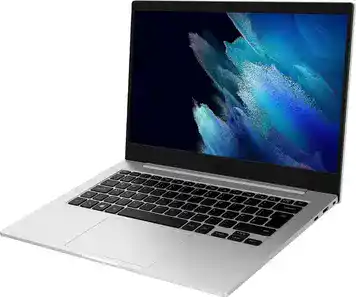
The Samsung Galaxy Book Go measures 323.9 x 224.8 x 14.9 mm. The 14.9mm thickness makes it genuinely thin. At 1.38kg (3.04 pounds), it’s one of the lightest 14-inch Windows laptops ever made.

For comparison: most budget laptops this size weigh 1.6-1.9kg. The weight difference is noticeable when carrying it all day.

Materials & Construction

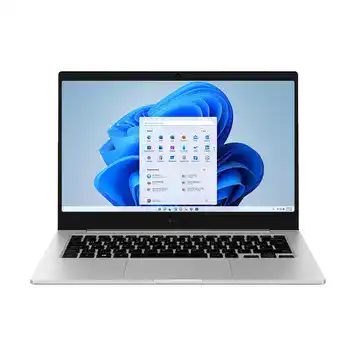
The laptop uses a mix of plastic and metal. Surprisingly, it doesn’t feel cheap. Reviews mention the plastic feels more premium than expected – you might not guess it’s not all metal.

The silver color looks professional. Only a Samsung logo marks the lid. No flashy designs or RGB lights here.

Build Quality Reality

Multiple reviews mention these issues:

  • The hinge is stiff to open one-handed
  • The keyboard deck flex when you type hard
  • The trackpad is basic plastic, not glass
  • The base feels slightly flexible under pressure

None of this breaks the laptop. But it reminds you this costs ₹27,000, not ₹70,000.

Portability Assessment

This is where the laptop shines. The 1.38kg weight means:

  • No shoulder strain during commutes
  • Fits easily in any backpack
  • Comfortable to use on your lap
  • Easy to carry around campus or offices

The thin profile slips into bags without bulk. For frequent travelers, this weight advantage is real.

Display Quality: The Biggest Weakness

Screen Specifications

The 14-inch display has 1920 x 1080 (Full HD) resolution. The panel type is TN (Twisted Nematic) – an older, cheaper technology. This is the laptop’s worst component according to every review.

What’s Wrong with TN Panels?

TN panels were common 10-15 years ago. Today, most laptops use IPS panels. Here’s why TN is bad:

Terrible Viewing Angles: Colors shift dramatically when you tilt the screen. Look at it from the side and colors wash out completely. Even straight-on viewing shows color distortion.

Poor Color Accuracy: Reviews mention the screen shows washed-out colors. The JSON specs list only 58% sRGB coverage – professional standards require 100% sRGB.

Low Brightness: The specs show 230 nits brightness. Most modern laptops hit 300-400 nits. This screen is dim. Outdoor use is nearly impossible. Even indoor use in bright rooms is challenging.

Real-World Experience

Multiple reviews describe the display as:

  • “Frankly, just not good” (XDA Developers)
  • “Cloudy screen” (TechRadar)
  • “Screams budget PC” (XDA Developers)

For basic tasks like email and documents, it works. For anything visual – photos, videos, design work – it’s poor.

The matte anti-glare coating helps slightly with reflections. But it can’t fix the fundamental TN panel limitations.

Who Can Accept This Display?

You might tolerate this screen if you:

  • Only do text-based work (writing, spreadsheets)
  • Never watch videos or photos
  • Work indoors with dim lighting
  • Care more about battery life than visual quality

Everyone else should look at IPS display laptops.

Performance: ARM Processor Challenges

The Qualcomm Snapdragon 7c Gen 2 Processor

This laptop uses an ARM processor, not the Intel/AMD processors in most Windows laptops. ARM processors power smartphones and tablets. They use less power but face software compatibility issues on Windows.

Specifications:

  • 8 cores (2 performance + 6 efficiency)
  • 2.55 GHz maximum speed
  • 1MB cache
  • Built on 8nm process

The ARM Windows Problem

Here’s the critical issue: Windows was built for Intel/AMD (x86) processors. ARM processors speak a different language. Windows must “translate” or “emulate” most programs.

The result:

  • Native ARM apps run fine (Microsoft Office, Edge browser)
  • Translated x86 apps run slower (30-50% performance hit)
  • Many programs won’t install at all

What Works and What Doesn’t

Works Well:

  • Microsoft Edge browser
  • Microsoft Office (Word, Excel, PowerPoint)
  • Built-in Windows 11 apps
  • Web-based applications
  • Email and basic tasks

Works Poorly or Not At All:

  • Google Chrome (only 32-bit version, very slow)
  • Adobe Creative Suite (Photoshop, Premiere, etc.)
  • Many development tools
  • Specialized software (CAD, engineering programs)
  • Most PC games

Real Performance Tests

Reviews mention:

  • Opening apps takes longer than Intel laptops
  • Multitasking with 4GB RAM causes slowdowns
  • 30 Chrome tabs crashed the system (Laptop Mag)
  • Even simple Google Docs showed lag

The Snapdragon 7c Gen 2 is fine for light tasks. But the 4GB RAM makes everything worse.

4GB RAM: Too Little in 2026

The laptop has 4GB LPDDR4X RAM soldered (non-upgradable). In 2026, this is very tight:

  • Windows 11 uses 2-2.5GB just running
  • Leaves only 1.5-2GB for your apps
  • Browser with multiple tabs uses 1GB+
  • Result: Constant app reloading and slowdowns

An 8GB version exists but is harder to find. That would help significantly.

Who Can Live with This Performance?

This laptop works for:

  • Email and web browsing
  • Microsoft Office documents
  • Video calls (Zoom, Teams)
  • Light productivity tasks
  • People using mostly web apps

Skip this if you need:

  • Adobe Creative Cloud
  • Programming/development
  • Any specialized Windows software
  • Heavy multitasking
  • Gaming

Graphics: Minimal Gaming Ability

Qualcomm Adreno 618 GPU

The integrated Adreno 618 graphics chip comes from smartphone technology. It shares the system’s 4GB RAM for graphics memory (VRAM).

This GPU is designed for phone games, not PC gaming.

Gaming Reality

Casual Games: Simple games from the Microsoft Store might work. Solitaire, Minesweeper, basic puzzle games – yes.

Light 3D Games: Reviews tested Asphalt 8 (a racing game) and found “occasional stutters” interrupting gameplay.

Popular PC Games: Forget it. Most won’t install due to ARM compatibility. Those that do run will have unplayable frame rates.

Heavy Games: Genshin Impact, Fortnite, Valorant – none of these work properly on ARM Windows.

Creative Work Limitations

The weak graphics also impact:

  • Photo editing (slow in Photoshop IF it even installs)
  • Video editing (not recommended at all)
  • 3D modeling (impossible)
  • CAD software (incompatible)

For any creative work, look elsewhere.

Keyboard & Trackpad Experience

Keyboard Design

The laptop has an 80-key backlit keyboard. The layout is standard QWERTY without a number pad (tenkeyless design).

Typing Experience: Reviews describe “solid travel on keys” despite the thin chassis. The keyboard deck flexes when typing hard, but keys themselves feel okay.

The backlight helps in dark rooms. Brightness isn’t adjustable on this model.

Trackpad Quality

The clickpad uses “basic cheap-and-cheerful” plastic according to reviews. It supports precision touchpad gestures:

  • Two-finger scrolling
  • Three-finger task switching
  • Four-finger desktop view

The trackpad works but doesn’t feel premium. Glass trackpads found on expensive laptops feel much smoother.

Fingerprint Sensor

A fingerprint reader is built into the side for Windows Hello login. Reviews don’t mention problems with it.

180-Degree Hinge

Samsung advertises the hinge opens flat to 180 degrees. Reviews call this “questionably useful.” The hinge is:

  • Too stiff to open one-handed
  • Slightly wobbly when typing on your lap
  • Stable enough on desks

Battery Life: The Star Feature

Battery Capacity

The 42.3 Wh (5480 mAh) battery is modest by capacity numbers. But ARM processors use much less power than Intel/AMD chips.

Real-World Battery Tests

Multiple professional reviews tested battery life:

Laptop Mag Test: 12 hours 49 minutes (continuous web browsing at 150 nits)

NotebookCheck Test: Almost 13 hours in practical WiFi test

User Reports: 12-14 hours for typical office work

This crushes most budget laptops (8-9 hours) and even many premium laptops (10-11 hours).

Usage Scenarios

Based on reviews and specs:

Light Use (email, web, documents):
14-16 hours easily

Normal Use (multitasking, videos, calls):
12-13 hours

Heavy Use (maximum brightness, demanding tasks):
8-10 hours

For comparison: typical Intel budget laptops last 6-8 hours for normal use.

Charging Speed

The included 25W USB-C charger fully recharges the battery in 1.5-2 hours according to Samsung. This is reasonable, not super-fast but acceptable.

Why the Battery Lasts So Long

Three factors create excellent battery life:

  1. ARM processor uses less power than Intel/AMD
  2. TN display uses less power than IPS/OLED
  3. Passive cooling (no fan) eliminates that power drain

The battery life is genuinely exceptional. Reviews consistently praise this as the laptop’s best feature.

Ports & Connectivity

Physical Ports

USB Ports:

  • 1x USB-A 2.0 (right side)
  • 2x USB-C 3.0 (one each side)

The USB-A port uses old USB 2.0 speed (slow for file transfers). But it connects mice, keyboards, and flash drives.

The two USB-C ports handle:

  • Charging (either side)
  • Data transfer
  • Display output (with adapter)

Other Ports:

  • 3.5mm headphone/mic combo jack
  • MicroSD card reader (expand storage)
  • Nano SIM slot (for LTE model)
  • Kensington lock slot

Missing Ports:

  • No HDMI (need USB-C adapter)
  • No Ethernet (need USB-C adapter)
  • No Thunderbolt
  • No extra USB-A ports

The port selection is minimal but covers basics. You’ll need dongles for presentations or multiple peripherals.

Wireless Connectivity

WiFi 5 (802.11ac): Dual-band 2.4GHz and 5GHz support. Not the latest WiFi 6, but adequate for most home/office networks.

Bluetooth 5.1: Connects headphones, mice, keyboards. Supports modern codecs.

4G LTE (Optional): Some versions have a SIM slot for mobile data. The version reviewed here (WiFi-only) doesn’t have this.

Cooling: Completely Silent

Fanless Passive Cooling

The Samsung Galaxy Book Go has zero fans. Heat dissipates through the metal/plastic chassis passively.

This is possible because the Snapdragon 7c Gen 2 generates minimal heat compared to Intel/AMD processors.

Noise Levels

The laptop operates in complete silence. Reviews emphasize “silent operation” as a key feature. No fan noise ever.

Where this matters:

  • Libraries and quiet study spaces
  • Recording audio/videos
  • Meetings and video calls
  • Noise-sensitive environments
  • Late-night work without disturbing others

Temperature Management

Reviews mention the laptop stays cool during use. The low-power ARM processor doesn’t generate much heat.

Under sustained load, the chassis gets warm but not uncomfortable. One review measured 41.6°C (107°F) maximum – warm but tolerable.

No thermal throttling reported – performance stays consistent.

Audio & Webcam

Speaker System

Two 1.5W stereo speakers sit on the bottom. The laptop supports Dolby Atmos audio processing.

Audio Quality: Adequate for video calls and casual video watching. Don’t expect rich sound or bass. Typical thin laptop speakers.

The bottom placement means sound gets muffled when used on soft surfaces (beds, couches).

Microphone

Dual-array digital microphones with noise cancellation handle voice input. Reviews don’t complain about call quality.

720p Webcam

The standard HD webcam sits in the top bezel. Reviews describe it as “no different from scores of other poor laptop cameras.”

Image quality is acceptable in good lighting. Poor in dim conditions. Typical budget laptop webcam – fine for Zoom/Teams, not great quality.

No privacy shutter included. Use a webcam cover if concerned about privacy.

Who Should Buy Samsung Galaxy Book Go?

Design & Portability: 9.0/10
Display Quality: 3.0/10
Performance: 5.0/10
Graphics: 3.0/10
Keyboard & Input: 6.5/10
Battery Life: 9.5/10
Connectivity: 5.5/10
Value for Money: 5.0/10

Buy This Laptop If You:

Need Extreme Portability: The 1.38kg weight is exceptional for a 14-inch laptop. Perfect for people who carry laptops all day.

Value Silent Operation: The fanless design means zero noise. Ideal for libraries, recording environments, or shared spaces.

Prioritize Battery Life: 12-13 hours of real-world battery life beats most laptops. Good for long flights, full workdays without charging.

Use Only Basic Software: If you live in Microsoft Edge, Office, and web apps, this works.

Want Windows on a Budget: At ₹27,000 (when available), it’s cheaper than many Windows laptops.

Skip This Laptop If You:

Use Google Chrome Heavily: Chrome runs poorly on ARM Windows. It’s slow and crashes with many tabs.

Need Specialized Software: Adobe Suite, CAD programs, development tools – most won’t work.

Care About Display Quality: The TN panel is genuinely bad. Dim, poor colors, terrible viewing angles.

Want to Play Games: Gaming is essentially impossible on this laptop.

Need More Than 4GB RAM: Multitasking quickly hits RAM limits. The laptop slows down with many apps open.

Expect Traditional Windows Compatibility: Many programs simply won’t install or run.

Samsung Galaxy Book Go vs Traditional Intel Laptops

The ARM vs x86 Question

The Samsung Galaxy Book Go uses ARM architecture. Most Windows laptops use Intel/AMD (x86) processors. This fundamental difference creates trade-offs:

ARM Advantages:

  • Better battery life (12-13 vs 7-8 hours)
  • Lower heat generation
  • Fanless, silent operation possible
  • Instant-on from sleep
  • Lighter weight possible

x86 Advantages:

  • Universal Windows software compatibility
  • Better performance for heavy tasks
  • More RAM options (8GB, 16GB, 32GB)
  • Better display options at same price
  • Faster charging typically available

vs Intel Celeron/Pentium Laptops

In the ₹25,000-30,000 range, Intel Celeron or Pentium laptops compete:

Galaxy Book Go Wins On:

  • Weight (1.38kg vs 1.7-1.9kg typically)
  • Battery life (12-13 hours vs 6-8 hours)
  • Silent operation (fanless vs noisy fans)

Intel Laptops Win On:

  • Display quality (usually IPS, not TN)
  • Software compatibility (everything works)
  • RAM (usually 8GB vs 4GB)
  • Storage speed (usually better SSDs)

Real Value Assessment

At ₹27,000, the Galaxy Book Go offers:

  • Unique portability and battery life
  • Poor display and limited compatibility
  • Niche appeal for specific users

Traditional Intel laptops at ₹30,000-35,000 offer:

  • Better all-around experience
  • Universal compatibility
  • Better displays
  • More RAM

Unless you specifically need the portability/battery combination, most users are better served by traditional laptops with slight price increases.

Price & Availability in 2026

The Galaxy Book Go launched in 2021. Samsung has since moved to newer Galaxy Book models (Galaxy Book 2, Book 4, Book 6 series). The original Book Go is essentially discontinued.

Reviews from 2021-2022 were mixed to negative, particularly about the ARM limitations and poor display. Sales likely didn’t meet expectations.

Should You Hunt for One?

If you find one at ₹20,000-25,000, it might be worth considering for its specific strengths. At the original ₹27,000-30,000 pricing, better options exist.

The Samsung Galaxy Book 2 Go launched later with similar concepts. That’s also mostly unavailable in India as of 2026.

Samsung’s focus has shifted to traditional Intel-based Galaxy Book models like the Book 4 and new Book 6 series (announced January 2026 at CES).

What Comes in the Box (If You Find One)

  • Samsung Galaxy Book Go laptop
  • 25W USB-C travel adapter
  • USB-C charging cable
  • Quick start guide
  • Warranty information

No protective sleeve or accessories included.

Honest Pros & Cons

What Works Well:

Exceptionally Lightweight at 1.38kg: This is genuinely impressive for a 14-inch Windows laptop. The weight advantage is noticeable when carrying it all day. Perfect for students walking across campus or professionals commuting.

Outstanding 12-13 Hour Battery Life: Real-world tests consistently show 12+ hours of usage. This beats most laptops by 30-50%. You can work all day without hunting for outlets.

Completely Silent Fanless Design: Zero fan noise ever. Ideal for quiet environments like libraries, recording studios, or shared workspaces. The laptop never gets hot either.

Instant-On Performance: ARM architecture enables immediate wake from sleep. No waiting for the laptop to “wake up” – it’s instantly ready.

Surprisingly Premium Feel: Despite plastic construction and low price, reviews mention it feels more expensive than it is. The silver finish looks professional.

Decent Port Selection: Two USB-C ports (one each side), USB-A, headphone jack, and microSD cover basics without too many dongles.

Serious Problems:

Terrible TN Display Panel: This is the worst component. Poor viewing angles, dim 230 nits brightness, washed-out colors with only 58% sRGB coverage. Every review criticizes the screen. Outdoor use is nearly impossible.

ARM Processor Compatibility Nightmare: Many Windows programs won’t install. Google Chrome runs slowly. Adobe Creative Suite doesn’t work. Gaming is impossible. This limitation affects daily use constantly.

Severely Limited 4GB RAM: In 2026, 4GB RAM is inadequate for Windows 11. The system struggles with multitasking. Browser tabs reload frequently. Apps close unexpectedly. The RAM cannot be upgraded.

Slow eMMC Storage: The 128GB eMMC storage is slower than modern NVMe SSDs. App loading and file transfers take longer. You’ll notice the difference compared to newer laptops.

No 5G or Even Fast Charging: The WiFi-only model lacks cellular connectivity. While ARM laptops should have this, Samsung skipped it on the base model. Charging is okay at 25W but not fast.

Build Quality Flexes: The keyboard deck and base flex under pressure. The hinge is stiff to open. These remind you this is a budget laptop despite the weight advantage.

 

Frequently Asked Questions

Is the Samsung Galaxy Book Go worth buying in 2026?

Honestly, no for most people. The laptop is discontinued and hard to find. The ARM processor limitations frustrate daily use. The TN display is genuinely poor. If you find one at ₹20,000 or less and only need basic web browsing and Office work, maybe. Otherwise, spend ₹30,000-35,000 on an Intel-based laptop with better compatibility and display quality.

Can I install Google Chrome on this laptop?

Yes, but it runs poorly. Only the 32-bit Chrome version works, running through Windows' x86 emulation. Multiple reviews report lag, crashes, and slowdowns. Microsoft Edge (native ARM) works much better. If Chrome is essential for your workflow, don't buy this laptop.

Will Adobe Photoshop or Premiere work?

No. Adobe Creative Suite applications require x86 processors and won't install on ARM Windows. Even if you force installation, performance would be unusable. Creative professionals should avoid this laptop entirely. Look for Intel Core i5 laptops with 16GB RAM instead.

How is the battery life actually?

The battery life is genuinely excellent - the laptop's best feature. Professional tests show 12-13 hours of real-world use (web browsing, Office work). Light users might reach 14-15 hours. This beats most Windows laptops by 40-50%. If you need all-day battery without charging, this delivers.

Can I upgrade the RAM or storage?

No. The 4GB RAM is soldered to the motherboard - no upgrade possible. The 128GB eMMC storage is also fixed. You can add a microSD card for additional files, but it won't speed up the system. The 4GB RAM limitation is permanent and increasingly problematic in 2026.

Is this laptop good for programming or coding?

No. Many development tools require x86 processors and won't run on ARM Windows. IDEs like Android Studio, Visual Studio (full version), and other tools either don't work or perform poorly. Web development using browser-based tools might work, but you're better off with a traditional laptop.

Can I play games on this laptop?

Essentially no. The Qualcomm Adreno 618 GPU is smartphone-level graphics. Most PC games require x86 processors and won't install. Simple games from the Microsoft Store might work. Anything beyond Solitaire or basic puzzle games will struggle or fail. This is not a gaming laptop.

How bad is the display really?

The TN panel is genuinely poor by 2026 standards. Colors wash out when viewed from angles. Brightness maxes at 230 nits - too dim for outdoor use and barely adequate indoors. Colors look dull with only 58% sRGB coverage. For text work it's tolerable. For photos, videos, or any visual work, it's frustrating.

Why does Samsung not sell this anymore?

The ARM Windows experiment didn't succeed in the market. Reviews were mixed to negative. Sales likely disappointed. Samsung has moved to traditional Intel-based Galaxy Book models (Book 4, Book 6). The Book Go concept - ultra-portable ARM laptops - exists but is niche. The successor Book 2 Go also has limited availability.

What should I buy instead?

For similar money (₹30,000-35,000), consider: Intel Celeron/Pentium laptops with 8GB RAM, AMD Athlon-based laptops with IPS displays, Older generation Intel Core i3 laptops. These offer better software compatibility, more RAM, and better displays.

Final Verdict: Should You Buy?

6.0 /10
Average Pick

The Samsung Galaxy Book Go is an interesting experiment that doesn’t work for most people. It delivers exceptional battery life (12-13 hours) and remarkable portability (1.38kg) in a silent, fanless package. For someone who carries a laptop all day and needs basic web browsing and Office work, these benefits matter.

But the compromises are severe. The TN display is genuinely bad – dim, poor colors, terrible viewing angles. This affects daily use constantly. The ARM processor creates endless compatibility headaches. Google Chrome runs slowly. Adobe programs don’t work. Gaming is impossible. Many apps simply won’t install.

The 4GB RAM feels cramped in 2026, even for basic multitasking. The eMMC storage is slower than modern SSDs. The build quality flexes and feels budget despite the premium weight.

As of January 2026, this laptop is discontinued and hard to find. Samsung has moved to traditional Intel processors in newer Galaxy Book models. The ARM Windows experiment continues with Microsoft’s Surface Pro X and newer Snapdragon X Elite processors, but the 7c Gen 2 in this laptop is outdated.

Who This Laptop Fits

Students with extremely light workloads (notes, web research, Office)
Business travelers who only use Microsoft 365 and email
People with secondary laptops for heavy work
Users who absolutely prioritize weight and battery over everything else
Someone finding it at ₹20,000 or less (not ₹27,000)

Who Should Look Elsewhere (Almost Everyone)

Use Google Chrome as your main browser
Need any specialized Windows software
Want to edit photos or videos
Play any games
Need more than 4GB RAM for multitasking
Care about display quality
Expect normal Windows compatibility

Final Score: 6.0/10 – Niche Product with Major Limitations

The laptop earns 6/10 because it excels in specific areas (weight, battery, silence) while failing in others (display, compatibility, RAM). It’s a niche product for specific needs, not a general-purpose recommendation.

Bottom Line: The Samsung Galaxy Book Go proves that ultra-light, long-battery Windows laptops are possible with ARM processors. But the software ecosystem isn't ready. The poor display compounds the problems. Unless you have very specific needs that match this laptop's narrow strengths, spend ₹30,000-35,000 on a traditional Intel laptop instead. The future of ARM Windows might be brighter with newer Snapdragon X Elite processors. But this 2021 Snapdragon 7c Gen 2 model is outdated and flawed. Consider newer Samsung Galaxy Book 4 or Book 6 models with Intel processors for better Windows compatibility!

Disclaimer: Prices and specifications shown may vary from actual products. Please check with the retailer before purchasing.