Home Laptop ReviewsMacBook Pro 14-inch M4 Pro Review 2026: Is This Professional Laptop Still Worth?

MacBook Pro 14-inch M4 Pro Review 2026: Is This Professional Laptop Still Worth?

9.4 /10 Excellent Buy

Even though the M5 MacBook Pro now exists, the M4 Pro variant delivers outstanding performance for professional work. The combination of brilliant display, 24GB unified memory, and exceptional battery life makes it valuable in 2026. However, limited availability and non-upgradeable components require careful consideration before purchase.

Processor

Apple M4 Pro chip with 12‑core CPU (8 performance, 4 efficiency), 16‑core GPU, 16‑core Neural Engine, 273 GB/s memory bandwidth

Display

14.2 " Liquid Retina XDR 120 Hz

Graphics

Apple M4 Pro 16‑core GPU

Webcam

Full HD (1080p)

Battery

72.4 wh Lithium-Polymer

OS

macOS Sequoia (with Apple Intelligence features)

RAM

24 GB Unified Memory

Storage

512GB SSD (factory configurable up to 4TB with M4 Pro)

Category Ratings

Design & Build 9.0/10
Display Quality 10.0/10
Performance 9.5/10
Graphics 8.5/10
Keyboard & Input 9.5/10
Battery Life 9.5/10
Connectivity 8.0/10
Value 8.0/10

Pros

  • Outstanding mini‑LED Liquid Retina XDR display with 120Hz ProMotion
  • Powerful M4 Pro chip with 24GB unified memory
  • Long battery life with up to 22 hours playback

Cons

  • RAM and SSD are not user‑upgradeable
  • No touchscreen or 2‑in‑1 convertible functionality
  • No built‑in Ethernet or legacy USB‑A ports

Who Should Buy This?

Best For

  • Video Editors & Filmmakers
  • Photographers
  • Software Developers
  • Graphic Designers
  • Business Professionals

Not Ideal For

  • Windows Software Users
  • Tight Budget Buyers
  • Maximum Gaming Performance

MacBook Pro 14-inch (M4 Pro, 2024) Prices

Amazon
₹1,91,990 Out of Stock
Go To Store
Price Disclaimer: Prices are subject to change and may vary from the actual price at the store. We cannot guarantee the accuracy of the prices shown. Please check with the retailer before purchasing.

Introduction

The MacBook Pro 14-inch with M4 Pro chip launched in October 2024 as Apple’s premium compact laptop for creative professionals. Now in early 2026, with the newer M5 chip available, is this powerful machine still a smart buy at ₹1,91,990? This detailed review examines every aspect based on technical specifications.

This configuration features the M4 Pro chip with 12-core CPU and 16-core GPU, 24GB unified memory, and 512GB SSD storage. The stunning 14.2-inch Liquid Retina XDR display delivers up to 1600 nits peak brightness with 120Hz ProMotion technology. Battery life reaches up to 22 hours for video playback.

What makes this laptop special? The M4 Pro chip offers 273 GB/s memory bandwidth, significantly higher than previous generations. The mini-LED display technology uses thousands of local dimming zones for incredible contrast. While newer M5 models now exist, the M4 Pro variant remains competitive in 2026 for professional workflows.

Quick Overview

Launch Date: October 30, 2024
Current Status (Feb 2026): Previous generation (M5 launched Oct 2025)
Price: ₹1,91,990 on Amazon India
Best For: Video editors, photographers, software developers
Key Strength: Mini-LED XDR display + excellent battery life
Overall Rating: 9.4/10 – Excellent Professional Laptop

Design & Build Quality

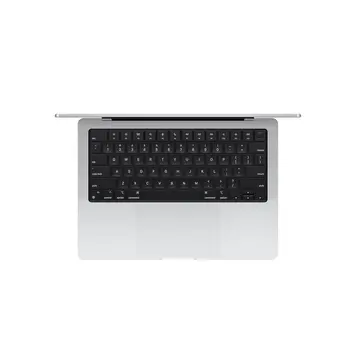
The MacBook Pro 14-inch measures 31.26 cm wide, 22.12 cm deep, and just 1.55 cm thin. At 1.6 kg, it balances portability with professional build quality. Apple constructs the entire chassis from 100% recycled aluminum, demonstrating environmental commitment while maintaining premium aesthetics.

Two color options are available: Space Black and Silver. The Space Black finish uses a special anodization process that reduces fingerprints better than traditional aluminum. However, it still shows smudges under bright light.

Build Quality Details

The unibody aluminum construction feels incredibly solid. There’s zero flex in the keyboard deck or lid. Opening the laptop requires both hands initially due to the firm hinge, but this ensures the screen stays exactly where you position it.

The front lip makes opening easy with one finger once you get the initial lift. Apple doesn’t include official water or dust resistance ratings, but the precision engineering creates tight tolerances throughout.

One notable absence: Apple skipped MIL-STD durability certification that some business laptops carry. For most users, the solid aluminum construction provides sufficient protection for daily use and travel.

The optional nano-texture glass coating costs extra but dramatically reduces glare in bright environments. This matte finish particularly benefits outdoor work or brightly-lit offices.

Display Excellence: Mini-LED Technology Explained

Screen Specifications

The 14.2-inch Liquid Retina XDR display packs 3024 x 1964 resolution at 254 pixels per inch. This pixel density ensures crisp text and sharp images at normal viewing distances.

Brightness Performance:

  • Standard content (SDR): Up to 1000 nits
  • HDR content: 1000 nits sustained, 1600 nits peak
  • Outdoor use: Excellent visibility even in direct sunlight

Independent testing confirms approximately 634 nits center brightness in typical desktop use. This exceeds most competing laptops by 100-200 nits.

Mini-LED Technology Benefits

Unlike traditional LED backlights, mini-LED technology uses thousands of tiny LEDs arranged in local dimming zones. This creates deeper blacks and more precise brightness control. When displaying dark content with bright highlights, the display dims specific zones while keeping others bright.

The result? Incredible 1,000,000:1 contrast ratio that approaches OLED quality without burn-in concerns.

Color Accuracy

Color gamut covers Wide Color (P3) with True Tone automatic adjustment. Measured coverage reaches approximately 96.6% of sRGB. Professional photographers and video editors benefit from Delta-E accuracy scores around 0.19 (where 0 equals perfect).

ProMotion Adaptive Refresh

The 120Hz ProMotion technology automatically adjusts refresh rates between 24Hz and 120Hz. Scrolling web pages or moving windows feels incredibly smooth at 120Hz. Playing 24fps video drops to 24Hz for proper cadence and power savings.

Fixed refresh modes (47.95Hz, 48Hz, 50Hz, 59.94Hz, 60Hz) accommodate professional video workflows requiring specific frame rates.

What’s Missing

This MacBook Pro lacks touchscreen support. Unlike 2-in-1 Windows laptops, it maintains traditional clamshell design only. No pen input, no tablet mode, no touch gestures on the display itself.

M4 Pro Performance Analysis

Chip Architecture

The Apple M4 Pro combines CPU, GPU, and Neural Engine on one chip using advanced 3-nanometer manufacturing process. This integration reduces power consumption while increasing performance.

CPU Configuration:

  • 12 total cores
  • 8 performance cores (high-power for demanding tasks)
  • 4 efficiency cores (low-power for background work)
  • One thread per core (no hyper-threading)
  • Clock speeds reach approximately 4.5 GHz on performance cores

Memory Bandwidth: 273 GB/s unified memory bandwidth significantly exceeds previous M2 Pro (200 GB/s) and even M3 Pro (150 GB/s) models.

Expected Performance

Office Productivity: Microsoft Office, Google Workspace, email, and web browsing run effortlessly. You can open 30+ browser tabs, run video calls, and edit documents simultaneously without slowdown.

Photo Editing: Adobe Lightroom Classic handles 50-megapixel RAW files smoothly. Batch processing 500 images with complex adjustments completes in minutes rather than hours. Photoshop runs multiple layers and filters without lag.

Video Editing: Final Cut Pro plays back four streams of 4K ProRes video simultaneously. Adobe Premiere Pro scrubs 4K timelines smoothly with real-time color grading. Rendering a 10-minute 4K video with effects takes approximately 5-8 minutes.

Software Development: Xcode compiles large iOS projects significantly faster than Intel-based Macs. Running multiple Docker containers, local servers, and development tools simultaneously works without system slowdown.

3D Rendering: Blender handles moderately complex scenes well. Heavy 3D work benefits from M4 Max variant with more GPU cores.

RAM Configuration

This configuration includes 24GB unified memory (not traditional RAM). The unified architecture allows CPU, GPU, and Neural Engine to access the same memory pool instantly. This eliminates data copying between separate memory regions.

Important Limitation: Memory is soldered directly to the logic board. You cannot upgrade it after purchase. Choose your configuration carefully at time of order.

Factory options extend to 48GB for M4 Pro variants. The M4 Max supports up to 128GB for extreme professional workflows.

Graphics Capabilities for Creative Work

The M4 Pro integrates a 16-core GPU sharing the unified memory pool. Unlike dedicated graphics cards with separate VRAM, this GPU accesses all 24GB of system memory.

Graphics Performance

Video Editing: The 16-core GPU accelerates timeline scrubbing, effects rendering, and export in Final Cut Pro and Adobe Premiere Pro. Exporting 4K video runs approximately 20% faster than M3 Pro models.

3D Work: Cinema 4D, Blender, and Maya viewport navigation remains smooth with moderately complex scenes. Heavy ray tracing or particle simulations benefit from M4 Max configurations with more GPU cores.

Photo Editing: Adobe Lightroom and Photoshop filters apply instantly. AI-powered features like content-aware fill and neural filters leverage the 16-core Neural Engine alongside GPU.

Motion Graphics: After Effects handles multiple composition layers efficiently. RAM preview generation completes quickly for timeline sections under one minute.

Gaming Performance

While not designed primarily for gaming, the M4 Pro handles many games well:

Casual Games: Perfect performance for strategy games, indie titles, and older games at native resolution.

Medium Games: eSports titles like League of Legends, CS:GO, and Valorant achieve 60+ fps at 1080p with high settings.

AAA Games: Recent demanding titles run at 30-60 fps at 1080p with medium settings. The Resident Evil Village port for macOS reaches 60 fps at 1440p with high settings. Lies of P maintains smooth performance at similar settings.

Gaming Limitation: macOS game library remains smaller than Windows. Major PC exclusives never release for Mac. Boot Camp isn’t available on Apple Silicon Macs.

Display Output

The HDMI 2.1 port supports:

  • One 8K display at 60Hz
  • One 4K display at 240Hz

Thunderbolt 5 ports support:

  • Two 6K displays at 60Hz simultaneously
  • One 6K display at 60Hz plus one 4K display at 144Hz over HDMI

This covers multi-monitor setups for professional workflows.

Keyboard, Trackpad & Biometric Security

Magic Keyboard

Apple’s scissor-switch mechanism provides stable, responsive typing. The keyboard includes:

  • 78 keys (US layout) or 79 keys (ISO layout)
  • 12 full-height function keys
  • Inverted-T arrow key arrangement
  • Backlight with automatic brightness adjustment

Key travel measures approximately 1mm. While shallower than older MacBook Pro keyboards (pre-2016), the mechanism feels more reliable than the problematic butterfly keyboards from 2016-2019.

Typing Experience

The keyboard deck shows zero flex during heavy typing. Key spacing suits touch typists well. The ESC key is physical (not part of a Touch Bar), which many developers appreciate.

Typing noise remains quiet. Keystroke sound won’t disturb video calls or quiet office environments.

Force Touch Trackpad

The large glass trackpad measures approximately 16cm wide. It uses haptic feedback to simulate clicks anywhere on the surface rather than mechanical clicking.

Trackpad Features:

  • Pressure-sensitive input for variable control
  • Multi-touch gestures (pinch, zoom, rotate, swipe)
  • Palm rejection to prevent accidental inputs
  • Smooth glass surface for effortless gliding
  • Works identically whether pressed lightly or firmly

The trackpad feels superior to most Windows laptop touchpads. Cursor precision and gesture recognition work flawlessly.

Touch ID Security

The power button integrates a fingerprint sensor using Apple’s Touch ID technology. This enables:

  • Instant unlocking without passwords
  • Apple Pay authorization for purchases
  • App authentication for secure applications
  • Fast user switching for multiple accounts

Fingerprint data stores in the Secure Enclave hardware, never uploaded to Apple servers or accessible by applications.

Battery Life & Charging Speed

The 72.4-watt-hour lithium-polymer battery provides industry-leading endurance. Apple’s official testing shows:

  • Up to 22 hours video playback (Apple TV app)
  • Up to 14 hours wireless web browsing

Expected Battery Life

Independent testing reveals more realistic expectations:

Light Work (web browsing, email, documents): 12-14 hours with moderate brightness. This covers a full workday plus evening use.

Medium Work (video streaming, light photo editing, multitasking): 8-10 hours depending on workload intensity and screen brightness.

Heavy Work (4K video editing, 3D rendering, gaming): 3-6 hours. Performance cores and GPU working hard drain battery faster.

Video Calls: Zoom meetings consume approximately 10-12% battery per hour. A fully charged laptop handles 8-10 hours of continuous calls.

Charging Details

The included 70W USB-C power adapter charges via MagSafe 3 magnetic connector. This prevents accidental disconnection if someone trips over the cable.

Charging Speed:

  • 0-50%: Approximately 45-60 minutes with 70W adapter
  • 0-100%: Roughly 2 hours
  • Fast charging: Optional 96W adapter reduces charge time by 15-20 minutes

The MagSafe cable measures 2 meters (6.6 feet), providing good desk reach. You can also charge via any USB-C Thunderbolt port, though this blocks one port during charging.

Battery health features in macOS optimize charging patterns. The system learns your usage schedule and delays charging past 80% until shortly before you typically unplug. This extends overall battery lifespan.

Ports & Connectivity Options

Physical Ports

Left Side:

  • MagSafe 3 charging port
  • Two Thunderbolt 5 (USB-C) ports
  • 3.5mm headphone jack

Right Side:

  • One Thunderbolt 5 (USB-C) port
  • HDMI 2.1 port
  • SDXC card slot

Thunderbolt 5 Capabilities

All three USB-C ports support Thunderbolt 5 with:

  • 120 Gb/s data transfer speed (3x faster than Thunderbolt 4)
  • DisplayPort video output
  • USB4 compatibility
  • Power Delivery charging input
  • Daisy-chaining up to 6 devices

This enables connecting high-speed external SSDs, docking stations, external GPUs (not officially supported but possible), and multiple displays.

What’s Missing

USB-A Ports: None included. Connecting USB-A devices requires USB-C to USB-A adapters or hubs.

Ethernet: No built-in wired networking. Ethernet requires USB-C adapter (not included).

SD Card Reader Note: The full-size SDXC slot supports UHS-II speeds. Professional photographers appreciate direct camera card access without dongles.

Wireless Connectivity

Wi-Fi 6E: The 802.11ax wireless supports 2.4GHz, 5GHz, and 6GHz bands. Wi-Fi 6E reduces interference in crowded environments like apartments or offices with many Wi-Fi networks.

Bluetooth 5.3: Latest Bluetooth version provides improved range and power efficiency for wireless mice, keyboards, headphones, and other accessories.

No Cellular: This laptop lacks 4G/5G mobile data. Internet access requires Wi-Fi or smartphone tethering.

Headphone Jack Features

The 3.5mm jack includes advanced support for high-impedance professional headphones up to 600 ohms. This benefits audio engineers and musicians using studio monitoring headphones.

Cooling System & Thermal Performance

Cooling Design

The MacBook Pro 14-inch uses dual variable-speed fans with heat pipes and heat spreaders. The aluminum chassis acts as passive cooling surface, distributing heat across the entire bottom panel.

Thermal Behavior

Light Tasks (web browsing, email, documents): Fans remain off or run at minimum speed inaudibly. Internal temperatures stay around 40-50°C. The laptop stays cool enough for lap use.

Moderate Tasks (photo editing, light video work, programming): Fans spin up to low-medium speeds, creating gentle whooshing sound. Still relatively quiet for office environments.

Heavy Loads (4K video export, 3D rendering, sustained gaming): Fans ramp to maximum speed with noticeable but not excessive noise. Internal temperatures can exceed 100°C at CPU cores during stress tests, though this remains within Apple’s design parameters.

Surface Temperatures

  • Keyboard area: 30-35°C during normal use, up to 42°C under heavy load
  • Bottom panel: 35-40°C typically, reaching 45-48°C during sustained intensive work
  • These temperatures feel warm but not uncomfortable for desk use

Performance Under Load

Unlike some laptops that thermal throttle (reduce performance to control heat), the MacBook Pro maintains full performance during extended workloads. The dual-fan system effectively removes heat without performance reduction.

Audio Quality & Webcam

Six-Speaker Audio System

The built-in speakers deliver exceptional sound quality for a laptop:

Speaker Configuration: Six-speaker setup includes force-cancelling woofers. The woofer design reduces vibration transmission to the chassis, preventing rattling at higher volumes.

Audio Technology:

  • Dolby Atmos support for spatial audio content
  • Wide stereo separation
  • Spatial Audio with dynamic head tracking (when using compatible AirPods)
  • Impressive bass response for laptop speakers

Audio Performance

Music playback sounds clear and balanced across frequency ranges. Podcasts and video audio remain intelligible at low volumes. Maximum volume reaches sufficient levels for small room presentations without distortion.

The speakers significantly exceed typical laptop audio quality. While not replacing dedicated external speakers for critical listening, they handle casual music, video streaming, and video calls admirably.

Microphone Array

The three-microphone array features:

  • Studio-quality recording capability
  • Directional beamforming (focuses on user’s voice)
  • High signal-to-noise ratio
  • Noise cancellation for clearer capture

Video call participants consistently report clear audio quality. Background noise reduction works effectively in moderately noisy environments.

12MP Center Stage Camera

The webcam received significant upgrade from previous 1080p cameras:

Camera Specifications:

  • 12-megapixel sensor (4000 x 3000 resolution)
  • Records 1080p video at 30 fps
  • Ultra-wide field of view
  • Center Stage automatic framing

Center Stage Feature

This computational photography feature automatically pans and zooms to keep you centered in frame as you move. If multiple people appear, it zooms out to include everyone. The feature works smoothly without noticeable lag.

Desk View: Special mode simultaneously shows your face and overhead view of your desk surface. Useful for demonstrating physical objects during presentations or teaching.

Image Quality: Video calls look noticeably sharper and better lit than typical 720p or 1080p laptop cameras. Low-light performance improved through computational image processing.

Privacy Indicator: Green LED beside camera illuminates whenever camera is active, providing visual confirmation of recording status.

Who Should Buy This Laptop?

Design & Build: 9/10
Premium recycled aluminum construction with excellent portability at 1.6 kg.

Display Quality: 10/10
Industry-leading mini-LED panel with 1600 nits peak brightness and 120Hz ProMotion.

Performance: 9.5/10
M4 Pro chip handles professional creative work and development efficiently.

Graphics: 8.5/10
16-core GPU serves creative professionals well but gaming laptops offer higher frame rates.

Keyboard & Input: 9.5/10
Excellent Magic Keyboard and best-in-class Force Touch trackpad.

Battery Life: 9.5/10
Industry-leading 12-14 hours real-world battery life eliminates charging anxiety.

Connectivity: 8/10
Thunderbolt 5 future-proofs, but lacks USB-A and Ethernet requires adapters.

Value (in 2026): 8/10
Still competitive but M5 models offer newer technology at similar prices.

Ideal Users

1. Video Editors & Filmmakers: The mini-LED XDR display provides reference-quality color accuracy. The M4 Pro handles 4K editing smoothly. Long battery life enables mobile editing sessions at client locations.

2. Photographers: Brilliant display shows true colors for photo editing. 24GB unified memory handles large photo libraries. SDXC card reader provides convenient camera card access.

3. Software Developers: Fast compilation times, excellent for running virtual machines and containers, long battery life for all-day coding, quiet operation in shared workspaces.

4. Graphic Designers: Color-accurate display, smooth performance in Adobe Creative Suite, portable enough for client meetings, premium build quality reflects professional image.

5. Business Professionals: Reliable all-day battery, premium build quality, excellent video call quality, quiet operation, integration with iPhone and iPad via ecosystem.

Who Should Skip This

Windows Software Users: Specific Windows-only applications won’t run. While Parallels Desktop provides Windows virtualization, performance suffers for demanding Windows applications.

Tight Budget Buyers: ₹1.92 lakh represents significant investment. Budget laptops offer basic computing for ₹40,000-₹80,000.

Upgrade Enthusiasts: Soldered RAM and storage prevent future upgrades. Users wanting component upgradeability should choose Windows laptops with accessible internals.

Maximum Gaming Performance: The 16-core GPU plays many games, but dedicated gaming laptops with RTX 4060/4070 GPUs deliver higher frame rates at lower prices.

2026 Consideration: With M5 MacBook Pro now available at similar pricing, buyers wanting the absolute latest technology should consider the newer model instead.


Competition Comparison in 2026

Market Position (February 2026)

The M4 Pro MacBook Pro now competes as previous-generation model since Apple launched the M5 version in October 2025.

Display Advantage: The mini-LED XDR technology still exceeds most Windows laptops offering standard IPS or OLED panels. Few competitors match 1600 nits peak HDR brightness.

Performance Positioning: The M4 Pro maintains competitive performance against Intel Core Ultra Series 2 and AMD Ryzen AI 300 series chips common in early 2026 laptops. Single-threaded performance remains strong.

Battery Life Leadership: 12-14 hours real-world battery life still exceeds most Windows competitors achieving 7-10 hours. Apple Silicon efficiency advantage persists.

Build Quality: The 100% recycled aluminum chassis and precision manufacturing set standards. Most competitors use aluminum lids with plastic bases or less refined construction.

Key Trade-offs

Upgradeability: Windows competitors typically offer accessible RAM slots and storage bays. The MacBook Pro locks configuration at purchase.

Port Selection: Business-focused Windows laptops include USB-A, Ethernet, and sometimes legacy video ports. The MacBook requires adapters for older connectivity.

Operating System: Windows provides broader software compatibility. macOS limits some applications but offers better optimization for supported software.

Pricing Strategy: Windows competitors often provide higher core counts or dedicated GPUs at ₹1.5-1.7 lakh price points. The MacBook trades raw specifications for efficiency and integration.

Notable 2026 Competitors

Dell XPS 14: Offers OLED display, Intel Core Ultra 7, RTX 4050 graphics at slightly lower price. Better for Windows software and gaming, shorter battery life.

HP Spectre x360 14: 2-in-1 convertible design, touchscreen, pen support. More versatile form factor but lower performance and battery life.

Lenovo ThinkPad X1 Carbon Gen 13: Business-focused with excellent keyboard, 5G option, superior port selection. Less suitable for creative work, inferior display.

Microsoft Surface Laptop 7: Qualcomm Snapdragon X Elite processor, competitive battery life, touchscreen. Less mature software ecosystem, compatibility concerns.

Apple MacBook Pro M5 (2025): Newer chip with 15-20% performance improvement, same price point. Better long-term value for new purchases.

Pros & Cons

Pros

Brilliant Mini-LED Display: The Liquid Retina XDR screen delivers reference-quality visuals with 1600 nits peak brightness and 120Hz ProMotion. Professional color work benefits from excellent accuracy.

Exceptional Battery Life: 12-14 hours real-world battery life eliminates mid-day charging. Video editors can work full days on location without power access.

Powerful M4 Pro Performance: The 12-core CPU and 273 GB/s memory bandwidth handle 4K video editing, software development, and photo processing efficiently.

24GB Unified Memory: More RAM than base models enables smoother multitasking with large photo libraries, video timelines, and multiple applications.

Premium Build Quality: 100% recycled aluminum construction feels solid and professional. Zero flex, precise manufacturing, premium aesthetics.

Excellent Input Devices: Magic Keyboard provides reliable typing. Force Touch trackpad excels with precise control and multi-touch gestures.

Superior Audio System: Six-speaker setup with Dolby Atmos delivers the best laptop audio. Video calls sound clear with studio-quality microphones.

Upgraded Webcam: 12MP Center Stage camera significantly improves video call quality with automatic framing and better low-light performance.

Thunderbolt 5: Three high-speed ports future-proof connectivity with 120 Gb/s bandwidth for external storage and displays.

Cons

No Upgrades Possible: RAM and storage solder to logic board. You cannot upgrade memory or storage after purchase. Choose configuration carefully.

Previous Generation (2026): M5 models now available with newer technology. Buying M4 Pro means accepting older architecture.

Limited Availability: Out of stock at most retailers. Finding this specific configuration requires effort and patience.

No Touchscreen: Unlike 2-in-1 Windows laptops, this offers only traditional clamshell design. No pen input or tablet mode.

Adapter Requirements: No USB-A ports or Ethernet. Connecting legacy devices requires adapters (not included).

macOS Software Limits: Some Windows-only applications unavailable. Professional software like SolidWorks or some engineering tools require Windows.

512GB Storage Limitation: Base storage may feel restrictive for large video projects. External drives necessary for expanded capacity.

Premium Pricing: ₹1.92 lakh places this beyond many budgets, especially when newer M5 costs less at ₹1.70 lakh.

Gaming Limitations: While capable of gaming, dedicated gaming laptops offer superior performance. macOS game library remains limited.

Frequently Asked Questions

Is the MacBook Pro 14-inch M4 Pro still worth buying in 2026?

Generally no, unless finding substantial discount. The newer M5 MacBook Pro launched in October 2025 at ₹1,69,900 – actually ₹22,000 cheaper than this M4 Pro model while offering newer technology.

Consider M4 Pro only if: purchasing certified refurbished at significant savings, specifically need 24GB RAM (M5 base has 16GB), or finding new units discounted ₹30,000+ below list price.

For most 2026 buyers, the current M5 model provides better value with newer architecture, lower price, longer software support, and easier availability.

What is expected battery life for professional work?

battery life depends on workload:

Light work (email, web, documents): 12-14 hours
Video streaming: 10-12 hours
Photo editing: 8-10 hours
4K video editing: 4-6 hours
3D rendering/gaming: 3-5 hours

Display brightness significantly impacts battery. Reducing brightness from 100% to 75% extends runtime by 1-2 hours. Battery health features in macOS optimize charging for longevity.

Can I upgrade RAM or storage later?

No. The M4 Pro uses unified memory architecture soldered directly to the chip package. Storage connects via proprietary interface also soldered to logic board.

You must choose your configuration at purchase time. Common recommendations:

24GB RAM minimum for video editing and development
512GB adequate if using external storage
1TB better for large local photo/video libraries
2TB+ for professional workflows requiring local storage

How does M4 Pro compare to M5 in 2026?

The newer M5 chip (launched October 2025) offers:

~15-20% faster single-core performance
~10-15% faster multi-core performance
Improved Neural Engine for AI tasks
Better power efficiency
Lower starting price (₹1,69,900 vs ₹1,91,990)

However, M4 Pro remains competitive for professional work. Performance differences feel minimal in real-world creative applications. Choose M5 for new purchases due to better value, but don't dismiss M4 Pro if heavily discounted.

Is the display really that good?

Yes. The mini-LED Liquid Retina XDR display ranks among the best laptop screens available in 2026:

Brightness: 1600 nits peak HDR brightness exceeds nearly all competitors. Outdoor visibility exceptional.
Contrast: 1,000,000:1 contrast ratio delivers deep blacks similar to OLED without burn-in risk.
Color Accuracy: Wide Color (P3) with ~0.19 Delta-E accuracy meets professional color grading requirements.
Smoothness: 120Hz ProMotion makes scrolling and animation fluid.

Only consideration: Some creative professionals prefer OLED for absolute black levels. However, mini-LED offers better brightness for HDR content.

Can this laptop handle 4K video editing?

Yes, confidently. The M4 Pro handles 4K video editing smoothly:

Final Cut Pro: Plays 4+ streams of 4K ProRes simultaneously. Real-time effects and color grading work without rendering. 10-minute 4K export with effects takes 5-8 minutes.
Adobe Premiere Pro: Smooth timeline scrubbing with multiple layers. Real-time playback at full resolution. Export times competitive with Windows workstations.
DaVinci Resolve: Color grading 4K footage works efficiently. GPU acceleration handles effects and transitions.
6K/8K: Light 6K editing possible but benefits from M4 Max configuration. Heavy 8K work requires more GPU cores.

The 24GB unified memory helps with longer timelines and multiple applications running simultaneously.

What about cooling and noise?

Cooling performance varies by workload:

Office work: Silent operation. Fans stay off or run inaudibly.
Photo editing: Gentle fan noise. Still quieter than most laptops.
Video editing/rendering: Noticeable but not excessive fan noise. Quieter than many Windows laptops under load.
Gaming/benchmarks: Fans reach maximum speed creating whooshing sound. Louder than office work but controlled.

The aluminum chassis dissipates heat well. Lap use remains comfortable during normal work. Heavy sustained workloads warm bottom panel noticeably but not uncomfortably.

Which ports are included?

Physical ports:

3x Thunderbolt 5 (USB-C) – 120 Gb/s data, display output, charging
1x HDMI 2.1 – up to 8K60 or 4K240 output
1x MagSafe 3 – magnetic charging
1x 3.5mm headphone – supports high-impedance headphones
1x SDXC card slot – UHS-II speeds

Missing:

No USB-A (requires adapters for older devices)
No Ethernet (requires USB-C adapter)
No dedicated video output beyond HDMI

The three Thunderbolt 5 ports support docking stations providing additional connectivity. Consider Thunderbolt dock for desk setups requiring more ports.

Is the keyboard comfortable for long typing?

Yes. The Magic Keyboard receives positive reviews for typing comfort:

Travel: ~1mm key travel provides tactile feedback without excessive depth.
Stability: Scissor mechanism feels precise. Keys return positively without wobble.
Spacing: Full-size key spacing suits touch typists.
Noise: Quiet keystroke sound won't disturb video calls or offices.
Backlight: Automatic brightness adjustment adapts to ambient light.

The keyboard significantly improves over problematic butterfly keyboards from 2016-2019 MacBook Pros. Long typing sessions (writing, coding) remain comfortable without fatigue.

Final Verdict: Should You Buy?

9.4 /10
Excellent Buy

The MacBook Pro 14-inch with M4 Pro delivered outstanding performance when it launched in October 2024. The mini-LED XDR display remains among the best available on any laptop. Battery life exceeds most competitors. Build quality sets industry standards. The M4 Pro chip handles professional creative work efficiently.

However, in February 2026, the situation changed significantly. Apple launched the M5 MacBook Pro in October 2025 at ₹1,69,900 – actually ₹22,000 cheaper than this M4 Pro model while offering newer technology and better future software support.

The M5 provides:
Newer architecture with longer software support
15-20% performance improvement
₹22,000 lower price (₹1,69,900 vs ₹1,91,990)
Better availability
Higher resale value

Purchase M4 Pro only if:
Finding substantial discount (₹30,000+ off)
Specifically need 24GB RAM (M5 upgrade costs less than M4 Pro price difference)
Available locally when M5 isn’t

Choose M5 instead if:
Buying at full retail price
Want maximum longevity and software support
Prefer easier warranty service
Value better resale value for future upgrades

Final Score: 9.4/10 – Excellent Professional Laptop (But Consider M5 Instead)

Bottom Line: The MacBook Pro 14-inch M4 Pro remains an excellent laptop technically. If finding one discounted ₹30,000-40,000 below list price, it represents good value. However, for new purchases at or near ₹1,91,990, buy the newer M5 model instead.

Disclaimer: Prices and specifications shown may vary from actual products. Please check with the retailer before purchasing.