Home Laptop ReviewsLenovo Yoga Slim 7 (83CV00B3IN) Laptop Review: Complete Analysis

Lenovo Yoga Slim 7 (83CV00B3IN) Laptop Review: Complete Analysis

9.1 /10 Excellent Buy

The Lenovo Yoga Slim 7 (83CV00B3IN) is a premium AI PC that delivers exceptional CPU performance, a stunning certified OLED display, and a durable aluminium build in an ultraportable form. Its limitations are the integrated GPU and the soldered RAM. For productivity and creative work, it is hard to beat at this price.

Processor

Intel Core Ultra 9 185H (Series 1)

Display

14 " WUXGA (1920x1200) 60 Hz

Graphics

Intel Arc (integrated)

Webcam

Full HD (1080p)

Battery

65 wh Lithium-Polymer

OS

Windows 11 Home Single Language 64‑bit

RAM

32 GB LPDDR5X

Storage

1TB SSD

Category Ratings

Design & Portability 9.5/10
Display Quality 9.5/10
Performance 9.5/10
Graphics 6.5/10
Keyboard & Input 8.5/10
Battery Life 8.0/10
Connectivity 7.5/10
Value for Money 8.5/10

Pros

  • Powerful Intel Core Ultra 9 185H processor.
  • 32GB LPDDR5x RAM for heavy multitasking.
  • 14-inch WUXGA OLED display with 100% DCI-P3.

Cons

  • No dedicated graphics for AAA gaming.
  • RAM is soldered, not user-upgradeable.
  • No built-in Ethernet or SD card reader.

Who Should Buy This?

Best For

  • content creators and creative professionals
  • business professionals and remote workers
  • developers and engineers

Not Ideal For

  • gamers
  • Creative professionals who need GPU

Lenovo Yoga Slim 7 (83CV00B3IN) Laptop (Intel Core Ultra 9 185H/32GB RAM/1TB SSD/AI PC/Windows 11) Prices

Flipkart
₹1,05,890 In Stock
View Price
Amazon
₹1,09,990 In Stock
View Price
Price Disclaimer: Prices are subject to change and may vary from the actual price at the store. We cannot guarantee the accuracy of the prices shown. Please check with the retailer before purchasing.

Introduction

The Lenovo Yoga Slim 7 (83CV00B3IN) Laptop Review begins with a clear standout: this machine pairs Intel’s flagship Core Ultra 9 185H processor with a certified OLED display and aluminium chassis — all in a body weighing just 1.39 kg. For anyone looking for a serious premium thin-and-light laptop in India in 2026, this is one of the most complete packages available under ₹1,10,000.

Launched in India in July 2025, the Yoga Slim 7 14IMH9 targets professionals, content creators, and power users who need real performance without carrying extra weight. The 14-inch WUXGA OLED panel with Dolby Vision, DisplayHDR True Black 500, and 100% DCI-P3 colour coverage sets the display apart from nearly every competitor at this price point.

The laptop is currently available on Flipkart and Amazon India. It ships with Microsoft 365 Basic and Office Home 2024 pre-installed, adding genuine value to the bundle.

Lenovo Yoga Slim 7 (83CV00B3IN) Design, Build Quality & Portability

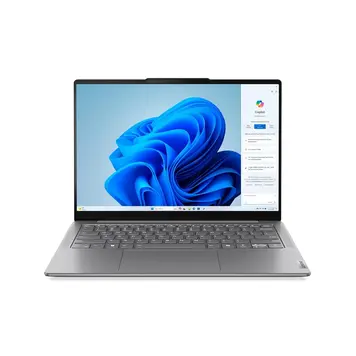
The Lenovo Yoga Slim 7 (83CV00B3IN) Laptop has a full aluminium chassis — aluminium on both the top lid and the bottom base. The finish is an anodised and sandblasted treatment, which gives the Luna Grey surface a premium, matte-like feel that resists fingerprints well and gives the machine a refined, professional look.

The dimensions are 312 x 221 x 14.9 mm, placing it in genuinely slim territory. At just 14.9mm thin, it slides easily into a slim sleeve or backpack compartment. The weight specification confirms 1.39 kg (3.06 lbs), which is light enough to carry comfortably for a full working day without strain.

The Intel Evo Platform certification is another credential for this model. Intel Evo requires laptops to meet specific thresholds for responsiveness, battery life, connectivity, and wake-from-sleep speed — it is a meaningful quality stamp for everyday usability.

The 16:10 aspect ratio of the display dictates a taller footprint than typical 16:9 laptops of the same screen size. This slightly taller form factor gives you more vertical screen space while keeping the overall chassis compact.

Lenovo Yoga Slim 7 (83CV00B3IN) Display — OLED Panel Analysis

The display in the Lenovo Yoga Slim 7 (83CV00B3IN) Laptop Review is where the machine truly differentiates itself from competitors at this price. The 14-inch WUXGA OLED panel with a 1920 x 1200 resolution and a 16:10 aspect ratio is packed with certifications that confirm its quality.

The display certifications for this model include Dolby Vision, DisplayHDR True Black 500, Eyesafe Certified 2.0, TÜV Rheinland Flicker Reduced, and TÜV Rheinland Low Blue Light. Each of these matters. Dolby Vision enables dynamic HDR metadata for compatible streaming content from platforms like Netflix and Apple TV+. DisplayHDR True Black 500 is a VESA certification confirming the OLED panel can achieve 500 nits of peak HDR brightness with true black reproduction — pixel-level light control is what makes OLED’s black levels perfect.

The colour gamut specification confirms 100% DCI-P3 coverage. DCI-P3 is the cinema colour standard used in professional film production. Achieving full coverage means colours in photos, videos, and design work are reproduced with high accuracy. For photographers, video editors, and graphic designers, this eliminates the need for an external colour-accurate monitor at the desk.

The resolution of 1920 x 1200 at 14 inches produces a sharp pixel density that keeps text crisp and images detailed. The 16:10 ratio adds more vertical real estate than a standard 16:9 display — useful when working in documents, writing code, or browsing long web pages.

The refresh rate is 60Hz. This is adequate for productivity, document work, and video playback. It is not a gaming panel. Users accustomed to 90Hz or 120Hz displays on phones or other laptops may notice the difference when scrolling fast, though for most professional tasks it is unobtrusive.

The display is glossy and does not have an anti-glare coating. This means it can catch reflections in bright indoor environments or near windows. The Eyesafe 2.0 certification confirms low blue light emission at the hardware level — protecting your eyes during long working sessions without needing software filters that alter colour accuracy.

There is no touchscreen support on this model.

Intel Core Ultra 9 185H Performance — Lenovo Yoga Slim 7 Analysis

Processor Performance

The processor in the Lenovo Yoga Slim 7 (83CV00B3IN) Laptop Review is the Intel Core Ultra 9 185H, the top-tier chip in Intel’s Meteor Lake Series 1 mobile platform. The specifications confirm a 16-core layout made up of 6 Performance cores, 8 Efficiency cores, and 2 Low-Power Efficiency cores, supported by 22 threads. The maximum turbo boost clock speed reaches 5.1 GHz, and the chip carries a 24MB Intel Smart Cache.

This is a true AI PC. The Core Ultra 9 185H includes Intel’s built-in AI Boost NPU supporting up to 11 TOPS (Tera Operations Per Second). This NPU accelerates AI workloads including real-time noise cancellation, background blur in video calls, AI-powered image processing, and future AI application features from Windows 11 and third-party apps — all without taxing the CPU or GPU.

For office productivity — document editing, spreadsheets, browser work, video calls — this processor is vastly over-specified, which means it handles these tasks instantly and with very little power draw, preserving battery life.

For content creation, the Core Ultra 9 185H excels. Video editing timelines in software like DaVinci Resolve or Adobe Premiere Pro respond fluidly thanks to the high core count. RAW photo batch processing in Lightroom Classic, multi-layer PSD files in Photoshop, and complex illustration files in Affinity Designer will all run comfortably. The processor’s strong multi-threaded performance also speeds up export and rendering tasks.

For software developers and programmers, the 16-core architecture handles simultaneous compilation, containerised environments via Docker, and parallel testing workloads without slowdown. Switching between a heavy IDE, a browser with research tabs, and a terminal is smooth due to the processor and 32GB RAM combination.

Intel Core Ultra Series 1, this chip represents Intel’s premium architecture as of 2025-2026.

RAM & Storage

The RAM specification is 32GB LPDDR5 running at 6400 MHz, soldered to the motherboard. LPDDR5 at 6400MHz is fast, low-power memory designed for thin-and-light form factors. The high clock speed supports memory-intensive workloads including large datasets, video editing, and multi-application multitasking.

The RAM is permanently soldered. There are zero user-accessible slots. You cannot add more memory after purchase. 32GB is generous and future-proof for most workflows today, but buyers should confirm their long-term needs before committing.

Storage is a 1TB PCIe Gen4 NVMe SSD. PCIe Gen4 NVMe delivers sequential read speeds typically in the 5,000–7,000 MB/s range, which is significantly faster than older SATA or PCIe Gen3 drives. Application launches, file transfers, and OS operations all benefit from this speed. Importantly, as per specifications this laptop has one additional PCIe Gen4 slot for storage expansion — so you can add a second SSD later if needed, which is a meaningful upgrade advantage.

Graphics & Gaming Capabilities

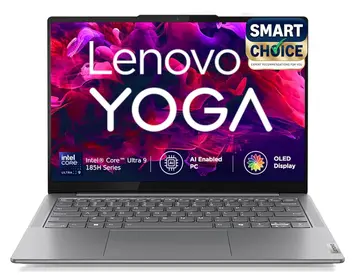
The graphics configuration in the Lenovo Yoga Slim 7 (83CV00B3IN) is integrated Intel Arc Graphics, which uses shared system memory from the 32GB pool rather than dedicated VRAM. This is the honest truth about this laptop’s GPU, and it shapes who this machine is suited for.

Intel Arc integrated graphics — as part of the Meteor Lake Series 1 platform — is a meaningful upgrade from older Intel Iris Xe or Intel UHD solutions. It includes hardware-accelerated AV1 encoding and decoding, DirectX 12 Ultimate support, and hardware ray tracing at low fidelity. For creative media tasks, this matters: hardware AV1 decode reduces CPU load during video playback, and hardware encode speeds up exports in applications that support Intel Quick Sync, including Handbrake, DaVinci Resolve, and Adobe Media Encoder.

For casual gaming — indie titles, older games, 2D games — the integrated graphics handles these comfortably. Titles like Minecraft, Stardew Valley, FIFA, or older Need for Speed games will run well at moderate settings.

For eSports gaming — Valorant, Counter-Strike 2, Rocket League, PUBG at low to medium settings — performance is achievable but variable. Frame rates may not be consistently high enough for competitive play.

For AAA gaming — Cyberpunk 2077, Elden Ring, Call of Duty, or recent open-world games at medium or high quality settings — integrated graphics cannot deliver a playable experience. This is a firm limitation. The specifications confirm no dedicated GPU is available.

For creative GPU work — hardware-accelerated video exports, real-time preview rendering in Premiere or Resolve — Intel Arc integrated graphics provides meaningful acceleration compared to no GPU support, though it cannot match dedicated NVIDIA or AMD cards.

The laptop supports external display output via the two Thunderbolt 4 ports (DisplayPort 1.4) and the HDMI 2.1 port, enabling multi-monitor productivity setups. External reference: Intel Arc Graphics.

Keyboard, Trackpad & Input Experience

Keyboard Quality

The keyboard on the Lenovo Yoga Slim 7 is a backlit keyboard with English layout. Lenovo’s keyboard engineering across the Yoga and ThinkPad lineages is among the most respected in the laptop industry. Even on slim chassis designs, Lenovo typically maintains reasonable key spacing and a comfortable typing feel.

The backlight provides good visibility in dimly lit rooms, on flights, and in low-light working environments. key travel is expected to be in the 1.0mm to 1.5mm range — typical for ultraportables at this thickness.

Trackpad

The Lenovo Yoga Slim 7 features a buttonless surface multi-touch touchpad measuring 75 x 120 mm with Microsoft Precision TouchPad (PTP) support.

At 120mm wide and 75mm tall, this is a generously sized touchpad for a 14-inch laptop. The surface provides smooth finger glide. Precision TouchPad compliance means Windows 11 delivers accurate multi-finger gestures natively — two-finger scrolling, three-finger app switching, four-finger gestures for virtual desktops, and pinch-to-zoom all work smoothly without third-party driver dependencies.

Additional Input Features

The webcam is a FHD 1080p camera with IR and an Electronic Shutter (E-shutter), plus a Time-of-Flight (ToF) sensor. The IR camera enables Windows Hello facial recognition for secure, password-free login. The E-shutter is a privacy control that disables the camera at the hardware level — more secure than software-based privacy blocking. The 1080p resolution ensures clear video quality for video calls, conferences, and remote meetings.

Battery Life & Charging

The battery in the Lenovo Yoga Slim 7 (83CV00B3IN) is a 65Wh 4-cell Lithium Polymer unit, charged via a 65W USB-C Slim Wall-mount power adapter. At 65Wh, this is a moderate battery capacity that reflects the trade-off made for the slim 14.9mm chassis.

The estimated battery life is cited as up to 10 hours. Based on the 65Wh capacity and the Core Ultra 9 185H’s hybrid efficiency architecture — which routes background tasks to the Low-Power Efficiency cores drawing significantly less power — this figure is realistic for typical productivity use at moderate brightness.

For light tasks such as writing documents, browsing the web, reading emails, and attending video calls with the OLED display at 50–60% brightness, battery life in the 8–10 hour range is achievable. The OLED display’s ability to turn individual pixels completely off during dark-themed content and dark mode usage also helps reduce screen power consumption.

For medium-intensity tasks — streaming video, running multiple browser tabs simultaneously, working in design applications at moderate load — expect 6–8 hours of real-world use before needing a charge.

For heavy workloads — sustained video rendering, large compilation jobs, or running CPU-intensive applications continuously — battery life will drop to the 3–5 hour range. This is expected and normal behaviour for any top-tier mobile processor under full load.

The USB-C charging standard also means one of the two Thunderbolt 4 ports doubles as the charging port — keeping cable management clean at a desk with a USB-C hub or monitor.

Ports and Connectivity

Port Selection

The port configuration for the Lenovo Yoga Slim 7 (83CV00B3IN) is as follows. There is 1 USB-A port (USB 3.2 Gen 1 / 5Gbps) marked as Always On — meaning it can charge devices even when the laptop is powered off or in sleep mode. There are 2 USB-C ports supporting Thunderbolt 4 and USB4 at 40Gbps, with USB Power Delivery 3.1 and DisplayPort 1.4 output. There is 1 HDMI 2.1 port supporting up to 4K at 60Hz. Finally, there is 1 3.5mm combo headphone and microphone jack.

There is no SD or microSD card reader and no Ethernet RJ-45 port. These two absences are genuine practical drawbacks for photographers who work directly from camera cards and professionals who need wired network stability. A USB-C hub or USB-C multiport adapter addresses both needs and adds minimal bulk.

Wireless Connectivity

Wireless connectivity is handled by Wi-Fi 6E (802.11ax) with 2×2 antenna configuration and Bluetooth 5.3. Wi-Fi 6E extends the proven Wi-Fi 6 standard into the less-congested 6GHz frequency band, delivering faster speeds and lower latency in environments with many competing wireless networks.

Bluetooth 5.3 maintains stable, low-latency connections to wireless peripherals, headphones, speakers, and keyboards. No cellular or 4G/5G WWAN connectivity is available on this model.

Thermal Management & Cooling

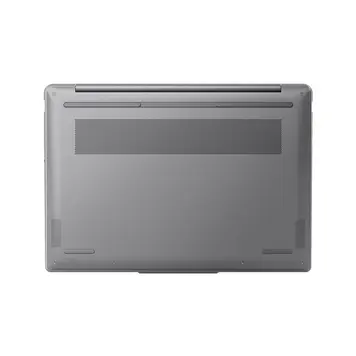
The Lenovo Yoga Slim 7 (83CV00B3IN) uses an active dual-fan cooling system inside its 14.9mm slim chassis. Two internal fans work together to dissipate heat from the Core Ultra 9 185H processor, which operates across a flexible TDP range depending on workload intensity.

The dual-fan design is a positive indicator for sustained workload performance. It distributes thermal dissipation across a wider internal surface area and allows each fan to manage heat from separate heat zones on the motherboard. Lenovo’s Yoga Slim series typically uses copper heat pipe routing between the processor die and the fan modules to transfer heat efficiently.

For light and everyday workloads — browsing, writing, video calls, and office applications — the Core Ultra 9’s Efficiency and Low-Power Efficiency cores handle these tasks with minimal heat generation. The fans will either run at very low speeds or remain effectively silent during these sessions.

For sustained heavy workloads — video rendering over extended periods, large compilation tasks, or running multiple resource-intensive applications simultaneously — the fans will ramp up to manage heat. This is normal and expected behaviour for any thin chassis laptop at this performance level.

Audio Quality

Audio

The Lenovo Yoga Slim 7 features a quad-speaker system with four 2W drivers — delivering a total of 8W of audio output — optimised with Dolby Atmos and a hardware amplifier (AMP). For a 14-inch slim laptop, this is an above-average audio specification in both power output and speaker count.

Dolby Atmos processing on a laptop applies spatial audio algorithms to create a wider, more three-dimensional soundstage from the four speakers.

The quad-speaker configuration is well-positioned for media consumption, conference calls, and casual music listening — all common use cases for a productivity-focused laptop.

Who Should Buy the Lenovo Yoga Slim 7 (83CV00B3IN)?

Best For:

The primary audience is content creators and creative professionals — photographers, video editors, graphic designers, and motion graphics artists who need accurate colour on a properly calibrated display. The 100% DCI-P3 OLED with Dolby Vision, certified by DisplayHDR True Black 500, is built for this purpose. The Core Ultra 9 processor provides the rendering horsepower to match.

The secondary audience is business professionals and remote workers who spend long days in meetings, presentations, document work, and multi-app multitasking. The slim build, Windows Hello webcam, four-mic array for clear call audio, and solid battery life make this a high-quality remote work machine.

The tertiary audience is developers and engineers running heavy IDEs, Docker containers, virtual machines, and code compilation tasks. The 32GB LPDDR5 RAM and PCIe Gen4 NVMe storage ensure smooth context switching across demanding development environments.

Not Ideal For:

Dedicated gamers seeking AAA gaming capability should look at laptops with discrete NVIDIA or AMD GPUs. Users who frequently connect multiple USB-A devices, SD cards, or wired Ethernet will find the port selection limiting and will need to carry a USB-C hub. Creative professionals who need GPU-accelerated rendering at scale will benefit more from a laptop with a dedicated graphics card.

Lenovo Yoga Slim 7 (83CV00B3IN) vs Competitors

In the ₹1,00,000 to ₹1,15,000 range for thin-and-light premium laptops, the Lenovo Yoga Slim 7 (83CV00B3IN) holds a strong position — but understanding its specific advantages and weaknesses relative to alternatives helps buyers make the right call.

Against thin-and-light laptops at this price with IPS FHD or QHD displays, the Yoga Slim 7’s OLED panel with 100% DCI-P3, Dolby Vision, and DisplayHDR True Black 500 is a decisive display advantage. Most IPS-based competitors in this range achieve 72% NTSC or 100% sRGB coverage — both are visually behind DCI-P3 OLED for colour accuracy and contrast.

Against alternatives with Intel Core Ultra 5 or Core Ultra 7 processors, the Core Ultra 9 185H with 16 cores and 5.1GHz turbo delivers measurably higher peak performance for CPU-bound creative work and development tasks. For everyday productivity, the difference narrows — but for rendering and compilation, the advantage is real.

The 32GB RAM configuration at this price point is competitive. Many alternatives in the same price range offer 16GB as their primary configuration. For power users and multitaskers, the 32GB standard here removes the need for a RAM upgrade consideration.

The disadvantage against competitors with dedicated GPUs — even entry-level discrete cards — is clear. If gaming, 3D rendering, or GPU-accelerated video processing at scale is a primary need, a competitor with a dedicated GPU at a similar price may serve those workflows better.

Pros & Cons

Pros:

Intel Core Ultra 9 185H with NPU — The top-tier 16-core mobile processor with a built-in AI Boost NPU (11 TOPS) delivers class-leading CPU performance for creative work, development, and AI-accelerated tasks. This chip ensures the laptop stays relevant and powerful for years to come.

OLED Display with Dolby Vision and DisplayHDR True Black 500 — The 14-inch WUXGA OLED panel with 100% DCI-P3 coverage, Dolby Vision, Eyesafe 2.0, and TÜV Rheinland certifications is one of the most comprehensively certified laptop displays in this price range. Colours are accurate, black levels are perfect, and eye protection is built in at the hardware level.

32GB LPDDR5 RAM + PCIe Gen4 NVMe SSD — Generous, fast memory and fast storage together ensure the laptop handles demanding workloads smoothly. The confirmed secondary M.2 slot allows future storage expansion.

FHD 1080p IR Webcam with E-Shutter — A proper 1080p webcam with Windows Hello facial recognition and a hardware privacy E-shutter is a complete professional-grade camera setup.

Wi-Fi 6E, Thunderbolt 4, and HDMI 2.1 — Future-ready wireless and wired connectivity standards ensure this laptop supports fast external displays, eGPU enclosures, high-speed peripherals, and the next generation of networking infrastructure.

Cons:

No Dedicated GPU — Integrated Intel Arc Graphics cannot support AAA gaming or heavy GPU-accelerated creative tasks at the level that discrete graphics provide. This is the most significant limitation for buyers with gaming or GPU-intensive rendering needs.

RAM is Soldered — No Upgrade Path — 32GB is permanently fixed. While generous today, the inability to expand memory means buyers with very long-term plans must accept this as the permanent ceiling.

No Ethernet Port or SD Card Reader — The absence of wired networking and a memory card slot requires adapters for photographers, network-dependent professionals, and users who prefer stable wired internet connections.

60Hz Display Refresh Rate — For a premium OLED panel in 2026, 60Hz is on the conservative side. Users familiar with 90Hz or 120Hz displays will notice the difference during fast scrolling and animations.

Frequently Asked Questions

Is the Lenovo Yoga Slim 7 (83CV00B3IN) worth buying in 2026?

Yes — for professionals, content creators, and developers, the Lenovo Yoga Slim 7 (83CV00B3IN) is a strong buy in 2026. The combination of an Intel Core Ultra 9 185H, certified OLED display with Dolby Vision, MIL-STD-810H durability, and 32GB RAM at ₹1,05,890 represents compelling value in the premium thin-and-light segment. It is not the right choice if dedicated GPU performance or expandable RAM are priorities.

What is the battery life of the Lenovo Yoga Slim 7 (83CV00B3IN)?

Based on the 65Wh battery and the Core Ultra 9's efficiency architecture, light-to-moderate productivity use can approach up to 10 hours. Heavy workloads — sustained rendering, gaming, or compilation — will reduce battery life to the 3–5 hour range.

Is the Lenovo Yoga Slim 7 (83CV00B3IN) good for gaming?

It handles casual and light eSports gaming reasonably. Integrated Intel Arc Graphics can run older titles, indie games, and some eSports titles at lower settings. AAA gaming at medium or high quality settings is not practical without a dedicated GPU. For gaming-focused buyers, a laptop with discrete NVIDIA or AMD graphics is the better choice.

Can I upgrade the RAM and storage in the Lenovo Yoga Slim 7 (83CV00B3IN)?

RAM is soldered at 32GB and cannot be upgraded. However, storage can be expanded — the laptop has one additional M.2 PCIe Gen4 slot, so a second SSD can be added later. The primary 1TB SSD in the M.2 slot may also be replaceable, though this should be verified with a certified technician.

What certifications does the Lenovo Yoga Slim 7 (83CV00B3IN) display have?

The display carries Dolby Vision, DisplayHDR True Black 500, Eyesafe Certified 2.0, TÜV Rheinland Flicker Reduced, and TÜV Rheinland Low Blue Light (Hardware Solution) certifications.

Is the Lenovo Yoga Slim 7 (83CV00B3IN) suitable for video editing?

Yes — it is well-suited for video editing. The Core Ultra 9 185H delivers strong CPU performance for timeline editing and rendering. The 100% DCI-P3 OLED display enables accurate colour grading. Hardware AV1 encode/decode via Intel Arc graphics accelerates export and playback. Very heavy GPU-dependent effects will be slower than on a system with dedicated graphics, but for most professional editing workflows it performs capably.

What security features does the Lenovo Yoga Slim 7 (83CV00B3IN) have?

Security features include Windows Hello facial recognition via the IR camera, a hardware Electronic Shutter (E-shutter) for physical camera disabling, and Firmware TPM 2.0 for platform security and encryption. Secure Boot is supported as a Windows 11 requirement.

What ports are available on the Lenovo Yoga Slim 7 (83CV00B3IN)?

As per Specifications, available port are: 1 x USB-A 3.2 Gen 1 (Always On), 2 x Thunderbolt 4/USB4 (with DisplayPort 1.4 and USB PD 3.1), 1 x HDMI 2.1, and 1 x 3.5mm combo audio jack.

Is the keyboard comfortable for long typing sessions?

The Lenovo Yoga Slim 7 (83CV00B3IN) features a backlit keyboard with English layout. Lenovo's keyboard quality across the Yoga and ThinkPad ranges is well-regarded for comfort and key spacing. The Precision TouchPad with a glass surface is generously sized for a 14-inch laptop.

Final Verdict: Should You Buy?

9.1 /10
Excellent Buy

The Lenovo Yoga Slim 7 (83CV00B3IN) Laptop Review arrives at a clear and honest conclusion: this is one of the most well-rounded premium thin-and-light laptops available in India in 2026 for professionals, creators, and power users — at a price that, for the specification set, is genuinely competitive.

The Core Ultra 9 185H processor with AI NPU, 32GB LPDDR5 RAM, and PCIe Gen4 NVMe storage form a performance foundation that handles virtually any professional workload. The OLED display — carrying Dolby Vision, DisplayHDR True Black 500, 100% DCI-P3, and Eyesafe 2.0 certifications — is a genuinely premium panel that rivals displays found on laptops costing significantly more. The full aluminium chassis with MIL-STD-810H and Intel Evo Platform certifications adds durability and quality confidence that goes beyond what most competitors at this price can claim.

The limitations are honest and specific: no dedicated GPU, no Ethernet port, no SD card reader, soldered RAM, and a 60Hz display. These are real trade-offs made in favour of thinness, weight, and display quality. They matter for certain buyers and do not matter at all for others.

For the creative professional who needs a colour-accurate display, strong CPU power, and a portable build they can trust — the Lenovo Yoga Slim 7 (83CV00B3IN) is an excellent choice. For the buyer who needs dedicated GPU capability or maximum upgrade flexibility — look at alternatives with those specific features.

Final Score: 9.1/10 — Excellent Buy

Bottom Line: The Lenovo Yoga Slim 7 (83CV00B3IN) best suits if you work in creative fields, demand a colour-accurate OLED display, need top-tier CPU performance, and want a durable, ultraportable machine.

Was this helpful?

100% found this helpful

Thank you for your feedback!

User Comments

No comments yet. Be the first to share your thoughts!

Leave a Comment

Your email will not be published. Required fields are marked *

Disclaimer: Prices and specifications shown may vary from actual products. Please check with the retailer before purchasing.