Home Laptop ReviewsLenovo LOQ AMD Ryzen 5 7235HS Review: Budget Gaming Laptop Worth Buying?

Lenovo LOQ AMD Ryzen 5 7235HS Review: Budget Gaming Laptop Worth Buying?

7.6 /10 Good Choice

The Lenovo LOQ 15ARP9 delivers solid 1080p gaming with its RTX 3050 GPU and 144Hz display. The 24GB RAM model handles multitasking well, though the 4-core processor shows its limits in demanding applications. At ₹75,990, it offers good value for casual gamers and students who need dedicated graphics.

Processor

AMD Ryzen 5 7235HS

Display

15.6 " Full HD 144 Hz

Graphics

RTX 3050 Laptop

Webcam

Full HD (1080p)

Battery

60 wh Li-ion

OS

Windows 11 Home

RAM

24 GB DDR5

Storage

512 GB

Category Ratings

Design & Build 8.0/10
Display 8.5/10
Performance 7.0/10
Graphics 8.0/10
Keyboard & Input 7.5/10
Battery Life 5.5/10
Connectivity 8.0/10
Value for Money 8.5/10

Pros

  • 144Hz IPS display with 300 nits brightness ensures smooth gaming and vibrant visuals.
  • Dual-fan Hyperchamber cooling maintains sub-80°C temps during intense gaming sessions.
  • RTX 3050 with DLSS support delivers strong 1080p gaming at 60+ FPS in modern titles.

Cons

  • Quad-core CPU bottlenecks RTX 3050 in CPU-heavy competitive gaming titles.
  • 3.8-hour battery life limits portability for on-the-go usage without charger.
  • No fingerprint scanner or IR camera limits modern security and convenience features.

Who Should Buy This?

Best For

  • Budget-Conscious Gamers
  • College Students
  • Content Creators (Entry-Level)

Not Ideal For

  • Competitive Esports Players
  • Professional Content Creators
  • Users Needing Premium Build

Lenovo LOQ, AMD Ryzen 5 7235HS Prices

Amazon
₹75,990 In Stock
Go To Store
Flipkart
₹75,990 In Stock
Go To Store
Lenovo
₹75,991 Out of Stock
Go To Store
Price Disclaimer: Prices are subject to change and may vary from the actual price at the store. We cannot guarantee the accuracy of the prices shown. Please check with the retailer before purchasing.

Introduction

The Lenovo LOQ with AMD Ryzen 5 7235HS is a gaming laptop that costs around ₹72,000-₹90,000 in India as of February 2026. It brings RTX 3050 graphics and a 144Hz display to the budget gaming segment. But does it deliver enough performance to justify the price?

This laptop targets students and first-time gamers who want dedicated graphics without spending over ₹1 lakh. The 15.6-inch Full HD screen runs at 144Hz for smooth gaming, while the NVIDIA RTX 3050 GPU (6GB version) handles modern games at 1080p. The AMD Ryzen 5 7235HS has 4 cores and 8 threads, which is enough for everyday tasks but may struggle with heavy multitasking.

The 24GB RAM variant (model 83JC00EFIN) stands out in this price range. Most competitors offer only 12GB or 16GB. However, the 60Wh battery provides just 3-4 hours of real-world usage, which limits portability. The plastic build keeps costs down but feels less premium than metal alternatives.

Lenovo LOQ 15ARP9 Quick Overview

Launch Date: October 2024
Price Range: ₹72,000 – ₹90,000 (varies by configuration)
Best For: Budget gaming, student use, entry-level content creation
Key Strength: RTX 3050 graphics at affordable price
Rating: 7.6/10 – Good Value for Money

Design and Build Quality

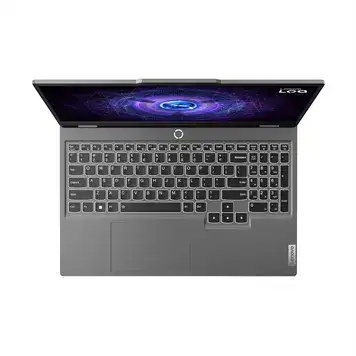
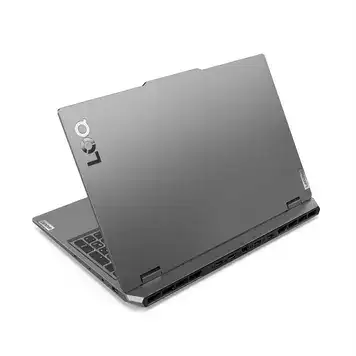
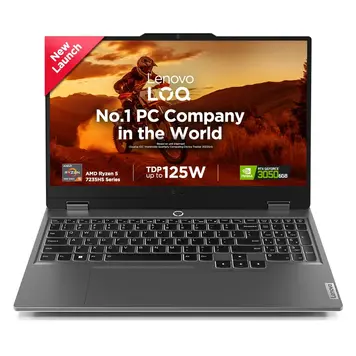
The Lenovo LOQ 15ARP9 measures 359.86 x 258.7 x 21.9-23.9 mm and weighs 2.38 kg (5.25 pounds). The plastic body comes in Luna Grey color only. While plastic construction helps keep the price low, it doesn’t feel as sturdy as aluminum gaming laptops.

The laptop meets MIL-STD 810H military durability standards. This means it passed tests for drops, vibrations, and temperature extremes. However, this doesn’t make it waterproof or dustproof – there’s no IP rating for water resistance.

At 2.38 kg, it’s portable enough for daily commutes but not ultralight. The 23.9mm thickness accommodates the cooling system and dedicated GPU without being overly bulky.

Build Materials:

  • Back panel: PC-ABS plastic
  • Frame: Plastic
  • No front glass protection
  • No water resistance rating

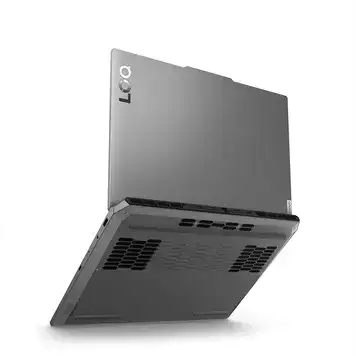
The power button includes a fan mode indicator light. A 720p webcam sits above the screen with a physical E-shutter (sliding privacy cover). The bottom panel has ventilation grills for cooling airflow.

Design Highlights:

  • Clean, minimalist gaming aesthetic
  • 4% slimmer than previous LOQ models
  • Hinge design allows one-handed opening
  • Subtle branding without RGB lighting

Display Performance

The 15.6-inch IPS panel offers Full HD resolution (1920×1080 pixels) with a 144Hz refresh rate. This combination works well for competitive gaming and general use.

The 144Hz refresh rate makes fast-paced games feel smoother than standard 60Hz displays. NVIDIA G-SYNC prevents screen tearing by synchronizing the display refresh rate with the GPU frame rate.

At 300 nits, the screen is bright enough for indoor use. Outdoor visibility suffers in direct sunlight. The anti-glare coating reduces reflections from overhead lighting.

The 100% sRGB color gamut means colors look accurate for photo editing and content creation. Professional color work requiring DCI-P3 or Adobe RGB needs a higher-end display.

The IPS panel maintains color accuracy even at wide viewing angles. No touch functionality is available – this is a traditional laptop display focused on gaming performance.

TÜV Low Blue Light certification reduces blue light through software filtering to minimize eye strain during long sessions.

What This Means for Users:

  • Smooth gameplay in first-person shooters and racing games
  • Good color accuracy for photo editing in sRGB space
  • Comfortable for indoor gaming and work
  • Struggles with glare in bright outdoor environments

Processor Performance

The AMD Ryzen 5 7235HS is a 4-core, 8-thread processor built on Zen 3+ architecture using a 6nm process. Base clock speed is 3.2 GHz, boosting up to 4.2 GHz.

Performance

Office Work: The 4-core processor handles Microsoft Office, web browsing with 20+ tabs, and video conferencing smoothly. Everyday productivity tasks run without noticeable slowdowns.

Content Creation: Photo editing in Adobe Lightroom works well. Video editing in Premiere Pro manages 1080p footage but struggles with 4K timelines or complex effects. Rendering times are longer than 6-core or 8-core processors.

Programming: Code compilation and running Docker containers work fine for small projects. Large-scale builds benefit from more cores.

Gaming: Single-threaded performance is good, which helps in many games. However, CPU-intensive titles like competitive shooters (CS:GO, Valorant) may not reach maximum FPS potential. Story-driven games rely more on the GPU, so the 4-core CPU isn’t a major bottleneck there.

RAM and Storage

Memory: The 24GB DDR5-4800 configuration is generous for this price point. DDR5 offers faster speeds and better power efficiency than DDR4. Two SO-DIMM slots allow upgrades to 32GB maximum.

Most competing laptops in this price range offer 12GB or 16GB. The extra 8-12GB makes a noticeable difference when running multiple applications, browser tabs, and games simultaneously.

Storage: 512GB NVMe SSD uses PCIe 4.0 interface for fast read/write speeds. Two M.2 2280 slots support expansion up to 2TB total storage (1TB per slot).

Performance Comparison: PassMark scores show the Ryzen 5 7235HS performing similarly to Intel Core i7-1185G7 in single-threaded tasks, with slightly better multi-threaded performance.

Graphics and Gaming Performance

The NVIDIA GeForce RTX 3050 Laptop GPU (6GB GDDR6 version) drives gaming performance. This laptop uses the 95W TGP (Total Graphics Power) variant, which is higher than some budget laptops that use 65W versions.

Gaming Benchmarks (1080p)

Based on verified benchmarks and user reports:

Esports & Competitive Games (High Settings):

  • CS:GO: 120-150 FPS
  • Valorant: 100-140 FPS
  • League of Legends: 140+ FPS
  • Overwatch 2: 90-120 FPS
  • Fortnite: 80-110 FPS

AAA Games (Medium-High Settings):

  • Cyberpunk 2077: 45-60 FPS (with DLSS)
  • Red Dead Redemption 2: 50-65 FPS
  • Assassin’s Creed Origins: 70-80 FPS
  • GTA V: 80-90 FPS (maxed out)
  • Forza Horizon 5: 80-90 FPS (Ultra)
  • Elden Ring: 55-65 FPS

Ray Tracing Performance: Ray tracing drops FPS to 30-40 range in most games. DLSS 2.0 helps recover 20-30% performance, making ray tracing playable in some titles.

DLSS Technology

DLSS (Deep Learning Super Sampling) uses AI to upscale lower-resolution images. In supported games, turning on DLSS Quality mode can boost FPS by 20-40% while maintaining good image quality. Over 200 games now support DLSS.

Content Creation

Video Editing: The RTX 3050 accelerates timeline scrubbing and effects in Adobe Premiere Pro. GPU-accelerated encoding reduces export times compared to CPU-only processing.

Photo Editing: Adobe Lightroom and Photoshop use GPU acceleration for filters and AI features.

3D Rendering: Blender uses CUDA cores for faster viewport rendering. Complex scenes render faster than integrated graphics but trail higher-end RTX 4050/4060 GPUs.

Display Outputs

  • HDMI 2.1: Supports up to 8K@60Hz or 4K@120Hz
  • USB-C DisplayPort 1.4: Supports up to 4K@60Hz
  • Can drive 3 displays total (built-in screen + 2 external monitors)

Keyboard and Trackpad

Keyboard

The 6-row chiclet keyboard includes a numeric keypad on the right side. White backlighting (not RGB) illuminates all keys uniformly.

The 1.5mm key travel provides tactile feedback suitable for typing. Anti-ghosting technology registers multiple simultaneous key presses, which helps during gaming.

Function keys control brightness, volume, and playback without additional software. The numeric keypad is useful for data entry and accounting work.

No per-key RGB lighting or dedicated macro keys – this is a basic gaming keyboard focused on functionality.

Trackpad

The buttonless Mylar surface trackpad supports Windows Precision Touchpad drivers. Size is approximately 75 x 120mm.

Trackpad Features:

  • Surface: Mylar (smooth plastic)
  • Technology: Precision Touchpad
  • Buttons: Buttonless (click anywhere)
  • Gestures: Full Windows 11 gesture support

Multi-touch gestures work smoothly:

  • Two-finger scrolling
  • Three-finger window switching
  • Four-finger virtual desktop navigation
  • Pinch-to-zoom

Palm rejection prevents accidental cursor movement while typing.

Additional Inputs

Webcam: FHD 1080p with fixed focus, positioned above the display. E-shutter provides physical privacy protection via a sliding cover.

Biometrics: No fingerprint scanner or IR camera. Windows Hello facial recognition isn’t available.

Battery Life

The 60Wh lithium-ion battery provides modest endurance for a gaming laptop. Real-world battery life varies significantly based on usage.

Real-World Battery Expectations

Light Use (web browsing, documents at 50% brightness, 60Hz mode):

  • Expected: 4-5 hours
  • The discrete GPU can be disabled through Windows settings to extend battery life by 15-20%

Medium Use (video streaming, social media, mixed tasks):

  • Expected: 3-4 hours
  • YouTube or Netflix at 1080p@60fps

Heavy Use (gaming, video editing):

  • Gaming unplugged: 1.5-2 hours
  • The RTX 3050 and 144Hz display drain power quickly
  • AC power recommended for gaming sessions

Note: This battery life is normal for a gaming laptop. All-day battery life is something you usually see on phones, like the Samsung Galaxy A36 5G, not on performance-focused laptops.

Charging

The 170W power adapter charges through a dedicated 3-pin connector (not USB-C). Rapid Charge Pro delivers 50% capacity in 30 minutes when the laptop is off or idle. Full 0-100% charge takes approximately 90 minutes.

The USB-C port supports Power Delivery for charging phones and accessories but doesn’t accept input charging for the laptop itself.

Battery Conservation: Lenovo Vantage software offers a battery conservation mode that caps charging at 60% to extend battery lifespan for users who primarily run on AC power.

Ports and Connectivity

Port Selection

Left Side:

  • 1x USB-C 3.2 Gen 2 (10 Gbps, 140W Power Delivery, DisplayPort 1.4)

Right Side:

  • 3x USB-A 3.2 Gen 1 (5 Gbps each)

Rear:

  • 1x HDMI 2.1 (supports up to 8K@60Hz or 4K@120Hz)
  • 1x Ethernet RJ-45 (Gigabit)
  • 1x Power connector (3-pin)

Left Side (also):

  • 1x 3.5mm combo audio jack (headphone + microphone)

The three USB-A ports are generous for peripherals (mouse, keyboard, external drive, controllers). No dongles or hubs needed for basic gaming setups.

The single USB-C port handles data transfer at 10 Gbps, video output via DisplayPort alt mode, and can charge compatible devices at up to 140W. However, it cannot charge the laptop itself.

Wireless Connectivity

Wi-Fi: Wi-Fi 6 (802.11ax) with 2×2 antenna configuration. Theoretical speeds up to 1200 Mbps. Better performance in congested networks compared to older Wi-Fi 5.

Bluetooth: Version 5.2 for wireless peripherals, headphones, and file transfers. Improved range and lower power consumption than Bluetooth 4.2.

Ethernet: Gigabit Ethernet (1000 Mbps) provides stable wired connection for competitive gaming and downloads.

Upgradeability

RAM: Two SO-DIMM DDR5 slots, accessible via bottom panel. Current 24GB can be upgraded to 32GB maximum (2x 16GB modules).

Storage: Two M.2 2280 slots support PCIe Gen 4 NVMe SSDs. Each slot accommodates up to 1TB for 2TB total capacity. Easy access through bottom panel.

GPU: Soldered to motherboard (cannot be upgraded).

Thermal Management

The dual-fan “Hyperchamber” cooling system separates CPU and GPU heat zones. Two 12V fans rotate in opposite directions to maximize airflow.

Temperature Performance

According to Lenovo specifications:

  • CPU under load: 60-72°C
  • GPU under load: 56-81°C

These temperatures are well below throttling thresholds (typically 95-100°C for CPUs and 80-85°C for GPUs). The sealed chamber prevents heat crossover between CPU and GPU zones.

Performance Modes (via Lenovo Vantage or Fn+Q key)

Quiet Mode: Reduced fan speeds for silent operation. CPU and GPU clocks slightly reduced. Good for office work and media consumption.

Balance Mode: Default profile balancing performance and acoustics. Suitable for everyday gaming.

Performance Mode: Maximum clock speeds and moderate fan speeds for demanding games.

Extreme Mode: Aggressive fan curves and +10W thermal budget through Hyperchamber design. Maintains sub-80°C temperatures even during stress tests. Fan noise becomes noticeable.

The rear exhaust placement directs hot air away from the user during gameplay. Keyboard and palmrest areas stay relatively cool.

Audio and Webcam Quality

Speakers

Stereo speakers (2W x 2) are positioned on the bottom of the chassis. Nahimic Audio software provides virtual surround sound and audio profiles optimized by SteelSeries.

The bottom placement reflects sound off the desk surface. Avoid placing the laptop on soft surfaces (beds, couches) which can muffle audio.

Nahimic offers multiple modes:

  • Gaming: Enhanced directional cues and footstep clarity
  • Movie: Expanded soundstage
  • Music: Balanced frequency response
  • Communication: Optimized voice clarity

Volume is adequate for personal use in quiet rooms. For better audio, use headphones or external speakers.

Microphone

Dual-array microphones with AI noise cancellation filter background sounds during video calls.

Background noise like keyboard typing, fan sounds, and conversations are reduced in real-time. Some vocal processing artifacts may occur under heavy background noise.

Webcam

The 1080p resolution beats standard 720p laptop webcams. Fixed focus means you need to stay at a consistent distance – no autofocus adjustment.

The E-shutter slides physically over the lens for privacy – no software can bypass it. No IR camera for Windows Hello facial recognition in low light.

Video Call Quality:

  • Well-lit rooms: Clear 1080p video with accurate colors
  • Low-light: Reduced clarity and increased noise
  • Backlit situations: May underexpose faces

Who Should Buy This Laptop?

Ideal Users

1. Budget-Conscious Gamers (₹70,000-₹90,000 budget)

This laptop suits gamers who want dedicated RTX graphics without crossing ₹1 lakh. The 144Hz display and RTX 3050 GPU deliver smooth 1080p gaming in most modern titles at medium-high settings. The 24GB RAM handles Discord, streaming software, and games simultaneously without slowdowns.

2. College Students

Engineering students can run CAD software, virtual machines, and programming environments. The numeric keypad helps with data entry and calculations. The RTX 3050 accelerates Adobe Creative Cloud apps. Durable enough for daily backpack transport with MIL-STD 810H certification.

3. Content Creators (Entry-Level)

Photo editors get 100% sRGB color accuracy and GPU acceleration in Lightroom and Photoshop. Video editors can work with 1080p footage, though 4K editing is challenging with the 4-core CPU. The RTX 3050 speeds up rendering and exports.

Not Recommended For

Competitive Esports Players: The 4-core CPU creates bottlenecks when chasing 200+ FPS in CS:GO and Valorant. 6-core or 8-core processors deliver better minimum frame rates in competitive games.

Mobile Professionals: 3-4 hour battery life and 2.38kg weight limit all-day unplugged work. Frequent charging needed. Ultrabooks offer better portability for business travel.

Professional Content Creators: 4K video editing and 3D rendering require more CPU cores and GPU power. Export times double versus 8-core alternatives with RTX 4060+ graphics.

Users Needing Premium Build: Plastic chassis flexes more than aluminum. No fingerprint scanner or IR camera for biometric security.

Lenovo LOQ vs Competitors

The ₹72,000-₹90,000 price segment includes several gaming laptops with similar specifications.

vs 6-Core Processor Alternatives

Laptops with AMD Ryzen 5 7535HS (6-core) or Intel Core i5-12450HX cost ₹5,000-₹10,000 more. The extra 2 cores reduce CPU bottlenecks in competitive gaming. However, the Lenovo LOQ’s 24GB RAM advantage helps with multitasking.

vs RTX 4050 Models

Entry-level RTX 4050 laptops start around ₹85,000-₹95,000. The RTX 4050 provides 25-30% higher gaming performance and supports newer DLSS 3 Frame Generation. The Lenovo LOQ trades cutting-edge GPU features for lower price and generous RAM.

vs Integrated Graphics Laptops

Some Ryzen 7-powered productivity laptops cost similar prices but use integrated Radeon graphics. These offer better CPU performance for productivity but significantly weaker gaming capability.

Lenovo LOQ Advantages

  • 24GB DDR5 RAM (most competitors: 12-16GB)
  • Dual M.2 slots (up to 2TB expansion)
  • Hyperchamber cooling (better than single-fan designs)
  • HDMI 2.1 (supports 4K@120Hz)
  • MIL-STD 810H durability
  • 95W TGP RTX 3050 (higher than 65W variants)

Limitations

  • 4-core CPU (competitors moving to 6-core)
  • 60Wh battery (below average)
  • Plastic build (less premium than metal)
  • No fingerprint scanner
  • No USB-C charging

Price-to-Performance

At ₹75,990, the LOQ delivers approximately 85% of ₹90,000 laptop gaming performance while including 50% more RAM. Good value for multitaskers and casual gamers who accept moderate CPU limitations.

Price Analysis

The 24GB RAM variant (83JC00EFIN) at ₹75,990 represents good value in the RTX 3050 laptop segment. The 12GB variant costs ₹10,000-₹15,000 less but offers less RAM.

Prices fluctuate by ₹5,000-₹10,000 during sale events (Amazon Great Indian Festival, Flipkart Big Billion Days).

What’s Included

  • Lenovo LOQ 15ARP9 laptop
  • 170W power adapter
  • Documentation
  • 1-year onsite warranty
  • MS Office Home & Student 2024 (varies by retailer)
  • 3-month Xbox Game Pass trial (select models)

Pros and Cons

Pros

144Hz Display Smooth for Gaming: The combination of 144Hz refresh rate and 300 nits brightness with 100% sRGB creates fluid motion in competitive games. G-SYNC prevents screen tearing.

Effective Dual-Fan Cooling: Hyperchamber design maintains CPU temperatures at 60-72°C and GPU at 56-81°C during heavy gaming. Performance stays consistent during long sessions.

RTX 3050 Handles 1080p Gaming: The 6GB GDDR6 RTX 3050 (95W TGP) delivers 60+ FPS in AAA titles at medium-high settings. DLSS 2.0 support extends playability in demanding games.

24GB RAM Excellent for Multitasking: DDR5-4800 memory surpasses typical 16GB configurations. Run games plus Discord, OBS streaming, Chrome with 30+ tabs, and Spotify without slowdowns.

Easy Storage Expansion: Two M.2 slots support 2TB total capacity. Add second SSD without removing existing drive. Tool-free access via bottom panel.

HDMI 2.1 Future-Proofed: Supports 4K@120Hz output for next-gen displays and TVs. No adapter needed for high-refresh gaming monitors.

Military-Grade Durability: MIL-STD 810H testing validates resistance to drops and environmental stress. Good for students transporting in backpacks.

Competitive Pricing: ₹75,990 for RTX graphics plus 24GB RAM beats most competitors in value.

Cons

4-Core CPU Limits Performance: Quad-core processor bottlenecks RTX 3050 potential in CPU-heavy games. Competitive titles like CS:GO and Valorant deliver lower FPS than 6-core alternatives.

Short Battery Life: 60Wh capacity provides only 3-4 hours of real-world use. Students need frequent charging during 8-hour academic days. Gaming unplugged lasts 1.5-2 hours.

No Biometric Security: Lacks fingerprint scanner and IR camera. Must type passwords instead of one-touch login or facial recognition.

Plastic Build Feels Less Premium: PC-ABS construction flexes under pressure. Aluminum competitors feel more rigid and premium despite similar pricing.

Limited Base Storage: 512GB fills quickly with 3-4 modern AAA games (100-150GB each). Expansion needed for large game libraries.

No USB-C Charging: Requires dedicated 170W power adapter. Cannot use universal USB-C chargers for convenient charging.

Frequently Asked Questions

Is the Lenovo LOQ worth buying in 2026?

Yes, for budget gamers and students seeking RTX graphics under ₹80,000. The RTX 3050 handles 1080p gaming at 60+ FPS in most titles with medium-high settings. The 24GB RAM configuration handles multitasking well. However, the 4-core processor shows limitations in competitive gaming. Better options exist above ₹90,000 with 6-core CPUs and RTX 4050 GPUs.

What is the real battery life?

Expect 3-4 hours for typical use (web browsing, videos, documents). Gaming unplugged drains the battery in 1.5-2 hours. The 60Wh capacity and power-hungry RTX 3050 GPU make this laptop dependent on AC power for extended gaming. Light productivity at 60Hz and 50% brightness extends runtime to 4-5 hours.

Can it run modern games?

Yes. Forza Horizon 5 runs at 80-90 FPS on Ultra settings. Cyberpunk 2077 achieves 45-60 FPS at medium-high settings with DLSS. Red Dead Redemption 2 maintains 50-65 FPS. GTA V maxes out at 80-90 FPS. Competitive games like Valorant and CS:GO exceed 100 FPS. Ray tracing drops performance to 30-40 FPS range.

Can I upgrade RAM and storage?

Yes. Two SO-DIMM slots support up to 32GB DDR5 total (currently has 24GB). Storage uses two M.2 2280 slots - each holds up to 1TB NVMe SSD for 2TB maximum. Bottom panel provides easy access to both. The GPU is soldered and cannot be upgraded.

How is the display quality?

The 15.6-inch IPS panel delivers sharp 1080p images with 100% sRGB color accuracy. The 144Hz refresh rate creates smooth motion in games. 300 nits brightness works well indoors but struggles in direct sunlight. The anti-glare coating reduces reflections. No touch functionality.

Is it good for video editing?

Adequate for 1080p video editing. The RTX 3050 accelerates timeline performance and effects in Adobe Premiere Pro. 24GB RAM handles complex timelines. However, the 4-core CPU struggles with 4K footage and lengthy export times. Professional editors should consider 6-8 core processors with RTX 4060+ GPUs.

Does the cooling work well?

Yes. The Hyperchamber dual-fan system keeps CPU at 60-72°C and GPU at 56-81°C during gaming. Temperatures stay well below throttling limits. The Extreme Performance mode adds 10W thermal headroom. Fan noise is moderate in Balance mode, louder in Extreme mode. Keyboard area stays cool during gameplay.

What ports does it have?

3x USB-A 3.2 (5 Gbps), 1x USB-C 3.2 (10 Gbps with Power Delivery and DisplayPort), HDMI 2.1, Gigabit Ethernet, 3.5mm audio jack. The USB-C charges accessories but not the laptop itself. HDMI 2.1 supports 4K@120Hz or 8K@60Hz output.

Is the keyboard good for typing?

Yes. The 1.5mm key travel provides decent tactile feedback. White backlighting illuminates all keys. The numeric keypad helps with data entry. Anti-ghosting registers multiple key presses during gaming. No RGB per-key lighting - just uniform white backlight.

Where can I buy it at the best price?

Amazon India and Flipkart both sell the 24GB RAM variant around ₹75,990-₹90,490. Prices vary by ₹5,000-₹10,000 during sales. The Lenovo official store lists ₹75,991 but stock varies. Check retailer stores for exact prices

Final Verdict: Should You Buy?

7.6 /10
Good Choice

Summary

The Lenovo LOQ with AMD Ryzen 5 7235HS succeeds where it matters for budget gamers: dedicated RTX 3050 graphics, smooth 144Hz display, and generous 24GB DDR5 RAM. The laptop delivers consistent 1080p gaming at 60+ FPS in modern AAA titles. The Hyperchamber cooling prevents thermal throttling during extended sessions.

The limitations are clear. The 4-core processor creates bottlenecks in CPU-intensive competitive games. The 60Wh battery provides only 3-4 hours of real use, requiring frequent charging. The plastic construction feels less premium than aluminum alternatives.

At ₹75,990, buyers get approximately 85% of ₹90,000 laptop performance while gaining 50% more RAM than standard configurations. This trade-off favors multitaskers and casual gamers willing to accept moderate CPU limitations.

Bottom Line: Buy this laptop if you want RTX 3050 gaming under ₹80,000, need 24GB RAM for multitasking, or are a student running engineering software and casual games. The value proposition is strong for first-time gaming laptop buyers. Skip this laptop if you prioritize all-day battery life, competitive esports performance with maximum FPS, or premium aluminum construction with biometric security.

Disclaimer: Prices and specifications shown may vary from actual products. Please check with the retailer before purchasing.