Home Laptop ReviewsHP 15-eg3026TU Laptop Review: Complete Productivity Analysis

HP 15-eg3026TU Laptop Review: Complete Productivity Analysis

8.0 /10 Great Value

he HP 15-eg3026TU is a capable productivity laptop with a display quality that beats most rivals in its price range. Battery life is its weakness, For buyers who can stay near a power point, this is could be a good choice.

Processor

Intel Core i5-1340P, 13th Gen, 12-core (4P+8E), 16 threads, up to 4.6 GHz Turbo

Display

15.6 " Full HD 60 Hz

Graphics

Intel Iris Xe Graphics

Webcam

HD (720p)

Battery

41 wh Li-ion

OS

Windows 11 Home 64-bit

RAM

16 GB DDR4

Storage

512 GB

Category Ratings

Design & Portability 7.5/10
Display Quality 9.0/10
Performance 8.5/10
Graphics 6.0/10
Keyboard & Input 7.5/10
Battery Life 6.5/10
Connectivity 7.0/10
Value for Money 8.5/10

Pros

  • Powerful 13th Gen Core i5-1340P with 12 cores and 16 threads delivers strong multitasking and productivity performance
  • Vivid 15.6-inch FHD IPS display with 300 nits brightness and 100% sRGB coverage, excellent for photo editing and content viewing at this price
  • Lightweight 1.74 kg aluminum lid and deck build with fingerprint reader, Wi-Fi 6, HDMI 2.1, and USB-C with Power Delivery and DisplayPort 1.4

Cons

  • Small 41 Wh battery limits real-world unplugged endurance to approximately 5–7 hours under typical workloads
  • Integrated-only Intel Iris Xe graphics with no dedicated GPU makes it unsuitable for heavy gaming or GPU-intensive workloads
  • No SD card reader, no built-in Ethernet port, and only one USB-C port reduce versatility for power users and content creators

Who Should Buy This?

Best For

  • Students
  • Office & Productivity Users
  • Photo Editing Enthusiasts

Not Ideal For

  • Gamers
  • All Day Battery
  • Content creators needing storage expansion

HP 15-eg3026TU Laptop (13th Gen Core i5/ 16GB/ 512GB SSD) Prices

Amazon
₹72,900 Out of Stock
Go To Store
Flipkart
₹77,990 In Stock
Go To Store
Price Disclaimer: Prices are subject to change and may vary from the actual price at the store. We cannot guarantee the accuracy of the prices shown. Please check with the retailer before purchasing.

Introduction

The HP 15-eg3026TU Laptop Review starts with a genuine standout feature: a colour-accurate 100% sRGB display packed into a thin-and-light chassis powered by a 13th Gen Intel Core i5 processor. Launched in April 2023, this HP Pavilion model was built for students and working professionals who need a reliable daily machine for productivity tasks.

As of 2026, the HP 15-eg3026TU is no longer the newest laptop on the shelf — but it remains relevant for buyers who can find it. This review is based entirely on specifications, verified product documentation, and real user feedback.

HP 15-eg3026TU Laptop Review: Build & Design Analysis

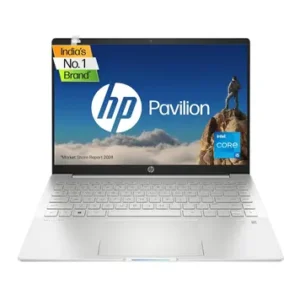
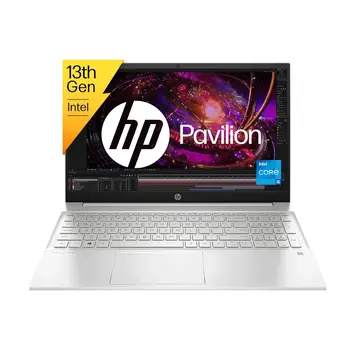
The HP 15-eg3026TU has a clean, professional look in Natural Silver. The lid is made from sandblasted anodised aluminium, which gives it a premium feel when you first pick it up.

The dimensions are 36.02 × 23.4 × 1.79 cm, and the weight sits at approximately 1.74–1.75 kg. For a 15.6-inch laptop, this is a reasonable weight to carry in a backpack. The profile is slim at under 18 mm, making it easy to slide in and out of a bag.

The hinge opens smoothly but requires two hands — you cannot open the lid with one hand. The keyboard deck does flex slightly under firm typing pressure, and some colour shifting appears on the panel when the chassis is twisted. These are minor issues common to plastic-bodied laptops in this price range.

The fingerprint reader is integrated into the palm rest for Windows Hello sign-in, which is a genuine convenience feature. There is no MIL-STD durability certification mentioned in the official specifications, so treat this machine with standard everyday care — it is not a ruggedised device.

HP 15-eg3026TU Laptop Review: Display Deep-Dive

The display is the single best reason to pick this laptop over many competitors. The 15.6-inch Full HD (1920 × 1080) IPS panel is rated at 300 nits of typical brightness and covers 100% of the sRGB colour gamut.

To put that in context: many laptops in the ₹60,000–₹70,000 range ship with panels that cover just 45% NTSC (roughly 60–65% sRGB). The HP 15-eg3026TU’s 100% sRGB coverage is a meaningful advantage for students studying design, photography enthusiasts, and professionals who need accurate colour on screen. Even the closely related HP Pavilion 15-eg3027TU drops to 250 nits brightness and 45% NTSC coverage — so this display spec is specific to the eg3026TU model, not the entire family.

The IPS panel type ensures wide viewing angles, which means colours stay consistent when you tilt the screen or view from the side. The micro-edge anti-glare coating reduces reflections in bright offices and classrooms. A low blue light filter is also included for extended usage comfort.

The display does not support touch input. The refresh rate is 60 Hz, which is standard for productivity use. Gamers who want smoother visuals at higher frame rates will find this limiting.

For watching streaming content, working on documents, editing photos in Lightroom, or giving presentations, this display punches well above its price class.

HP 15-eg3026TU Laptop Review: Intel Core i5-1340P Analysis

The Intel Core i5-1340P is a solid choice for this laptop’s target audience. This 13th Generation chip uses Intel’s hybrid architecture with 4 Performance cores and 8 Efficiency cores — 12 cores and 16 threads in total. The Performance cores run at a base of 1.9 GHz and boost up to 4.6 GHz. The Efficiency cores operate at a base of 1.4 GHz and boost to 3.4 GHz.

The hybrid design means the processor is efficient for lighter tasks (browsing, video calls, documents) using the Efficiency cores, and powerful for heavier tasks (photo editing, compiling code) using the Performance cores. For typical student and office workloads in 2026, this CPU remains capable and fast.

RAM & Storage

The 16 GB of DDR4-3200 MHz RAM runs in dual-channel configuration (2 × 8 GB), which benefits both system speed and the integrated GPU’s performance.

Storage is a 512 GB PCIe NVMe M.2 SSD. NVMe SSDs are significantly faster than older SATA SSDs, delivering faster boot times, snappier application launches, and quick file transfers.

For programming, web development, document-heavy workflows, and casual content creation at 1080p, the Core i5-1340P with 16 GB RAM provides a smooth, responsive experience. Video rendering at 4K or heavy 3D workloads will be slower, as expected at this price.

HP 15-eg3026TU Laptop Review: Graphics Analysis

The HP 15-eg3026TU uses integrated Intel Iris Xe Graphics only — there is no dedicated GPU in this configuration. The Iris Xe shares memory from the system’s 16 GB DDR4 RAM rather than having its own dedicated VRAM.

For everyday productivity, the Iris Xe handles all standard tasks well: video playback, presentations, web browsing, and basic photo editing in Lightroom or Photoshop. Running dual monitors via HDMI and USB-C simultaneously is also supported, which is useful for office setups.

For gaming, the picture is mixed. The Iris Xe can handle older, less demanding games. Light titles like Minecraft or older eSports games at low settings and 720p resolution are feasible. Some users have reported playing GTA 5 on this machine, though at reduced settings. However, modern AAA games and graphically demanding titles will not run well at all. This is not a gaming laptop, and buyers expecting to play current-generation games will be disappointed.

For video editing, 1080p timelines in Premiere Pro or DaVinci Resolve are manageable for short projects, but rendering will be slow compared to laptops with a dedicated GPU. The Iris Xe is not suitable for 3D rendering in Blender or GPU-intensive tasks.

If gaming or GPU-heavy creative work is important to you, consider a laptop with a dedicated GPU instead.

HP 15-eg3026TU Laptop Review: Keyboard & Trackpad

Keyboard Quality

The HP 15-eg3026TU has a full-size island-style (chiclet) backlit keyboard with a dedicated numeric keypad. For a 15.6-inch laptop, a numpad is a practical addition for finance professionals, students, and data-entry users. The white backlight makes typing in low-light rooms comfortable.

The key layout is standard and well-spaced for a 15.6-inch form factor. According to a detailed chassis review of the Pavilion 15-eg family, the keyboard deck does have slight flex under firm typing. Most users find it perfectly usable for extended sessions, but those who type hard will notice this more than others.

Trackpad

The HP Imagepad uses Microsoft Precision Touchpad drivers, which means native Windows gesture support — three-finger swipe, pinch-to-zoom, and scrolling gestures all work without third-party software. The mylar surface provides smooth, consistent tracking. Multi-touch accuracy is reliable for everyday navigation.

Security & Webcam

The fingerprint reader is located on the palm rest and enables Windows Hello biometric sign-in — a fast, convenient way to log in. The webcam is an HP Wide Vision 720p HD unit with dual-array digital microphones. Temporal noise reduction helps reduce background noise on video calls. Note that there is no physical webcam privacy shutter — users who want one will need to buy a clip-on cover separately.

Battery Life & Charging

The HP 15-eg3026TU uses a 41 Wh 3-cell lithium-ion battery. HP’s marketing literature for the Pavilion 15 series mentions figures like 7–8 hours under controlled test conditions. However, real-world user feedback from Indian buyers tells a consistently different story.

Multiple verified user reviews on HP’s own official website, Flipkart, report battery life of 3 to 5 hours under typical everyday use — activities like browsing, video calls, and document editing at moderate screen brightness. Some users with heavier workloads or full brightness report the battery running down in under 3 hours.

For students attending back-to-back college classes or professionals in all-day meetings away from a power outlet, this battery life will likely be insufficient without access to a charger. Carrying the 65W adapter is strongly recommended for any extended outing.

On the positive side, HP Fast Charge brings the battery from 0 to 50% in approximately 45 minutes — a practical feature for quick top-ups during breaks. The USB-C port also supports USB Power Delivery charging, so a compatible USB-C PD power bank or charger can also top up the battery on the go.

HP 15-eg3026TU Laptop Review: Ports & Wireless

Port Selection

The port layout is functional for most users but limited for power users and content creators. The port specifications are as follows:

  • 1× USB Type-C (USB 3.2 Gen 2, 10 Gbps) — with Power Delivery, DisplayPort 1.4, and HP Sleep and Charge
  • 2× USB Type-A (USB 3.2 Gen 1, 5 Gbps)
  • 1× HDMI 2.1 — for connecting external monitors or projectors
  • 1× 3.5mm combo audio jack — headphone and microphone combined
  • 1× AC Smart Pin power connector
  • 1× Kensington Nano Security lock slot

There is no SD card reader, no built-in Ethernet (LAN) port, and only one USB-C port. Content creators who work with camera memory cards will need an external card reader. Users who need a wired internet connection will need a USB or USB-C Ethernet adapter. If you plan to charge via USB-C and connect a USB-C device at the same time, you will need a USB hub or dock, since there is only one USB-C port.

Wireless Connectivity

Wi-Fi 6 (802.11ax, 2×2) via a Realtek adapter provides fast wireless speeds on compatible routers — significantly faster and more reliable than Wi-Fi 5 on congested networks. Bluetooth 5.3 is included for wireless peripherals, earbuds, and speakers.

Storage & RAM Expansion

This model has a single M.2 storage slot and a maximum RAM capacity of 16 GB. There is no internal upgrade path for either storage capacity or RAM beyond the factory configuration.

Thermal Management & Cooling

The HP 15-eg3026TU uses a single-fan, dual-heatpipe cooling system — standard for thin-and-light laptops in the Pavilion 15-eg chassis family. For everyday productivity tasks like browsing, video calls, and office work, the fan runs quietly or stays near-silent.

Under sustained CPU-intensive workloads — extended video rendering, large code compilation, or gaming — the fan will spin up noticeably and the chassis can get warm. This is expected behaviour for a thin (1.79 cm) laptop with a 41 Wh battery. The Intel Core i5-1340P’s power envelope is likely tuned conservatively in this chassis to manage heat and protect battery longevity.

Using the laptop on a flat, hard surface — rather than a bed or soft cushion — helps maintain proper airflow from the vents located on the bottom and rear of the chassis.

For typical productivity workloads that this laptop is designed for, the cooling is adequate. For sustained heavy workloads, expect some throttling and noticeable fan noise.

Audio & Webcam Quality

Speaker Quality

The HP 15-eg3026TU is equipped with dual stereo speakers tuned in partnership with Bang & Olufsen, with HP Audio Boost processing. Bang & Olufsen tuning on HP laptops typically results in cleaner sound staging and better mid-range clarity compared to untuned laptop speakers in the same price bracket. The speakers are well-suited for video calls, casual music listening, and streaming.

The dual-array digital microphones with temporal noise reduction perform reliably for voice calls, helping reduce background noise and keyboard clatter during meetings. This is a practical feature for students in online classes and remote-working professionals.

Webcam

The webcam is an HP Wide Vision 720p HD unit. In 2026, 720p is the baseline standard for video conferencing — it works adequately in decent lighting conditions but lacks sharpness compared to 1080p webcams. For Teams, Zoom, and Google Meet calls, it is functional. There is no physical privacy shutter, which may be a concern for privacy-conscious users.

Who Should Buy the HP 15-eg3026TU

Best For:

Students: The 1.74 kg weight, 100% sRGB display, and strong 13th Gen processor make this a great machine for college students who need to handle presentations, design assignments, and research work. The included Microsoft Office Home & Student 2021 adds real value.

Office & Productivity Users: Document editing, spreadsheets, video calls, and multitasking with multiple browser tabs and applications are all handled comfortably by the Core i5-1340P and 16 GB RAM.

Photo Editing Enthusiasts: The 100% sRGB colour-accurate display is a genuine differentiator for photographers working in Lightroom or Photoshop who need reliable colour representation on a budget.

Not Ideal For:

Gamers — No dedicated GPU means modern and demanding games will not run well. Only older or less demanding titles are feasible.

All-day mobile workers — Real-world battery life of 3–5 hours is not enough for a full workday away from a power outlet. Always carry the charger.

Content creators needing storage expansion — The single M.2 slot with no second bay and no SD card reader limits internal storage flexibility.

HP 15-eg3026TU vs Competitors

In the ₹60,000–₹70,000 segment, the HP 15-eg3026TU competes against several alternatives, and the comparison is nuanced.

Against laptops with Core i5-1335U (10-core): The i5-1340P in this laptop has 12 cores (4P+8E versus 10-core 1335U), which gives it a meaningful edge in sustained multitasking and multi-threaded workloads. If two laptops are priced similarly, the 1340P is the better processor.

Against laptops with larger batteries: Several competing laptops in this price bracket offer 53–60 Wh batteries, which can deliver 7–9 hours of real-world use. The HP’s 41 Wh battery is a significant competitive disadvantage for users who prioritise battery life. This is perhaps the most important factor to consider when comparing alternatives.

The HP’s unique advantage: The 100% sRGB IPS display at this price is genuinely hard to find from competitors. Most rivals ship with 45% NTSC (around 60–65% sRGB) panels. If display quality and colour accuracy matter to you, the HP 15-eg3026TU stands apart from the crowd.

Other advantages include Bang & Olufsen speaker tuning, Wi-Fi 6, and the bundled Microsoft Office Home & Student 2021 licence — features that add tangible everyday value.

HP 15-eg3026TU Pros & Cons

Pros

Outstanding 100% sRGB IPS Display — Rare at this price. 300-nit brightness and full sRGB coverage beat most competing panels in the segment. A genuine advantage for students, designers, and content viewers.

Strong 13th Gen Core i5-1340P Processor — 12 cores and 16 threads deliver confident multitasking performance. Handles office work, coding, browsing, and light creative tasks without slowdown.

Wi-Fi 6 & Bluetooth 5.3 — Modern wireless standards for fast, reliable connectivity on compatible routers and devices.

HP Fast Charge — Charges to 50% in approximately 45 minutes. Practical for quick top-ups between classes or meetings.

Microsoft Office Home & Student 2021 Included — Saves ₹5,000–₹7,000 on a software licence that most students and professionals need.

Bang & Olufsen Speaker Tuning — Noticeably better audio quality than typical untuned budget laptop speakers.

Cons:

Integrated Graphics Only — No dedicated GPU limits this laptop for gaming, 4K video editing, and GPU-accelerated creative tasks.

Single M.2 Slot, No SD Card Reader — Internal storage cannot be expanded with a second drive. Content creators needing card slots will need an external adapter.

No Ethernet Port — Wired internet requires a USB-to-Ethernet adapter.

Polycarbonate Body — While the lid is aluminium, the chassis base and body are polycarbonate. Some flex is present on the keyboard deck under firm pressure.

Frequently Asked Questions

Is the HP 15-eg3026TU worth buying in 2026?

It can be, if you find it at ₹65,000–₹68,000 and have access to a power outlet during your day. The display quality and processor are strong. However, the battery life is a significant limitation for mobile use, and the laptop is increasingly out of stock. Check live availability before planning to purchase.

What is the real-world battery life?

According to user reviews from owners in India, battery life under typical everyday use (browsing, video calls, documents at moderate brightness) ranges from 3 to 5 hours. Always carry the 65W charger for extended sessions.

Is the HP 15-eg3026TU good for gaming?

It is not designed for gaming. Intel Iris Xe Graphics is integrated with no dedicated GPU, and no VRAM of its own. Older titles and lighter games may run at reduced settings, but modern or graphically demanding games will not run acceptably. If gaming is a priority, look for a laptop with a dedicated GPU.

Can I upgrade the RAM or storage?

No. The maximum RAM for this model is 16 GB — no upgrade is possible. Storage uses a single M.2 slot that is already occupied by the 512 GB SSD, with no confirmed second bay for this SKU.

What is the display quality like?

The display is the strongest feature of this laptop. The 15.6-inch FHD IPS panel delivers 300-nit brightness and 100% sRGB colour coverage — well above the 45% NTSC panels found on most competitors at this price. It is excellent for everyday work, photo editing, and content viewing.

Is it suitable for video editing?

For 1080p video editing in Premiere Pro or DaVinci Resolve, it is workable for short projects. The Core i5-1340P and 16 GB RAM provide enough headroom, but export and rendering times will be slower than on a GPU-equipped laptop. For 4K editing or heavy effects work, this machine is not ideal.

Does the HP 15-eg3026TU have good cooling?

The single-fan, dual-heatpipe cooling is sufficient for light-to-medium productivity workloads. Under sustained heavy tasks, the fan will spin audibly and the bottom of the laptop gets warm. Place it on a hard, flat surface for best airflow. Thermal performance is appropriate for the chassis size and battery capacity.

What ports are available?

The laptop has one USB-C (10 Gbps, with Power Delivery and DisplayPort 1.4), two USB-A (5 Gbps), one HDMI 2.1, and one 3.5mm audio combo jack. There is no SD card reader and no built-in Ethernet port. A USB hub or dock is recommended for users who need more ports.

Is the keyboard comfortable for long typing sessions?

The full-size backlit keyboard with a numeric keypad is well-laid-out for a 15.6-inch laptop. The keyboard deck has slight flex under firm typing, which some users will notice. For everyday typing tasks — documents, emails, coding — it performs well. The white backlight is useful in dim environments.

Final Verdict: Should You Buy?

8.0 /10
Great Value

The HP 15-eg3026TU is a laptop with one remarkable strength and one honest weakness — and both are worth understanding clearly before you buy.

Its display is genuinely exceptional for the price. A 300-nit, 100% sRGB IPS panel in the ₹65,000–₹70,000 range is difficult to find from any brand. Paired with the Core i5-1340P’s 12-core performance and 16 GB of DDR4 RAM, this is a confident productivity machine for students, office users, and casual creative workers.

The battery, Expect 3–5 hours of real-world life. If you work from a desk or have access to charging points throughout the day, this is manageable. If you need genuine all-day battery life on the move, this laptop will frustrate you.

It is also worth noting that this is a 2023 model. In 2026, stock is becoming limited and newer alternatives exist at similar prices with better battery capacities and more modern configurations. If you can find this laptop at ₹65,000–₹67,000 and the display quality is your top priority, it remains a good buy. At ₹75,000 or above, the value case weakens considerably.

Final Score: 8.0/10 — Good Choice

Bottom Line: Buy this laptop if you need a colour-accurate display for creative or academic work and can stay near a charger. Look elsewhere if all-day battery life is a top priority.

Disclaimer: Prices and specifications shown may vary from actual products. Please check with the retailer before purchasing.