Home Laptop ReviewsDell XPS 14 9440 Laptop Review: Premium Ultraportable Analysis

Dell XPS 14 9440 Laptop Review: Premium Ultraportable Analysis

8.8 /10 Great Value

The Dell XPS 14 9440 combines a stunning OLED screen with solid performance in a thin, portable design. It works great for creative work and daily tasks. However, the controversial keyboard design, limited ports, and average battery life (with OLED) may not suit everyone.

Processor

Intel Core Ultra 7 155H (Series 1, 24MB cache, up to 4.8 GHz)

Display

14.5 " 3K 120 Hz

Graphics

Intel Arc Graphics

Webcam

Full HD (1080p)

Battery

69.5 wh Lithium-Polymer

OS

Windows 11 Home 64-bit

RAM

16 GB LPDDR5X

Storage

1 TB SSD (PCIe 4.0 NVMe)

Category Ratings

Design & Portability 9.0/10
Display Quality 9.5/10
Performance 8.5/10
Graphics 6.0/10
Keyboard & Input 7.0/10
Battery Life 7.5/10
Connectivity 7.5/10
Value 8.0/10

Pros

  • High-resolution 14.5-inch 3.2K OLED 120Hz touch display with 100% DCI-P3.
  • Powerful Intel Core Ultra 7 155H with fast LPDDR5x RAM and PCIe 4.0 SSD.
  • Premium CNC aluminum build, quad speakers, Wi-Fi 6E, and triple Thunderbolt 4 ports.

Cons

  • RAM is soldered and not upgradeable beyond 16 GB on this configuration.
  • No native USB-A or HDMI ports; relies on USB-C/Thunderbolt adapters.
  • OLED variant has shorter real-world battery life than FHD+ model.

Who Should Buy This?

Best For

  • Creative Work
  • Office & Business Use
  • Travel & Daily Use

Not Ideal For

  • Gaming
  • Heavy Multitasking
  • Low Budget Users
  • Users Needing Many Ports

Dell XPS 14 9440 Laptop (Intel Core Ultra 7 155H/ 16GB/ 1TB SSD) Prices

Flipkart
₹1,79,990 In Stock
Go To Store
Amazon
₹2,02,330 Out of Stock
Go To Store
Price Disclaimer: Prices are subject to change and may vary from the actual price at the store. We cannot guarantee the accuracy of the prices shown. Please check with the retailer before purchasing.

Introduction

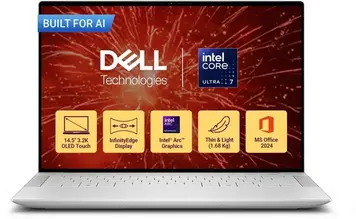
The Dell XPS 14 9440 Laptop Review shows a premium laptop that brings professional features to mobile workers and creators. This laptop uses Intel’s new Core Ultra 7 155H processor and a bright 14.5-inch 3.2K OLED screen with 120Hz refresh rate. The display shows 100% DCI-P3 colors, making it great for photo and video work.

The laptop costs ₹179,990 on Flipkart. It sits in the premium laptop market alongside Apple’s MacBook Pro 14-inch. What makes this laptop special is its thin aluminum body (just 18mm thick), weighing 1.74 kg. It packs triple Thunderbolt 4 ports, four speakers with Dolby Atmos sound, and a glass trackpad into this slim design.

The laptop comes with useful accessories in the box. Dell includes adapters for USB-A and HDMI connections since the laptop only has USB-C ports. This helps users connect older devices and monitors without buying extra adapters.

Dell XPS 14 9440 Quick Overview

Launch Date: April 2024
Best For: Creative Professionals, Business Users, Content Creators
Key Highlight: 3.2K OLED 120Hz touchscreen with perfect color accuracy
Overall Score: 8.8/10 – Great Choice

Dell XPS 14 9440 Design & Premium Build

The Dell XPS 14 9440 Laptop Review reveals a laptop made from CNC machined aluminum. This construction method cuts the metal from a solid block, making it stronger than cheaper welded designs. The laptop measures 320 x 216 x 18mm, making it one of the thinnest 14-inch laptops available. At 1.74 kg with the OLED screen, it’s light enough for daily carrying.

The outside has a matte finish that resists fingerprints. The Platinum color (white/silver) looks professional in office settings. The laptop also has a glass palm rest that feels smooth and premium. This glass area stays cool during work, unlike some laptops that get warm where you rest your hands.

Dell covers the OLED screen with Gorilla Glass Victus. This is the same tough glass used on high-end phones. It protects against scratches from keys or pens in your bag. However, the laptop has no water resistance rating. You should keep it away from liquids.

The build quality is excellent. When you hold the laptop, it feels solid with no flex in the keyboard area or screen. The hinges are smooth and hold the screen at any angle. Dell designed this laptop to look good and feel premium, which it does.

One design choice that divides users: Dell removed the visible trackpad outline. The glass surface under the keyboard hides the trackpad boundary. This looks clean and modern, but you might accidentally touch it while typing until you get used to it. The laptop also lacks a lip to help open the lid. You need to grip both sides to open it.

Display Quality & Visual Experience

The display on this Dell XPS 14 9440 Laptop Review unit has a 14.5-inch OLED panel. The screen shows 3200 x 2000 pixels in a 16:10 shape. This taller screen shows more content than traditional 16:9 laptop screens, helping with document work and web browsing.

The OLED technology makes each pixel light up independently. When showing black, pixels turn completely off. This creates perfect blacks and amazing contrast that LCD screens cannot match. Colors look vivid and life-like, especially in photos and videos.

The screen refreshes up to 120 times per second (120Hz). This makes scrolling feel smoother than standard 60Hz screens. Moving windows and browsing websites feels fluid. The screen automatically adjusts refresh rate to save battery when showing still images.

For brightness, Dell rates this screen at 400 nits for normal content. Independent testing shows it can peak at 500 nits for brief moments with HDR content. This brightness works well indoors and in moderate lighting. However, it’s not the brightest screen available. Using the laptop in direct sunlight can be challenging.

The color accuracy is excellent. The screen covers 100% of the DCI-P3 color space. This is the standard for digital cinema and professional video work. If you edit photos or videos, colors on this screen will look accurate and match what appears on other professional displays. The screen also covers 95% or more of the sRGB space used for web content.

The touchscreen responds quickly to taps and swipes. The glass feels smooth under your fingers. For creative work with a pen, the screen supports touch input but Dell doesn’t include a stylus.

One important note about OLED screens: they can experience burn-in over many years. If you leave the same image on screen for months (like a taskbar), it might leave a faint ghost image. Modern OLEDs include pixel-shifting technology to prevent this, but it’s something to know about.

For creative professionals working across devices: The color accuracy on this laptop’s OLED display matches well with premium smartphones. If you edit photos or videos on the go, you’ll want a phone with similar color standards. Check out the Samsung Galaxy S25 Ultra which also features a 100% DCI-P3 OLED display, ensuring your work looks consistent whether you’re editing on your laptop or reviewing on your phone.

Performance & Processing Power

Intel Core Ultra 7 155H Performance

The Dell XPS 14 9440 Laptop Review centers on Intel’s Core Ultra 7 155H processor. This chip has 16 cores split into different types: 6 high-performance cores, 8 efficient cores, and 2 low-power cores. This mix lets the laptop use the right core for each task.

The performance cores run at 1.4 GHz normally and boost up to 4.8 GHz when needed. These handle heavy tasks like editing videos or running complex programs. The efficient cores use less power and handle background work like email sync and music playback. The low-power cores help save battery during light tasks.

All together, the processor can run 22 tasks at once (threads). This helps when you have many programs open. The chip also has 24 MB of cache memory to speed up common tasks.

How it performs in real use:

Office and web work: The processor handles Microsoft Office, email, web browsing, and video calls easily. You can have 30+ browser tabs open with no slowdown. Multiple apps can run at once without lag.

Photo editing: Programs like Adobe Lightroom and Photoshop run well. You can edit 24-megapixel RAW photos smoothly. Complex filters and adjustments apply quickly. The Intel Arc graphics help speed up some effects.

Video editing: 1080p video editing works very well in Premiere Pro or DaVinci Resolve. 4K editing is possible but rendering takes time. Simple 4K projects with basic cuts work fine. Complex effects with many layers will slow down. The integrated graphics limit some GPU-heavy effects.

Programming: Code editors, compilers, and development tools run smoothly. You can run Docker containers and virtual machines. The 16GB of RAM might limit large virtual machine setups or big data projects.

Light gaming: The processor can run older games and light titles. Modern AAA games need lower settings to run smoothly. See the graphics section for gaming details.

Memory & Storage Performance

The laptop has 16 GB of LPDDR5x memory running at 6400 MHz. This is very fast memory that helps programs load quickly. However, the memory is soldered to the motherboard. You cannot upgrade it later. 16 GB works for most users, but heavy multitaskers or developers might want 32 GB (available in higher models).

Storage uses a 1 TB NVMe SSD with PCIe 4.0 interface. This drive reads data at over 5000 MB/s and writes at over 4000 MB/s. Programs and files load instantly. Windows boots in seconds. The drive is replaceable, so you can upgrade to 2 TB or 4 TB later if needed.

Graphics & Creative Work Capabilities

Intel Arc Integrated Graphics

The graphics for this Dell XPS 14 9440 Laptop Review come from Intel Arc built into the processor. This integrated graphics shares the 16 GB system memory instead of having its own dedicated RAM. It’s much faster than older Intel integrated graphics but slower than dedicated gaming GPUs.

Light gaming (casual titles): Games like Minecraft, Stardew Valley, Terraria, and older titles run smoothly at native 3.2K resolution. You can use high settings and get good frame rates. These games aren’t demanding, so the Intel Arc handles them easily.

Medium gaming (competitive titles): Games like Valorant, CS:GO, League of Legends, and Rocket League run well at 1080p resolution with medium-to-high settings. You’ll get 60+ frames per second for smooth gameplay. For the best experience, reduce from 3.2K to 1080p resolution.

Heavy gaming (modern AAA games): Recent demanding games like Cyberpunk 2077, Red Dead Redemption 2, or Elden Ring struggle on integrated graphics. You need to use 1080p resolution with low settings. Even then, you might get only 30-40 frames per second. This laptop isn’t built for serious gaming. For gaming, consider laptops with NVIDIA RTX 4050 or better.

Creative work performance:

Video editing: The Intel Arc includes hardware acceleration for H.264, H.265, and AV1 video. This speeds up video exports dramatically. A 10-minute 4K H.265 video might export in 3-4 minutes instead of 15-20 minutes without hardware acceleration.

Photo editing: Lightroom and Photoshop work well for most tasks. The GPU accelerates some filters and adjustments. Very complex edits with many layers might slow down compared to dedicated graphics cards.

3D work: Basic 3D modeling in Blender or SketchUp works for simple projects. Complex scenes with millions of polygons will be slow. Rendering a 3D animation would take hours instead of minutes with a dedicated GPU.

Display connections: Each Thunderbolt 4 port can drive a 4K monitor at 60 Hz. You can connect two external 4K displays or one 8K display. This is useful for traders, designers, or anyone needing multiple monitors.

Keyboard, Trackpad & Input Experience

Keyboard Design

The keyboard on this Dell XPS 14 9440 Laptop Review unit is full-size with white backlighting. The keys have only 1.0mm of travel. This is shallow compared to many laptops that offer 1.5-2.0mm. If you like deep, bouncy keys, this keyboard will feel different.

The keys are arranged in a “zero-lattice” design. This means they sit edge-to-edge with no gaps between them. It looks modern and clean. Some people love this style; others find it harder to locate keys by feel.

The function row issue: Dell removed physical F1-F12 keys. Instead, you get a capacitive touch strip above the number row. It lights up with icons for volume, brightness, and media controls. To access F1-F12, you press the Fn key. This design looks futuristic but has practical problems:

  • You might accidentally trigger functions while reaching for Escape or number keys
  • No tactile feedback when you press a function
  • Harder to use function keys without looking
  • Takes time to adapt if you’re used to physical keys

Many reviewers and users dislike this design choice. It’s similar to Apple’s failed Touch Bar experiment. Dell might change this in future models based on user feedback.

The backlight is bright with adjustable levels. The fingerprint reader sits in the power button for Windows Hello login. An ambient light sensor automatically adjusts keyboard and screen brightness.

Glass Haptic Trackpad

The trackpad uses glass with haptic feedback instead of physical clicking. It’s completely invisible—no outline shows where it starts or ends. This creates problems:

  • You might accidentally activate it while typing
  • Unclear where the trackpad boundaries are
  • Takes practice to use confidently

However, once you learn the boundaries, it works well. The glass surface is smooth. Multi-finger gestures (two-finger scroll, three-finger swipe) work perfectly. The haptic clicks feel realistic, mimicking real button presses through vibration.

The trackpad supports Microsoft Precision drivers with palm rejection. This should prevent accidental touches while typing, though it’s not perfect.

Webcam & Microphones

The webcam captures 1080p video at 30 frames per second. This is much sharper than old 720p webcams. Video calls look clear and professional. The webcam also has an infrared sensor for Windows Hello face login.

Two microphones sit above the display. They use noise cancellation and focus on your voice while reducing background sounds. This works well for video calls and voice commands.

Dell includes Windows Studio Effects software. This can:

  • Blur or replace your background
  • Correct your eye gaze to look at the camera
  • Keep you centered in frame when you move

There’s no physical webcam cover. An LED light shows when the camera is active.

Battery Life & Charging

Battery Performance

The battery for this Dell XPS 14 9440 Laptop Review holds 69.5 Wh. This is mid-range capacity for 14-inch laptops. Dell claims up to 21 hours on the FHD+ non-touch model.

Real-world battery life (based on user reviews):

Light tasks (web, documents): Expect 8-14 hours. Consumer Reports tested the OLED model and got 14 hours of web browsing and 11.25 hours of 4K video playback. These tests use moderate brightness settings. In daily office work with lower brightness, you might reach 10-12 hours.

Medium tasks (streaming, multitasking): Plan for 6-9 hours. When streaming Netflix, using multiple apps, and keeping brightness at 75%, most users report 6-8 hours. The high-resolution OLED screen uses more power than LCD displays.

Heavy tasks (video editing, intensive work): Expect 4-6 hours. When editing 4K video, running virtual machines, or doing processor-intensive work, the battery drains faster. Some users report as low as 4 hours under maximum load.

Why OLED reduces battery life: OLED pixels light up individually. Bright white content (like documents or websites) uses more power than dark content. The 3.2K resolution also requires more power than 1920×1200. The FHD+ LCD model gets significantly better battery life.

Charging Specifications

Dell includes a 60W USB-C charger with ExpressCharge technology. The battery can reach 80% charge in about an hour. Full charge takes approximately 2 hours.

You can charge from any of the three Thunderbolt 4 ports—no specific charging port required. The laptop also accepts third-party USB-C chargers rated at 45W or higher. However, lower-wattage chargers might show a “slow charging” warning.

For extending battery life:

  • Use dark mode when possible (saves power on OLED)
  • Lower screen brightness to 40-50% indoors
  • Close unnecessary background apps
  • Let the screen refresh rate drop to 60Hz when not needed

Ports, Connectivity & Expansion

Port Selection

The ports on this Dell XPS 14 9440 Laptop Review follow modern minimalist design. You get:

  • 3x Thunderbolt 4 (USB-C)
  • 1x 3.5mm headphone/microphone combo jack
  • 1x microSD card reader

What’s missing: No USB-A ports, no HDMI port, no Ethernet port. Dell includes adapters in the box for USB-A and HDMI, but you’ll need to carry them. For Ethernet, you need to buy a separate USB-C adapter.

Thunderbolt 4 capabilities: Each Thunderbolt 4 port offers:

  • 40 Gbps data transfer (very fast for external drives)
  • DisplayPort 2.1 for connecting monitors
  • 100W power delivery for charging
  • Daisy-chaining up to 6 devices per port

The microSD card reader is convenient but photographers using full-size SD cards from cameras need an adapter.

Wireless Connectivity

The laptop uses Intel Killer Wi-Fi 6E with 2×2 antennas. Wi-Fi 6E adds access to the 6 GHz frequency band. This provides:

  • Faster speeds with compatible routers
  • Less interference in crowded areas (apartments, offices)
  • Lower latency for video calls and gaming

Bluetooth 5.3 is included for wireless mice, keyboards, headphones, and other devices. This is the latest Bluetooth version with better range and power efficiency.

Expansion Limitations

The 16 GB RAM is soldered—no upgrade possible. You must choose 32 GB or 64 GB models at purchase if you need more memory.

The 1 TB SSD can be replaced. The laptop uses standard M.2 NVMe drives. You can upgrade to 2 TB or 4 TB, but there’s only one slot. You cannot add a second internal drive.

For users who need many ports, consider a Thunderbolt dock. One dock can add USB-A ports, HDMI, Ethernet, SD card reader, and more—all through a single cable.

Thermal Management & Cooling

Dual-Fan Cooling System

The cooling on this Dell XPS 14 9440 Laptop Review uses two fans with multiple heat pipes. The fans pull air from sides and push it out the back near the hinge. This keeps hot air away from your hands and the keyboard area.

Dell designed this cooling for sustained 47W performance. This means the laptop can run intensive tasks for extended periods without overheating. The dual-fan setup balances three goals: performance, temperature, and noise.

Temperature performance: In regular work (browsing, documents, video calls), the laptop stays cool. The bottom might get slightly warm, but the keyboard area remains comfortable. Under heavy load (rendering, gaming, large compilations), the bottom can get noticeably warm. Some users report the underside getting hot enough to be uncomfortable on lap during intensive tasks. Placing it on a desk solves this.

Fan noise: During light tasks, the fans stay quiet or off completely. You’ll barely hear them. When doing intensive work, the fans spin up and become audible. Multiple reviews describe the fan noise as noticeable but not excessive. It’s quieter than gaming laptops but louder than fanless devices like MacBook Air.

The thin design (18mm) limits cooling capability compared to thicker laptops. The system will throttle (slow down) slightly under sustained maximum load to prevent overheating. For most users, this throttling won’t be noticeable. Only people running benchmarks or rendering for hours will see the effect.

Tips for cooler operation:

  • Don’t block the bottom vents (use on a hard surface)
  • Keep the back vent clear
  • Use a laptop stand for better airflow
  • Clean the vents periodically with compressed air

Audio & Webcam Quality

Quad-Speaker Audio System

The Dell XPS 14 9440 Laptop Review reveals four speakers: two main 2W speakers and two 2W tweeters (8W total peak output). Dell positioned them to fire upward and downward for better sound dispersion.

The audio quality is impressive for a thin laptop. The speakers get loud enough for a small room. Music sounds clear with decent separation of instruments. Bass is present but not strong (typical for laptop speakers). Dialog in movies and videos is clear and easy to understand.

Dolby Atmos software creates virtual surround sound. This makes movies more immersive with sounds seeming to come from different directions. It works well with headphones too.

Additional audio software:

  • Waves MaxxAudio Pro for sound enhancement
  • Waves Nx 3D audio with head tracking
  • Noise cancellation for microphones

The dual microphones work well for video calls. They focus on your voice and reduce background noise like keyboard typing or fan noise. Colleagues on video calls will hear you clearly.

1080p Webcam Quality

The webcam captures 1080p video—much sharper than older 720p cameras. You’ll look professional on video calls with good detail and color. The webcam includes an infrared sensor for Windows Hello face recognition. This works well even in dim lighting.

Dell’s Windows Studio Effects add useful features:

  • Background blur/replacement: Hide messy rooms or add virtual backgrounds
  • Eye contact correction: Makes you appear to look at the camera even when reading the screen
  • Auto framing: Keeps you centered if you move around

These AI features work reasonably well, though they’re not perfect. The eye contact correction can look slightly unnatural in some lighting.

The webcam has an LED indicator that lights when active. There’s no physical privacy shutter, so privacy-focused users should consider a webcam cover.

Who Should Buy Dell XPS 14 9440 Laptop Review?

Design & Portability: 9.0/10
Premium CNC aluminum, thin 18mm profile, and 1.74 kg weight make this highly portable. Loses points for controversial keyboard design.

Display Quality: 9.5/10
The 3.2K OLED with 100% DCI-P3 and 120Hz is exceptional. Only brighter outdoor screens score higher.

Performance: 8.5/10
Core Ultra 7 155H handles demanding work well. Limited by integrated graphics and non-upgradeable 16GB RAM.

Graphics: 6.0/10
Intel Arc integrated graphics manage creative work and light gaming but fall short for intensive gaming or 3D rendering.

Keyboard & Input: 7.0/10
Glass trackpad is excellent when you adapt. Capacitive function keys and shallow travel divide users. 1080p webcam is great.

Battery Life: 7.5/10
8-14 hours with OLED is acceptable but not class-leading. FHD+ model lasts much longer.

Connectivity: 7.5/10
Triple Thunderbolt 4 and Wi-Fi 6E are excellent. Lack of USB-A and HDMI requires adapters.

Value: 8.0/10
At ₹179,990, you get premium build and OLED display. Comparable to MacBook Pro 14 pricing.

Best For:

  1. Creative Professionals – The 100% DCI-P3 OLED display makes this perfect for photographers, video editors, and designers who need accurate colors. The display quality alone justifies the premium price for color-critical work.
  2. Business Professionals – The premium build, professional appearance, and 1080p webcam suit executives and consultants. Great for presentations and video meetings.
  3. Mobile Workers – The 1.74 kg weight and thin profile make this easy to carry daily. Good battery life (8-14 hours) covers most work days.

Not Ideal For:

  • Gamers – Integrated graphics cannot handle demanding games well
  • Heavy Multitaskers – 16GB soldered RAM limits memory-intensive work
  • Budget Buyers – Premium pricing puts this out of reach for cost-conscious users
  • Users Who Need Many Ports – USB-C-only design requires adapter dependence
  • Anyone Who Hates Change – Controversial keyboard and trackpad design won’t suit traditional laptop users

Dell XPS 14 9440 Laptop Review vs Competition

The Dell XPS 14 9440 Laptop Review shows this laptop competes in the ₹170,000-₹220,000 premium ultraportable market.

Display Leadership: The 3.2K OLED with 100% DCI-P3 beats most competitors using IPS LCD panels. Few alternatives offer OLED at this price point. The MacBook Pro 14 has excellent LCD quality but still uses LCD, not OLED. The 120Hz refresh rate also beats many competitors stuck at 60Hz.

Performance Comparison: The Intel Core Ultra 7 155H trades blows with AMD Ryzen 7 8845HS and Apple M3 processors. In single-thread work, all three perform similarly. In multi-thread tasks, the AMD often wins by 10-20%. Apple’s M3 offers better power efficiency. For integrated graphics, AMD’s Radeon 780M slightly outperforms Intel Arc.

Build Quality: Dell’s CNC aluminum and glass palm rest represent top-tier construction. Most Windows competitors use standard aluminum without the machined precision. Only Apple matches or exceeds this build quality.

Port Situation: Competitors often include USB-A and HDMI ports. Laptops like the ASUS Zenbook 14 or HP Spectre x360 provide more ports without adapters. However, they lack the triple Thunderbolt 4 flexibility Dell offers.

Battery: The OLED’s 8-14 hour battery life falls behind efficient competitors. AMD Ryzen laptops often achieve 12-15 hours. Apple’s MacBook Air can exceed 15 hours. The Dell FHD+ model closes this gap significantly.

Price Positioning: At ₹179,990, Dell prices competitively for OLED laptops. Similar OLED Windows laptops often cost ₹200,000+. However, excellent LCD competitors cost ₹120,000-₹150,000. The MacBook Air 15 M3 starts around ₹150,000 with similar build quality.

Unique Advantages:

  • Best-in-class OLED display for color work
  • Premium materials and construction
  • Comprehensive Thunderbolt 4 connectivity

Notable Drawbacks:

  • Soldered RAM blocks upgrades
  • Controversial keyboard design
  • Requires adapters for common connections
  • Average battery life with OLED

Price Analysis

Value Proposition: At ₹179,990, you’re paying for the premium OLED display, build quality, and latest Intel processor. This pricing is reasonable for what you get but steep compared to mainstream laptops.

Market Position: This sits in the premium ultraportable segment. Mainstream productivity laptops cost ₹60,000-₹100,000. Gaming laptops with discrete graphics start around ₹100,000. Premium ultraportables like this range from ₹150,000-₹250,000.

Alternative Pricing:

  • Models with 32GB RAM and RTX 4050 graphics cost significantly more
  • The FHD+ non-OLED model saves ₹30,000-₹40,000
  • Older Dell XPS 13 models offer savings of ₹40,000-₹60,000

Is It Worth the Price?: If you need the OLED display’s color accuracy for creative work, yes. The combination of display quality and build justifies premium pricing. If you just need a fast laptop for general work, cheaper options exist.

Pros & Cons Summary

Pros:

Stunning OLED Display – The 14.5-inch 3.2K OLED with 120Hz and 100% DCI-P3 is among the best laptop displays available. Perfect for creative work requiring color accuracy. The vibrant colors and perfect blacks make both work and entertainment look amazing.

Premium Build Quality – CNC machined aluminum and glass palm rest create a laptop that feels luxury. It’s solid with no flex or creaks. Will look premium for years.

Modern Processor – Intel Core Ultra 7 155H with 16 cores and 22 threads handles demanding work well. AI acceleration features will become more useful as software adopts them.

Fast Memory and Storage – LPDDR5x-6400 RAM and PCIe 4.0 NVMe SSD provide instant responsiveness. Programs open immediately, files transfer quickly.

Thunderbolt 4 Flexibility – Three Thunderbolt 4 ports offer maximum expansion through docks and adapters. Each port handles charging, displays, and data.

Good Audio – Quad speakers with Dolby Atmos sound better than most ultraportables. Loud enough for small room viewing.

Sharp Webcam – 1080p camera with AI features makes video calls look professional. Much better than old 720p cameras.

Cons:

Controversial Keyboard Design – Capacitive function keys and shallow 1.0mm key travel don’t suit everyone. Many users and reviewers criticize this design. No physical function keys makes certain workflows harder.

Hidden Trackpad – No visible outline causes accidental activation until you memorize boundaries. Looks sleek but reduces usability.

Soldered RAM – The 16GB limit with no upgrade path restricts future flexibility. Power users may outgrow 16GB as software demands increase.

Limited Ports – USB-C-only means carrying adapters for USB-A, HDMI, and Ethernet. The included adapters help but add clutter to your bag.

OLED Battery Trade-off – 8-14 hour battery life is acceptable but not exceptional. The FHD+ model lasts much longer. Heavy users might need midday charging.

Premium Pricing – ₹179,990 puts this laptop beyond many budgets. Similar performance available for ₹100,000 less without OLED.

Integrated Graphics Only – Cannot handle serious gaming or GPU-intensive 3D work. Gamers and 3D artists need discrete graphics.

Frequently Asked Questions

Is the Dell XPS 14 9440 worth buying in 2026?

For creative professionals needing color-accurate work, yes. The 3.2K OLED display with 100% DCI-P3 colors is excellent for photo and video editing. The Intel Core Ultra 7 155H handles productivity and moderate creative work well. However, at ₹179,990, it's expensive. Budget buyers or gamers should look elsewhere. The controversial keyboard design also isn't for everyone.

What is real battery life on the Dell XPS 14 9440?

With the OLED display, expect 8-14 hours depending on use. User reviews shows 14 hours of web browsing and 11.25 hours of 4K video. In daily office work with moderate brightness, most users get 10-12 hours. Heavy tasks like video editing drop this to 4-6 hours. The FHD+ non-OLED model gets much better battery life

Can the Dell XPS 14 9440 handle gaming?

Only light gaming. The Intel Arc integrated graphics runs casual games (Minecraft, Stardew Valley) well. Competitive eSports titles (Valorant, CS:GO, League of Legends) work at 1080p medium settings. Modern AAA games struggle even on low settings. For serious gaming, buy a laptop with NVIDIA RTX 4050 or better dedicated graphics.

Can I upgrade RAM or storage on the Dell XPS 14 9440?

RAM is soldered—no upgrades possible. You're stuck with 16GB. If you need more RAM, buy the 32GB or 64GB model initially. Storage can be upgraded. The 1TB SSD is replaceable with standard M.2 NVMe drives up to 4TB. However, there's only one storage slot, so you cannot add a second drive.

How good is the OLED display?

The 3.2K OLED display is exceptional. It shows perfect blacks and vibrant colors that LCD panels cannot match. The 100% DCI-P3 color coverage makes it perfect for professional photo and video editing. At 120Hz, scrolling and motion look smooth. The main downside: it's not the brightest screen for outdoor use. Also, battery life is shorter than LCD models.

Is the Dell XPS 14 9440 good for video editing?

Yes for 1080p and 4K editing with some limits. The Intel Core Ultra 7 155H handles timeline editing well. Hardware video encoding speeds up exports for H.264/H.265. The 100% DCI-P3 OLED display shows accurate colors for color grading. However, complex effects benefit from dedicated GPU power this laptop lacks. 16GB RAM might limit very large projects.

Does the Dell XPS 14 9440 get hot?

It stays cool during normal work. Under heavy sustained load, the bottom gets warm to hot. The keyboard area stays comfortable. Dual fans handle cooling adequately but can be audible under load. The thin 18mm design limits cooling compared to thicker laptops. For intensive work, use on a desk rather than lap.

What ports does the Dell XPS 14 9440 have?

Three Thunderbolt 4 USB-C ports, one 3.5mm audio jack, and one microSD card reader. No USB-A, HDMI, or Ethernet ports built-in. Dell includes USB-C to USB-A and USB-C to HDMI adapters in the box. Each Thunderbolt 4 port supports 40 Gbps data, power delivery, and DisplayPort video.

Is the keyboard comfortable for typing?

This divides users. The 1.0mm key travel is shallow compared to traditional laptops (1.5-2.0mm). The zero-lattice design with edge-to-edge keys looks modern but requires adaptation. The capacitive function row receives widespread criticism—many users prefer physical F-keys. The glass trackpad works well once you learn its boundaries. Try before buying if possible.

Final Verdict: Should You Buy?

8.8 /10
Great Value

The Dell XPS 14 9440 Laptop Review reveals a premium laptop that excels at display quality, build excellence, and professional aesthetics. The 3.2K OLED screen is the star feature—delivering visual quality that makes the premium price worthwhile for creative work. Color accuracy, contrast, and smoothness all rate among the best in laptops. The Intel Core Ultra 7 155H provides strong performance for business, creative work, and moderate multitasking.

However, this laptop makes controversial choices that won’t suit everyone. The keyboard design with capacitive function keys and shallow travel frustrates many users. The invisible trackpad causes accidental activation until you adapt. Port selection requires carrying adapters. The soldered 16GB RAM limits future flexibility. Battery life with OLED (8-14 hours) is acceptable but not exceptional.

At ₹179,990, this laptop targets professionals who value premium build and display quality over versatility. Creative professionals who need accurate colors benefit most. Business users who want premium aesthetics and webcam quality will appreciate it. Multimedia enthusiasts get an amazing screen for entertainment. However, gamers, budget buyers, data scientists needing lots of RAM, and traditional laptop users should look elsewhere.

Final Score: 8.8/10 – Great Choice

Bottom Line: The Dell XPS 14 9440 delivers a stunning OLED display, premium construction, and solid performance in a portable design. Buy this if color-accurate creative work, professional presentation, or multimedia quality matters more than gaming, maximum battery life, or traditional keyboard design. The display alone justifies the premium price for the right buyer.

Disclaimer: Prices and specifications shown may vary from actual products. Please check with the retailer before purchasing.