Home Laptop ReviewsASUS Vivobook 15 Core i5-1335U Review: Complete Buyer’s Guide

ASUS Vivobook 15 Core i5-1335U Review: Complete Buyer’s Guide

8.2 /10 Great Value

The Asus Vivobook 15 Core i5-1335U offers strong everyday performance for students and office workers. The 10-core processor handles multitasking well, and you get 16GB RAM that can be upgraded. The included MS Office 2024 adds good value. However, the display color accuracy is basic, and there's no dedicated graphics card for gaming or video editing.

Processor

Intel Core i5-1335U

Display

15.6 " Full HD 60 Hz

Graphics

Intel Iris Xᵉ

Webcam

HD (720p)

Battery

42 wh Li-ion

OS

Windows 11 Home

RAM

16 GB DDR4

Storage

512GB

Category Ratings

Design & Portability 8.0/10
Display Quality 7.0/10
Performance 8.5/10
Graphics 6.0/10
Keyboard & Touchpad 8.0/10
Battery Life 7.5/10
Connectivity 7.5/10
Value for Money 9.0/10

Pros

  • Modern 10-core processor with 12 threads
  • Expandable 16GB DDR4 RAM up to 24GB
  • Includes MS Office 2024 + M365 Basic

Cons

  • No dedicated graphics for gaming performance
  • Limited 45% NTSC color gamut display
  • No fingerprint sensor or Thunderbolt support

Who Should Buy This?

Best For

  • Students
  • Office Professionals
  • Online Learners
  • Home and Family Use

Not Ideal For

  • Professional Content Creators
  • Serious Gamers
  • Users Needing All-Day Battery
  • Engineering Students (who use CAD or other graphics tools)

Asus Vivobook 15 Core i5-1335U Prices

Flipkart
₹52,980 In Stock
Go To Store
Price Disclaimer: Prices are subject to change and may vary from the actual price at the store. We cannot guarantee the accuracy of the prices shown. Please check with the retailer before purchasing.

Introduction

The Asus Vivobook 15 Core i5-1335U is a budget-friendly laptop designed for students and office workers who need reliable everyday performance. Launched in July 2024, this thin and light machine offers good value at its current price of ₹52,980.

This laptop packs Intel’s 13th Generation Core i5-1335U processor with 10 cores. It comes with 16GB RAM that you can upgrade to 24GB, and a fast 512GB storage drive. The 15.6-inch Full HD screen is good for daily work, and the laptop weighs just 1.7 kg, making it easy to carry.

The Core i5-1335U processor has an interesting design. It uses 2 powerful cores for heavy tasks and 8 energy-saving cores for regular work. This helps the laptop run smoothly while saving battery power. The laptop also includes Microsoft Office 2024, which saves you about ₹5,000-₹6,000.

Looking at real-world performance, this processor handles office work, web browsing, and video streaming without problems. The 250-nit display works well indoors but may struggle in bright sunlight. The 42 Wh battery typically lasts 6-8 hours with normal use.

Quick Overview

Launch Date: July 2024
Best For: Students and office professionals
Key Highlight: 10-core processor with upgradable RAM
Overall Rating: 8.2/10 – Excellent Value

Design and Build Quality

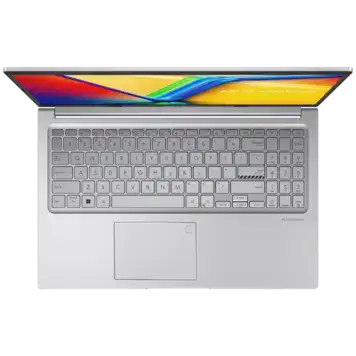
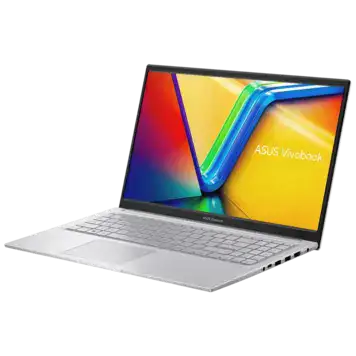
The ASUS Vivobook 15 X1504VA measures 360mm x 233mm x 18mm and weighs 1.7 kg. This makes it genuinely portable for students carrying it between classes or professionals commuting to work.

The body is made of plastic, which helps keep the price down. While it doesn’t feel as premium as metal laptops, it’s sturdy enough for daily use. The Cool Silver color looks professional and clean.

The laptop features thin bezels around the screen – 8mm on the sides, 12mm at the top, and 16mm at the bottom. The display can fold back 180 degrees flat, which is useful for sharing your screen with others. The hinges feel solid and shouldn’t loosen over time.

At 1.7 kg, this laptop is lighter than many 15.6-inch models. It’s thin enough at 1.8cm to slip into most backpacks easily. The compact size makes it practical for mobile computing without sacrificing screen space.

The keyboard is backlit, which helps when working in dim environments. The keys use a chiclet design with spaces between them, reducing typing errors. There’s also a full number pad, which is helpful for spreadsheet work.

Display Quality

The 15.6-inch display offers Full HD resolution (1920 x 1080 pixels). This gives you sharp text and clear images for work and entertainment. The IPS-level panel provides wide viewing angles of about 178 degrees, so colors don’t shift when you view the screen from the side.

The screen brightness is 250 nits. This is acceptable for indoor use in offices, classrooms, or homes. However, it struggles outdoors in direct sunlight. The anti-glare coating helps reduce reflections from overhead lights and windows.

The display covers 45% NTSC color space, which equals about 65% sRGB. This is fine for documents, web browsing, and videos. But if you edit photos or videos professionally, the limited color range will be a problem. The colors look slightly washed out compared to more expensive laptops.

The screen has TÜV Rheinland certification for low blue light. This reduces eye strain during long work sessions. The 60 Hz refresh rate is standard for productivity laptops. It works smoothly for everyday tasks but isn’t ideal for gaming.

The display doesn’t have touch support, which keeps the laptop lighter and cheaper. This is a good trade-off for most users who primarily use the keyboard and touchpad.

Processor Performance

The Intel Core i5-1335U is a 13th Generation processor released in early 2023. It uses a hybrid design with 10 cores and 12 threads. Here’s how it works:

Performance Cores (P-cores): 2 cores that run from 1.3 GHz up to 4.6 GHz. These handle demanding tasks like opening programs or processing data.

Efficiency Cores (E-cores): 8 cores that run at lower speeds. These manage background tasks and light work, saving battery power.

The processor has 12MB of cache memory, which helps it access frequently used data quickly. It’s built using Intel’s 10nm process technology. The base power consumption is 15W, but it can temporarily boost to 55W when needed.

Expected Performance:

Office Work: Excel spreadsheets, Word documents, and PowerPoint presentations run smoothly. You can work with multiple files open without slowdown. Web browsing with 10-15 tabs is comfortable.

Video Streaming: Netflix, YouTube, and other streaming services play 1080p video without any lag. The processor handles picture-in-picture mode easily.

Basic Photo Editing: Simple photo editing in apps like GIMP or Paint.NET works fine. You can adjust colors, crop images, and apply basic filters.

Programming: Code editors like Visual Studio Code run well. Compiling small to medium projects takes reasonable time. The multiple cores help when running tests or building projects.

Light Gaming: Casual games like Stardew Valley, Minecraft, or older titles run acceptably. Modern demanding games won’t work well without a dedicated graphics card.

Memory and Storage:

The 16GB DDR4 RAM is split as 8GB soldered and 8GB in a removable slot. You can upgrade to 24GB by replacing the removable module. The dual-channel setup maximizes memory speed.

The 512GB NVMe PCIe 4.0 SSD is fast. Windows boots in about 10-15 seconds. Programs open almost instantly. The SSD is faster than older SATA drives and helps the laptop feel responsive.

Graphics Capability

The laptop uses Intel Iris Xᵉ Graphics with 80 execution units. This is integrated graphics – meaning it shares memory with the system instead of having its own dedicated memory. The graphics run at up to 1.25 GHz.

Gaming Performance:

Casual Games (Very Good): Games like Among Us, Stardew Valley, and Terraria run smoothly at 1080p with high settings. These games aren’t demanding and work perfectly.

eSports Titles (Acceptable): Games like League of Legends, Dota 2, and CS:GO run at 1080p with medium settings. You get 40-60 FPS, which is playable. Lowering resolution to 900p improves frame rates.

AAA Games (Poor): Modern demanding games like Cyberpunk 2077, Red Dead Redemption 2, or Starfield won’t run well. The integrated graphics simply isn’t powerful enough.

Creative Work:

Video Editing: Basic 1080p editing in DaVinci Resolve or Shotcut works for simple projects. Cut clips, add transitions, and apply basic color correction. However, 4K editing or complex effects will cause slowdowns.

Photo Editing: Lightroom and Photoshop work for standard photo editing. Apply filters, adjust exposure, and make corrections. Large files with many layers may be slow.

3D Work: Simple 3D modeling in Blender or SketchUp is possible for basic scenes. Complex renders will take a long time. This isn’t suitable for professional 3D work.

The HDMI 1.4 port supports external monitors up to 4K at 30 Hz. The USB-C port also supports video output. You can connect two external monitors for a multi-screen setup.

Keyboard and Touchpad

Keyboard:

The chiclet-style keyboard has isolated keys with spacing between them. The key travel is approximately 1.4-1.5mm, which provides decent feedback. The full-size layout includes a number pad on the right side.

The backlit keys help when typing in dark rooms or dim lighting. The backlight appears to have a single brightness level. Function keys provide shortcuts for screen brightness, volume, keyboard light, and more.

The key spacing follows standard layouts, so if you’re used to desktop keyboards, the transition is smooth. The keys feel responsive and comfortable for long typing sessions. Most users should be able to type at their normal speed after a short adjustment period.

Touchpad:

The touchpad is a Windows Precision Touchpad, which means it has consistent gesture support. It responds smoothly to finger movements with good tracking accuracy.

Supported gestures include:

  • Two-finger scrolling (vertical and horizontal)
  • Two-finger pinch to zoom
  • Three-finger swipe to switch apps
  • Four-finger swipe for virtual desktops

The touchpad has no physical buttons. You click by pressing the lower corners. The click action feels solid and responsive.

Missing Features:

There’s no fingerprint sensor on this model. You’ll need to use a password, PIN, or Windows Hello facial recognition through the webcam for login. The lack of a fingerprint sensor reduces convenience compared to models that have it.

Battery Life

The laptop has a 42 Wh, 3-cell battery. This is a modest capacity for a 15.6-inch laptop. Battery life depends heavily on how you use the laptop and your power settings.

Expected Battery Life:

Light Use (Web Browsing, Documents): 6-8 hours

  • This includes reading documents, light web browsing, and email
  • Screen brightness at 40-50%
  • Wi-Fi connected
  • Minimal background apps

Medium Use (Video Streaming, Multitasking): 4-6 hours

  • Streaming 1080p videos
  • Multiple browser tabs and apps open
  • Screen brightness at 50-60%
  • Regular Wi-Fi use

Heavy Use (Gaming, Video Editing): 2-3 hours

  • Running demanding applications
  • Screen at higher brightness
  • Processor running at full speed
  • Intensive graphics workload

Note: Your actual battery life will vary based on your usage patterns and settings.

Fast Charging:

The included 45W power adapter supports fast charging. According to ASUS, you can charge from 0% to 60% in approximately 49 minutes. A full charge takes about 1.5-2 hours.

The laptop charges through a dedicated DC power jack, not USB-C. This means you can’t charge it with a USB-C power bank or generic USB-C charger.

Battery Tips:

  • Lower screen brightness when possible
  • Close unused apps and browser tabs
  • Use power-saving mode for longer battery life
  • Disable keyboard backlight when not needed

Ports and Connectivity

Physical Ports:

  • 1x USB 2.0 Type-A: Good for mice, keyboards, and basic peripherals
  • 2x USB 3.2 Gen 1 Type-A (5 Gbps): Fast enough for external hard drives and USB flash drives
  • 1x USB 3.2 Gen 1 Type-C (5 Gbps): Supports data transfer and video output through DisplayPort Alt Mode
  • 1x HDMI 1.4: Connects to external monitors, TVs, and projectors. Supports 4K at 30 Hz or 1080p at 120 Hz
  • 1x 3.5mm Audio Jack: Combo jack for headphones or headset with microphone
  • 1x DC Power Port: For the 45W charger

Missing Ports:

  • No SD card reader (photographers need an external adapter)
  • No Ethernet port (you must use Wi-Fi or buy a USB Ethernet adapter)
  • No Thunderbolt port (limits high-speed data transfer and docking station options)

Wireless Connectivity:

Wi-Fi 6E: This is the latest Wi-Fi standard operating on 2.4 GHz, 5 GHz, and 6 GHz bands. The 6 GHz band is less crowded, providing faster speeds and lower latency in compatible networks. Maximum theoretical speeds reach 2.4 Gbps with the right router.

Bluetooth 5.3: This offers improved range and better power efficiency compared to Bluetooth 5.0. You can connect wireless mice, keyboards, headphones, and speakers. Multiple Bluetooth devices can connect simultaneously.

Upgradeability:

The single RAM slot accepts up to 16GB modules, allowing upgrade from 16GB to 24GB total. The 8GB soldered RAM limits maximum capacity.

The single M.2 slot is occupied by the 512GB SSD. To add more storage, you must replace the existing drive. You cannot add a second drive.

Cooling System

The laptop uses a single fan with a heat pipe for cooling. This is standard for budget laptops. The design prioritizes quiet operation over maximum cooling performance.

Temperature Performance:

Light Tasks (~40-50°C): Web browsing, documents, and email keep the laptop cool. The fan often stays quiet or runs at very low speed. The keyboard and palm rest remain comfortable.

Medium Tasks (~55-65°C): Video playback and moderate multitasking increase temperatures slightly. The fan speed increases but stays relatively quiet. The laptop surface warms but isn’t uncomfortable.

Heavy Tasks (~75-85°C): Video editing, gaming, or other intensive work pushes temperatures higher. The fan becomes audible, similar to a quiet hum. The upper keyboard area gets noticeably warm. Performance may throttle slightly during extended heavy use.

The bottom panel has intake vents, and exhaust vents are likely at the rear or sides. For best cooling, use the laptop on hard, flat surfaces. Avoid using it on beds, couches, or your lap for extended periods, as soft surfaces block airflow.

The single-fan design means this laptop targets everyday users, not power users running intensive applications constantly. The thermal solution suits the intended use case of students and office workers.

Audio and Webcam Quality

Audio System:

The laptop has stereo speakers positioned on the bottom. They’re enhanced with ASUS SonicMaster technology, which is software tuning to improve clarity and bass response.

The bottom-firing placement means sound bounces off your desk. This creates fuller audio than front-firing speakers. However, the sound becomes muffled if you use the laptop on soft surfaces like beds or couches.

Audio quality is adequate for video calls, YouTube, and casual media consumption. Don’t expect rich bass or loud volume. For better audio, use headphones or external speakers.

The 3.5mm combo jack works with standard headphones or headsets with a microphone. Audio quality through headphones is clean without noticeable noise or distortion.

Webcam:

The 720p HD webcam sits above the display in the center. This resolution is standard for budget laptops in 2026, though many newer models now offer 1080p.

Key Features:

  • Resolution: 720p (1280 x 720) at 30 FPS
  • Privacy Shutter: Physical slider that covers the lens for privacy
  • Performance: Acceptable for Zoom, Microsoft Teams, and Google Meet calls

The webcam works fine in good lighting. In dim environments, the image becomes grainy and noisy. Position yourself facing a window or light source for best video quality.

The hardware privacy shutter is excellent for security. It’s more reliable than software-based camera blocking and gives you visible confirmation that the camera is covered.

Missing Features:

  • No Windows Hello support (infrared sensors required)
  • No 1080p resolution
  • Limited low-light performance

The built-in microphone array includes noise reduction. It captures voice clearly for calls while minimizing background noise. Quality is typical for laptop microphones – good enough for video calls but not for recording podcasts or professional content.

Who Should Buy the Asus Vivobook 15 Core i5-1335U?

Design & Portability: 8.0/10
The 1.7 kg weight and 1.8cm thickness make it genuinely portable. The plastic body is sturdy but doesn’t feel premium. Build quality is solid for the price.

Display Quality: 7.0/10
The Full HD IPS panel is sharp with good viewing angles. The 250-nit brightness and limited color gamut (45% NTSC) restrict outdoor use and creative work.

Performance: 8.5/10
The 10-core processor handles everyday tasks excellently. The 16GB RAM manages multitasking well. The fast SSD ensures responsive performance. Integrated graphics limit intensive workloads.

Graphics: 6.0/10
Intel Iris Xᵉ handles casual gaming and basic creative work. No dedicated GPU means limited gaming and professional creative capability.

Keyboard & Touchpad: 8.0/10
Comfortable backlit keyboard with good key travel. Precision Touchpad works smoothly. Missing fingerprint sensor reduces convenience.

Battery Life: 7.5/10
6-8 hours for light use is acceptable but not outstanding. The 42 Wh battery is smaller than competitors with 50-60 Wh capacities.

Connectivity: 7.5/10
Wi-Fi 6E and Bluetooth 5.3 are modern. The port selection covers basics. Missing Ethernet and SD card reader limit some use cases.

Value for Money: 9.0/10
At ₹52,980 with included MS Office 2024, the value is exceptional. The specifications typically cost ₹55,000-₹65,000 in competing models.


Perfect For:

1. College and University Students The 10-core processor handles research papers, presentations, note-taking, and streaming videos. The included MS Office 2024 saves ₹5,000-₹6,000. The 1.7 kg weight makes it easy to carry between classes. Battery life covers most school days.

2. Office Professionals Handles Microsoft Office applications, email, video calls, and web applications smoothly. The professional silver color suits business environments. The portable design works for mobile professionals. The 16GB RAM manages multiple applications comfortably.

3. Online Learners The Full HD display is clear for online courses and video lectures. The webcam with privacy shutter works well for video calls. The speakers provide adequate audio for streaming content. Wi-Fi 6E ensures smooth video streaming.

4. Home and Family Use Suitable for general computing, web browsing, shopping, and entertainment. The simple setup and Windows 11 interface are user-friendly. The reliability makes it good as a shared family computer.


NOT Ideal For:

Professional Content Creators The limited color gamut (45% NTSC) doesn’t provide accurate colors for photo and video editing. The integrated graphics struggles with 4K video editing. Professionals need color-accurate displays and dedicated GPUs.

Serious Gamers Intel Iris Xᵉ only handles casual games. Modern AAA titles won’t run acceptably. There’s no high refresh rate display. Gamers should look for laptops with NVIDIA RTX or AMD Radeon dedicated graphics.

Engineering Students Complex CAD work in SolidWorks or CATIA requires dedicated professional graphics. The integrated GPU limits capability for intensive engineering software. Engineering students need workstation-class GPUs.

Users Needing All-Day Battery The 42 Wh battery provides 6-8 hours maximum. If you need 10+ hours unplugged, consider laptops with larger 60-70 Wh batteries.

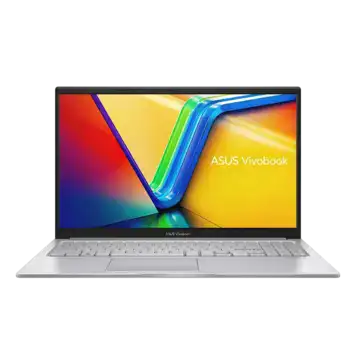
Asus Vivobook 15 Core i5-1335U vs Competition

How This Laptop Compares:

Advantages:

Modern Processor: The 10-core, 12-thread Core i5-1335U outperforms many competitors using older 8-core processors or 12th Gen Intel chips at similar prices.

Upgradable Memory: Starting with 16GB and upgrade capability to 24GB beats competitors with fixed 8GB configurations. This extends the laptop’s useful life.

Faster Storage: PCIe 4.0 NVMe SSD provides quicker speeds than competitors using PCIe 3.0 or SATA drives. Boot times and application loading benefit noticeably.

Included Software: MS Office 2024 + M365 Basic adds ₹5,000-₹6,000 value. Many competitors require separate Office purchases.

Latest Wi-Fi: Wi-Fi 6E future-proofs wireless connectivity. Many competing models still use Wi-Fi 6 or older standards.

Disadvantages:

Display Limitations: The 45% NTSC color gamut trails competitors offering 72% NTSC or 100% sRGB panels for richer colors.

Smaller Battery: The 42 Wh battery is smaller than competitors with 50-60 Wh capacities, resulting in shorter battery life.

No Fingerprint Sensor: The absence of biometric security puts it behind competitors offering fingerprint readers at similar prices.

Plastic Construction: The plastic body feels less premium than competitors using aluminum or magnesium alloy, though it’s sturdy enough for daily use.

No SD Card Reader: Photographers and content creators who need quick photo transfers will miss this feature.

Pros and Cons

Pros:

Powerful 10-Core Processor
The Core i5-1335U with 2 Performance cores and 8 Efficiency cores handles multitasking excellently. It provides smooth performance for everyday tasks while maintaining good battery life.

Upgradable RAM
Starting with 16GB and upgrade capability to 24GB provides future-proofing. You can add more memory later as your needs grow.

Fast PCIe 4.0 Storage
The 512GB NVMe SSD ensures quick boot times (10-15 seconds) and instant application launches. It’s noticeably faster than older storage technologies.

Includes Microsoft Office 2024
Saves ₹5,000-₹6,000 with legitimate Office suite included. Students and professionals get Word, Excel, PowerPoint, and OneNote without extra cost.

Modern Wi-Fi 6E
Latest wireless standard with 6 GHz band support reduces interference in crowded networks. Future-proofs connectivity for years.

Lightweight Design
At 1.7 kg and 1.8cm thin, it’s easy to carry daily. Students and mobile professionals appreciate the portability.

Cons:

Limited Color Gamut
The 45% NTSC (~65% sRGB) display restricts color accuracy. Photo and video editors need better color reproduction.

No Dedicated Graphics
Intel Iris Xᵉ integrated graphics limits gaming and intensive creative work. Modern AAA games and 4K video editing aren’t practical.

Modest Battery Capacity
The 42 Wh battery provides 6-8 hours maximum. Competitors with larger batteries offer longer unplugged usage.

Basic 720p Webcam
The 720p resolution feels dated in 2026. Many newer laptops offer sharper 1080p webcams for video calls.

No Fingerprint Sensor
Missing biometric security reduces convenience. You must use passwords or PIN codes for login.

Plastic Build
The plastic body doesn’t feel as premium as metal alternatives. It’s functional but lacks the solid feel of aluminum laptops.

Limited Port Selection
Missing SD card reader and Ethernet port. USB-C doesn’t support charging. Users needing these features require adapters.

Frequently Asked Questions

Is the Asus Vivobook 15 Core i5-1335U worth buying in 2026?

Yes, for students and office workers. The 10-core processor, 16GB RAM, fast SSD, and included MS Office 2024 create excellent value. It handles everyday computing tasks smoothly. However, it's not suitable for gaming or professional creative work due to integrated graphics and limited display color accuracy.

What is the expected battery life?

The 42 Wh battery provides 6-8 hours with light use (web browsing, documents, email). Video streaming and multitasking reduce this to 4-6 hours. Heavy workloads drain it in 2-3 hours. You can extend battery life by lowering screen brightness and closing unnecessary apps.

Can it run games?

Only casual games run well. Titles like Stardew Valley, Minecraft, and Among Us work smoothly. eSports games like League of Legends and CS:GO are playable at medium settings with 40-60 FPS. Modern AAA games like Cyberpunk 2077 won't run acceptably. Serious gamers need laptops with dedicated NVIDIA or AMD graphics cards.

Can I upgrade RAM and storage?

RAM: Yes, partially. The laptop has 8GB soldered (permanent) plus one slot with 8GB removable. You can replace the removable module with 16GB for 24GB total maximum.
Storage: You must replace the existing 512GB SSD to add more storage. There's no second slot for an additional drive.

How is the display quality?

The 15.6-inch Full HD IPS display is sharp with good viewing angles. The 250-nit brightness works well indoors but struggles outdoors. The anti-glare coating reduces reflections. However, the 45% NTSC color gamut limits color accuracy. It's fine for documents and videos but not for professional photo or video editing. The TÜV certification reduces eye strain.

Is it good for video editing?

Basic 1080p video editing works for simple projects. You can cut clips, add transitions, and apply basic effects in DaVinci Resolve or Shotcut. However, 4K footage and complex effects cause slowdowns. The integrated graphics and limited processing power restrict professional video editing. Casual YouTube content creation at 1080p is manageable.

How is the cooling and fan noise?

The single-fan cooling system works adequately for everyday use. During light tasks, the fan stays quiet and temperatures remain around 40-50°C. Heavy workloads increase temperatures to 75-85°C with noticeable fan noise. The cooling prioritizes quiet operation over maximum performance, which suits typical student and office use.

What ports does it have?

The laptop includes 1x USB 2.0 Type-A, 2x USB 3.2 Gen 1 Type-A (5 Gbps), 1x USB 3.2 Gen 1 Type-C (5 Gbps with video output), 1x HDMI 1.4, and 1x 3.5mm audio jack. Missing: SD card reader, Ethernet port, and USB-C charging capability. The USB-C port supports DisplayPort for external monitors but not power delivery.

Is the keyboard comfortable?

Yes, for most users. The backlit chiclet keyboard has approximately 1.4-1.5mm key travel with good feedback. The full-size layout includes a number pad. The Precision Touchpad supports smooth gestures. It's comfortable for extended typing sessions, though users accustomed to mechanical keyboards may need adjustment time.

Final Verdict: Should You Buy?

8.2 /10
Great Value

Should You Buy the Asus Vivobook 15 Core i5-1335U?

The Asus Vivobook 15 Core i5-1335U delivers exactly what its target audience needs. Students and office professionals get strong everyday performance, adequate portability, and exceptional value. The 10-core processor handles multitasking smoothly. The 16GB RAM manages multiple applications comfortably. The fast SSD eliminates waiting for boot-ups and app launches.

This laptop makes smart compromises to achieve the current price. The plastic body sacrifices premium feel but maintains durability. The integrated graphics handles everyday tasks while keeping power consumption low. The 42 Wh battery provides adequate but not exceptional runtime. The display works well for productivity despite limited color accuracy.

The included MS Office 2024 significantly improves value. Students avoid additional software costs. The upgradable memory extends useful lifespan. The modern Wi-Fi 6E future-proofs wireless connectivity. These thoughtful features create compelling total ownership value.

However, this laptop clearly isn’t for everyone. Gamers need dedicated graphics cards. Creative professionals require color-accurate displays. Users wanting all-day battery should compare alternatives. The specifications honestly communicate what this laptop delivers and what it doesn’t.

Final Rating: 8.2/10 – Excellent Buy for Students & Professionals

Bottom Line: The Asus Vivobook 15 Core i5-1335U offers outstanding value. Students and office professionals get premium components typically found in ₹60,000+ laptops. The 10-core processor, 16GB RAM, fast SSD, and included Office suite create unbeatable productivity value. Buy this if you need reliable everyday performance and excellent value. Skip this if you need gaming capabilities, professional creative work, or all-day battery life.

Disclaimer: Prices and specifications shown may vary from actual products. Please check with the retailer before purchasing.