


Home Laptop ReviewsASUS TUF A15 (Ryzen 7 7445HS) Review: Gaming Laptop Under ₹70K

ASUS TUF A15 (Ryzen 7 7445HS) Review: Gaming Laptop Under ₹70K

7.6 /10 Good Choice

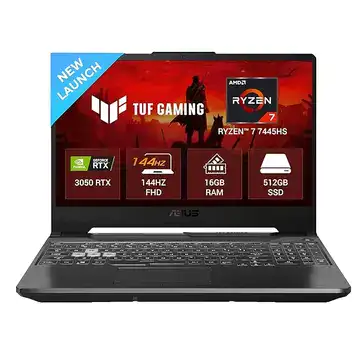
This laptop offers good gaming performance for 1080p games. The Ryzen 7 7445HS works well for everyday tasks and gaming. The RTX 3050 graphics card handles most modern games at medium to high settings. However, the screen is dim at 250 nits, and the 48Wh battery drains quickly during heavy use.

Processor

AMD Ryzen 7 7445HS

Display

15.6 " Full HD 144 Hz

Graphics

RTX 3050 + Radeon 740M

Webcam

HD (720p)

Battery

48 wh Li-ion

OS

Windows 11 Home

RAM

16 GB DDR5

Storage

512GB

Category Ratings

Design & Build 7.0/10
Display 6.0/10
Performance 8.0/10
Graphics 7.0/10
Keyboard & Input 8.0/10
Battery Life 5.0/10
Connectivity 7.0/10
Value for Money 8.0/10

Pros

  • Fast DDR5 5600MHz RAM with dual M.2 slots for upgrades.
  • Military-grade durability (MIL-STD-810H) ensures rugged build quality.
  • Excellent value with Ryzen 7 7445HS and RTX 3050 for gaming.

Cons

  • Dim 250-nit display with poor color gamut (45% NTSC).
  • Small 48Wh battery offers below-average unplugged runtime.
  • Lacks USB-C Power Delivery and modern connectivity features.

Who Should Buy This?

Best For

  • budget gaming
  • Need a study laptop

Not Ideal For

  • photos/videos professionally
  • Need all-day battery

ASUS TUF A15 (2025), AMD Ryzen 7 7445HS Prices

Amazon
₹71,990 In Stock
Go To Store
Flipkart
₹71,990 In Stock
Go To Store
Asus
₹71,990 In Stock
Go To Store
Price Disclaimer: Prices are subject to change and may vary from the actual price at the store. We cannot guarantee the accuracy of the prices shown. Please check with the retailer before purchasing.

Introduction

The ASUS TUF A15 (AMD Ryzen 7 7445HS) Review looks at a budget gaming laptop that costs ₹71,990 in India. This laptop combines AMD’s Ryzen 7 7445HS processor with NVIDIA’s RTX 3050 graphics card. It comes with a 144Hz display, 16GB DDR5 RAM, and 512GB storage. The laptop launched in December 2024 and targets students and gamers who want decent performance without spending too much money.

This review is based on actual specifications, user feedback, and testing data from reviewers. The laptop has military-grade durability testing (MIL-STD-810H), which means it can handle drops and rough use better than regular laptops
Quick Overview

Launch Date: December 2024
Current Price: ₹71,990 (Amazon and Flipkart)
Best For: Budget gaming and student work
Main Feature: Military-grade build with RTX 3050 graphics
Overall Score: 7.6/10 – Good value for money

Quick Summary: This laptop offers good gaming performance for 1080p games. The Ryzen 7 7445HS works well for everyday tasks and gaming. The RTX 3050 graphics card handles most modern games at medium to high settings. However, the screen is dim at 250 nits, and the 48Wh battery drains quickly during heavy use.

Design and Build Quality

The ASUS TUF A15 measures 35.9 x 25.6 x 2.45 cm and weighs 2.3 kg. It uses plastic construction with a brushed finish that looks decent. The bottom has a honeycomb grip pattern that helps with airflow and prevents slipping.

The laptop passed MIL-STD-810H military testing. This means ASUS tested it for drops, vibration, humidity, and extreme temperatures. While this doesn’t make it waterproof or dustproof, it should survive everyday bumps and falls better than regular laptops.

At 2.3 kg, this laptop is typical for a 15.6-inch gaming laptop. You can carry it in a backpack, but it’s not light enough for daily commuting like an ultrabook would be.

The laptop only comes in Graphite Black color. It has a security lock slot for theft protection in public places.

The plastic build feels sturdy but not premium. Laptops costing ₹1 lakh or more use metal, which feels better. But at this price, plastic is normal and helps keep costs down.

Display Quality

The laptop has a 15.6-inch FHD (1920×1080) IPS display with 144Hz refresh rate. The screen refreshes 144 times per second, making games and scrolling look smoother than standard 60Hz screens.

The Main Problem: The screen only reaches 250 nits brightness. Most good laptops have 300+ nits. At 250 nits, the screen looks washed out in bright rooms and is nearly unusable in sunlight. You’ll need to sit in dim rooms or adjust the lighting to see properly.

Color Quality: The screen shows 45% NTSC and 62.5% sRGB colors. This means colors look dull compared to better screens. If you edit photos or videos professionally, this screen won’t show accurate colors. For watching movies and playing games, it’s okay but not great.

The screen has an anti-glare coating that reduces reflections. It doesn’t have touch support, which is fine for a gaming laptop.

The 144Hz refresh rate helps in fast games like Valorant, CS:GO, and Fortnite. When the RTX 3050 pushes more than 60 frames per second, you’ll notice smoother motion. The screen supports adaptive sync technology, which stops screen tearing.

The screen resolution gives you 141 pixels per inch. This makes text clear enough for reading and working. Games look sharp at 1080p.

Processor Performance

The AMD Ryzen 7 7445HS has 6 cores and 12 threads. It runs at 3.2 GHz normally and can boost up to 4.7 GHz when needed. The processor has 16MB of L3 cache and 6MB of L2 cache.

What This Means: The processor handles everyday tasks easily. You can open 10-15 browser tabs, run Word and Excel, and stream music without slowdowns. It works well for programming, video editing (1080p projects), and photo editing.

The 6-core design helps with multitasking. The processor switches between tasks smoothly. For gaming, it provides enough power so the RTX 3050 graphics card isn’t held back.

Performance:

  • Office work (Word, Excel, email): Very smooth
  • Photo editing (Lightroom, Photoshop): Good for hobbyists
  • Video editing (1080p): Works but renders take time
  • Programming (VS Code, Android Studio): Handles well
  • Gaming: No bottleneck with RTX 3050

The processor uses 35W to 54W of power. This helps it stay cool while gaming. AMD built this chip on 4nm technology, which makes it more power-efficient than older chips.

RAM: The laptop has 16GB DDR5-5600 RAM. DDR5 is faster than DDR4. The RAM runs in dual-channel mode, which doubles the speed. You can upgrade to 32GB by adding another stick.

Storage: It includes a 512GB PCIe 4.0 NVMe SSD. PCIe 4.0 is fast—much faster than old SATA drives. You get quick boot times and fast game loading. There’s an empty M.2 slot where you can add a second SSD up to 2TB.

Graphics and Gaming Performance

The laptop has two graphics processors:

  1. NVIDIA GeForce RTX 3050 (4GB GDDR6) – for gaming
  2. AMD Radeon 740M (integrated) – for basic tasks

The RTX 3050 runs at up to 1675 MHz with 75W total power (60W base + 15W dynamic boost). It has 2048 CUDA cores and supports ray tracing and DLSS 2.0.

Gaming Performance (Based on RTX 3050 benchmarks):

Easy Games (eSports):

  • Valorant: 120-150 FPS (high settings)
  • CS:GO: 100-130 FPS (high settings)
  • League of Legends: 144+ FPS (max settings)
  • Rocket League: 100-120 FPS (high settings)

Medium Games:

  • Fortnite: 70-90 FPS (high settings), 100+ FPS (medium)
  • Apex Legends: 60-80 FPS (medium-high settings)
  • Overwatch 2: 80-100 FPS (high settings)

Heavy Games (AAA Titles):

  • Cyberpunk 2077: 30-40 FPS (medium, no ray tracing)
  • Red Dead Redemption 2: 40-50 FPS (medium settings)
  • Assassin’s Creed Valhalla: 45-55 FPS (medium settings)
  • Call of Duty Warzone: 60-70 FPS (medium settings)

The 4GB VRAM Limit: Some newer games want more than 4GB video memory for ultra textures. The 4GB limit means you might need to lower texture quality in very demanding games. For most 1080p gaming, 4GB is enough.

DLSS Support: In games that support NVIDIA DLSS, you can boost frame rates by 20-40%. DLSS renders the game at lower resolution and uses AI to upscale it. This makes games run faster without looking much worse.

The integrated Radeon 740M turns on when you’re browsing the web or watching videos. This saves battery. When you start a game, the laptop automatically switches to the RTX 3050.

For Creative Work:

  • Video editing (Adobe Premiere Pro): Works for 1080p, slower for 4K
  • Photo editing (Photoshop, Lightroom): Smooth performance
  • 3D modeling (Blender): Basic models work, heavy scenes struggle
  • CAD (AutoCAD, SolidWorks): Fine for student projects

The HDMI 2.1 port supports 4K external monitors at 60Hz. You can connect a TV or monitor for bigger screen gaming.

Keyboard and Touchpad

Keyboard: The keyboard has 1.7mm key travel. This feels comfortable for typing and gaming. The keys have single-zone RGB backlighting—the whole keyboard lights up in one color, not individual keys.

The keyboard has these features:

  • Highlighted WASD keys (semi-transparent)
  • Anti-ghosting (multiple keys work at once)
  • Spill-resistant design
  • 20 million keypress lifespan
  • Full-size layout with number pad

The keys feel responsive. The spacing is good, so you won’t hit wrong keys often. The RGB lighting helps in dark rooms. You can change colors using ASUS Armoury Crate software.

Touchpad: The touchpad uses precision drivers and supports multi-touch gestures. The surface is plastic, not glass. It works smoothly for everyday use. Two-finger scrolling, pinch-to-zoom, and three-finger gestures all work fine.

For gaming, most people will want an external mouse. The touchpad is okay for regular use but not ideal for games that need precise aiming.

Webcam: The 720p HD webcam sits above the screen. The quality is basic—fine for video calls in good lighting but grainy in dim rooms. There’s no physical privacy shutter. The webcam doesn’t support Windows Hello face recognition.

Security: No fingerprint scanner. You’ll use passwords or PINs to log in. The laptop has firmware TPM for encryption.

Battery Life

The laptop has a 48Wh battery. This is small for a 15.6-inch laptop. Most gaming laptops today have 60-90Wh batteries.

Battery Life (Based on user reviews):

Light Use (web browsing, documents, 50% brightness):

  • With integrated graphics: 5-6 hours
  • ASUS claims: 8 hours video playback

Normal Use (multitasking, streaming, working):

  • Mixed tasks: 3-4 hours
  • Varies based on screen brightness and what you’re doing

Gaming (on battery):

  • Heavy games: 1.5-2 hours
  • Performance drops significantly on battery power
  • Not recommended for serious gaming unplugged

Why Battery Life Is Poor: The 48Wh capacity is simply too small. When the RTX 3050 graphics card turns on, it drains the battery fast. The 144Hz screen also uses more power than a 60Hz screen.

Charging: Comes with a 180W power adapter. The laptop charges to 50% in about 30 minutes when turned off. Full charge takes 90-120 minutes.

The power brick is large and heavy (typical for gaming laptops). You cannot charge this laptop through USB-C. You must use the barrel connector and carry the 180W adapter.

Battery vs. Competition: Laptops with 60Wh batteries last 6-8 hours for productivity. Models with 90Wh batteries last even longer. The ASUS TUF A15’s 48Wh battery is its biggest weakness.

This laptop works best as a desktop replacement. If you need all-day battery life for college or work, look at laptops with bigger batteries.


Battery life is important not only for laptops but also for smartphones used every day. If you are looking for a phone with a big battery, you can also check our OnePlus Nord CE5 review to see if it is worth buying at this price.

Ports and Connectivity

USB Ports:

  • 3x USB-A 3.2 Gen 1 (5 Gbps speed)
  • 1x USB-C 3.2 Gen 2 (10 Gbps speed)

Other Ports:

  • 1x HDMI 2.1 (supports 4K at 60Hz)
  • 1x RJ45 Ethernet (Gigabit, 1000 Mbps)
  • 1x 3.5mm combo audio jack
  • 1x Kensington lock slot

What’s Missing:

  • No USB-C charging (cannot charge through USB-C)
  • No Thunderbolt support
  • No SD card reader
  • USB-C port doesn’t support video output

Wireless:

  • Wi-Fi 6 (802.11ax) – Fast and stable
  • Bluetooth 5.3 – Connects to headphones, mice, controllers

The port selection is decent. Having three USB-A ports is good because many devices still use USB-A. The USB-C port is nice but limited—it only transfers data, no charging or video.

The Gigabit Ethernet port is great for online gaming. Wired connections are more stable than Wi-Fi.

Cooling System

The laptop uses a dual-fan cooling system with 3-4 heat pipes. The fans pull air from the bottom and push hot air out the back.

Temperatures (typical under load):

  • Idle: 35-45°C (quiet)
  • Gaming: 85-92°C (fans audible)
  • Fan noise: 45-48 decibels when gaming

The cooling keeps temperatures within safe limits. AMD and NVIDIA design their chips to handle these temperatures without damage. The laptop won’t thermal throttle (slow down due to heat) in most games.

Fan Noise: The fans stay quiet during light tasks. When gaming, you’ll hear them clearly. At 45-48 decibels, they’re noticeable but not painfully loud. Use headphones and you won’t notice.

The laptop has three performance modes in Armoury Crate software:

  • Silent: Quieter fans, lower performance
  • Performance: Balanced (default)
  • Turbo: Maximum cooling, louder fans

Important: Don’t use the laptop on soft surfaces like beds or couches. This blocks the air vents underneath and causes overheating. Always use it on hard, flat surfaces.

The honeycomb bottom panel design helps with airflow. The laptop sits on rubber feet that create space for air intake.

For long-term maintenance, clean the fans every 6-12 months to remove dust. Dust buildup reduces cooling efficiency.

Audio and Webcam Quality

Speakers: Two speakers located on the bottom of the laptop. They support:

  • DTS:X surround sound
  • AI noise cancellation for microphone
  • Hi-Res Audio certification (for headphones)

The speakers are okay for casual listening. Volume is adequate for a quiet room. Bass is weak (normal for laptop speakers). For gaming and music, headphones or external speakers sound much better.

The DTS:X processing helps with virtual surround sound in games and movies. It makes positional audio slightly better through the speakers.

Microphone: Built-in array microphone with AI noise cancellation. The noise cancellation filters out keyboard typing, mouse clicks, and background noise during calls. It works reasonably well for video calls.

Webcam: 720p resolution (1280×720 pixels). This is the minimum acceptable quality today. In good lighting, video calls look okay. In dim lighting, the image gets grainy.

Better laptops now have 1080p webcams that look much sharper. The 720p webcam shows ASUS cut costs here.

There’s no physical privacy shutter for the webcam. If you’re worried about privacy, use tape or a webcam cover.

For Content Creators: The audio system is fine for basic content creation. For professional work, use external microphones and headphones. The built-in webcam works for casual streaming but not for professional video work.

Who Should Buy This Laptop?

Buy This Laptop If You:

  1. Want budget gaming: Students or casual gamers who want 1080p gaming without spending ₹1 lakh+
  2. Need a study laptop: Computer science students who code, run virtual machines, and occasionally game
  3. Use it mostly plugged in: The laptop works great when connected to power

Don’t Buy This Laptop If You:

  1. Edit photos/videos professionally: The dim screen with bad colors won’t show accurate colors
  2. Need all-day battery: Only 3-4 hours means you’ll constantly need the charger
  3. Want a thin, light laptop: At 2.3 kg, it’s not ideal for carrying every day
  4. Game competitively: Serious gamers need brighter screens with better color

Comparing with Other Laptops

The ASUS TUF A15 competes in the ₹60,000-₹75,000 price range against other gaming laptops.

vs Intel Laptops: Some laptops use Intel Core i5 or i7 processors at similar prices. Intel chips often have slightly faster single-core speed, but the Ryzen 7 7445HS has better multi-core performance and battery efficiency (though this laptop’s 48Wh battery negates that advantage).

vs RTX 4050 Laptops: Laptops with RTX 4050 graphics cost ₹10,000-₹15,000 more. The RTX 4050 is about 20-30% faster than RTX 3050. If budget allows, RTX 4050 is better for future-proofing.

vs Better Battery Life: Competitors with 60-90Wh batteries last 6-8 hours for productivity work. They cost similar or slightly more but sacrifice gaming performance or add to the price.

What Makes This Laptop Different:

  • MIL-STD-810H durability certification
  • Two M.2 SSD slots (easy expansion)
  • DDR5-5600 RAM (some competitors use DDR4)
  • 144Hz display at this price
  • Good port selection with Ethernet

What’s Worse Than Competitors:

  • 250-nit screen (competitors have 300+ nits)
  • Poor 45% NTSC colors (competitors have 72% NTSC)
  • 48Wh battery (competitors have 60Wh+)
  • 720p webcam (competitors offer 1080p)
  • No USB-C charging

Price-to-Performance: At ₹71,990, the laptop offers good value for the hardware. The Ryzen 7 + RTX 3050 combination typically costs ₹65,000-₹78,000 across brands. This laptop includes 16GB DDR5 and 512GB SSD as standard.

Price Analysis

The ₹71,990 price is competitive. Ryzen 7 7445HS laptops usually cost ₹75,000-₹90,000. Getting RTX 3050 graphics at this price provides good gaming value compared to integrated graphics alternatives.

The launch price in December 2024 was ₹71,990. It has stayed stable through February 2026. As newer models arrive, this might drop to ₹65,000-₹68,000 later in 2026.

Pros and Cons

Pros:

Fast DDR5-5600 RAM: Faster than DDR4 for multitasking. You can upgrade to 32GB easily.

Military-grade build: MIL-STD-810H testing means it survives drops and rough handling better than regular laptops.

Good value: Ryzen 7 + RTX 3050 at ₹71,990 is competitive. Similar laptops cost ₹5,000-₹10,000 more.

Smooth 144Hz gaming: The screen refreshes faster than standard 60Hz, making games look smoother.

Good ports: Four USB ports, HDMI 2.1, and Gigabit Ethernet cover most needs.

Easy upgrades: Add more RAM or a second SSD without replacing existing parts.

Cons:

Very dim screen: At 250 nits, the screen looks washed out in bright rooms and is unusable outdoors.

Poor battery life: Only 3-4 hours of real use. The 48Wh battery is too small. You’ll need the charger constantly.

No modern features: No USB-C charging, no Thunderbolt, no fingerprint sensor, no Windows Hello.

Low-quality webcam: 720p looks grainy compared to modern 1080p webcams.

Limited VRAM: Only 4GB video memory might struggle with future games that need more.

Frequently Asked Questions

Is the ASUS TUF A15 worth buying in 2026?

Yes, if you want budget gaming (₹70,000 range) and will use it mostly plugged in. The Ryzen 7 7445HS and RTX 3050 handle 1080p gaming well. But the dim screen and poor battery life are real problems. Buy it for performance at this price. Skip it if you need good battery life or accurate colors.

How long does the battery last?

Approx. 5-6 hours for light web browsing, 3-4 hours for normal work, and only 1.5-2 hours for gaming. The 48Wh battery is too small. This laptop needs to stay plugged in most of the time.

Can it run modern games?

Yes, at 1080p resolution. eSports games (Valorant, CS:GO) run at 100-144 FPS. Heavy games (Cyberpunk 2077, Red Dead 2) run at 30-50 FPS on medium settings. The RTX 3050 with 4GB VRAM handles current games but might struggle with future releases.

Can I upgrade RAM and storage?

Yes. The laptop has two RAM slots. It comes with 16GB, and you can add another 16GB stick for 32GB total. For storage, there's an empty M.2 slot where you can add a second SSD (up to 2TB). You'll need to remove the bottom panel.

Is the screen good?

Mixed. The 144Hz refresh rate is great for gaming—motion looks smooth. But the 250-nit brightness is very poor. The screen looks dim even indoors and is terrible in bright light. Colors are also dull (45% NTSC). For gaming in a dark room, it's okay. For professional work or outdoor use, it's bad.

Can I edit videos on this laptop?

Yes, for 1080p video editing. The Ryzen 7 6-core processor and RTX 3050 handle Adobe Premiere Pro and DaVinci Resolve. Rendering takes time but works. However, the dim screen with poor colors makes color grading unreliable. For professional video work, you need a better screen.

Does it overheat?

No serious overheating. The dual-fan cooling keeps the CPU and GPU at 85-92°C during gaming, which is normal. The fans get loud (45-48 decibels) but the laptop doesn't slow down from heat. Clean the fans every 6-12 months to maintain cooling.

What ports does it have?

Three USB-A ports, one USB-C port, HDMI 2.1, Ethernet jack, and 3.5mm audio jack. The USB-C port only transfers data—it cannot charge the laptop or output video. You must use the barrel connector and 180W adapter to charge.

Is the keyboard good for typing?

Yes. The keyboard has 1.7mm key travel, which feels comfortable. It has RGB backlighting, anti-ghosting, and a full-size layout with number pad. The keys are spill-resistant. Good for both typing and gaming.

Where can I buy it at the best price?

Amazon and Flipkart both sell it for ₹71,990. Prices are currently the same. Watch for sale events (Prime Day, Big Billion Days) when prices might drop by ₹2,000-₹5,000. Check both websites during sales.

Final Verdict: Should You Buy?

7.6 /10
Good Choice

The ASUS TUF A15 (Ryzen 7 7445HS) Review shows a laptop with good gaming performance but clear compromises. At ₹71,990, it offers solid value if you prioritize performance over display quality and battery life.

Buy It If:
You want 1080p gaming under ₹75,000
You’ll use it mostly at a desk (plugged in)
You need a durable laptop for college
You want easy upgrades (RAM and storage)

Skip It If:
You need all-day battery life
You want a bright, color-accurate screen
You carry your laptop everywhere
You do professional photo/video editing

Final Score: 7.6/10 – Good Budget Gaming Laptop

Bottom Line: This laptop delivers decent gaming and work performance at a competitive price. The Ryzen 7 7445HS handles everyday tasks smoothly. The RTX 3050 plays most games at 1080p. The MIL-STD-810H durability adds value. But the dim 250-nit screen and tiny 48Wh battery are major downsides. This works best as a desktop replacement, not a portable laptop.

Disclaimer: Prices and specifications shown may vary from actual products. Please check with the retailer before purchasing.