Home Laptop ReviewsAcer Aspire 7 A715-79G Review: Budget Gaming Laptop Worth Buying?

Acer Aspire 7 A715-79G Review: Budget Gaming Laptop Worth Buying?

7.3 /10 Good Choice

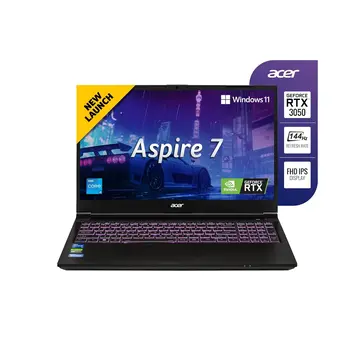
The Acer Aspire 7 A715-79G offers solid gaming performance for its price. The RTX 3050 6GB graphics card handles esports games smoothly and runs most modern titles at medium settings. The 144Hz display makes fast-paced games look smooth. However, battery life during gaming is limited (2-3 hours), and the display's color accuracy isn't suitable for professional photo or video work.

Processor

Intel Core i5-13420H 13th Generation

Display

15.6 " Full HD 144 Hz

Graphics

NVIDIA GeForce RTX 3050

Webcam

HD (720p)

Battery

50 wh Li-ion

OS

Windows 11 Home 64-bit

RAM

16 GB DDR4

Storage

512GB SSD primary storage

Category Ratings

Design & Build 7.0/10
Display 6.5/10
Performance 8.0/10
Graphics 7.5/10
Keyboard & Input 7.5/10
Battery Life 5.0/10
Connectivity 8.0/10
Value for Money 8.0/10

Pros

  • Strong 144Hz gaming performance at 1080p for esports and casual AAA titles
  • Excellent RTX 3050 6GB value with dual expandable RAM and storage slots
  • Wi-Fi 6, Bluetooth 5.2, Gigabit Ethernet for excellent connectivity

Cons

  • Limited 45% NTSC display inadequate for professional color-critical work
  • Short 2-3 hour battery life under gaming negates portability advantage
  • Noticeable 45-60 dB thermal fan noise during intensive gaming sessions

Who Should Buy This?

Best For

  • Esports Gamers
  • Budget-Conscious Gamers
  • Students

Not Ideal For

  • Professional Content Creators
  • Mobile Gamers
  • Quiet Environment Users

Acer Aspire 7 A715-79G Gaming Laptop (13th Gen Intel Core i5-13420H / RTX 3050 6GB) Prices

Flipkart
₹65,890 In Stock
Go To Store
Amazon
₹66,990 In Stock
Go To Store
Price Disclaimer: Prices are subject to change and may vary from the actual price at the store. We cannot guarantee the accuracy of the prices shown. Please check with the retailer before purchasing.

Introduction

The Acer Aspire 7 A715-79G is a budget gaming laptop that combines Intel’s 13th Generation Core i5-13420H processor with NVIDIA’s GeForce RTX 3050 6GB graphics card. Priced at ₹65,890 on Flipkart and ₹69,000 on Amazon, this laptop targets gamers who want decent gaming performance without spending a fortune.

This laptop features a 15.6-inch Full HD display with 144Hz refresh rate, 16GB DDR4 RAM, and 512GB SSD storage. The 144Hz screen provides smooth visuals for fast-paced games, while the RTX 3050 6GB graphics card handles modern games at 1080p resolution with medium to high settings.

Quick Overview

Launch Date: January 2023
Current Price: ₹65,890
Best For: Budget gaming, esports, and student use
Key Highlight: RTX 3050 6GB with 144Hz display under ₹70,000
Overall Score: 7.3/10 – Good Value

Design and Build Quality

The Acer Aspire 7 A715-79G has a plastic body with dimensions of 359.5 x 238 x 22.7 mm and weighs 1.99 kg. This makes it reasonably portable for a 15.6-inch gaming laptop. The build uses plastic instead of metal, which helps keep the weight down but feels less premium than aluminum laptops.

The laptop comes in two colors: Obsidian Black and Flame Black. The matte finish doesn’t show fingerprints easily, which keeps it looking clean. At 22.7 mm thick, it’s slightly bulkier than ultrabooks but still fits in most laptop bags comfortably.

The build doesn’t have any water resistance rating (no IP certification), so you need to be careful with liquids around it. The hinge allows you to open the laptop with one hand, though the plastic construction means you should handle it gently to avoid long-term wear.

At 1.99 kg, it’s lighter than many gaming laptops but heavier than business ultrabooks. You can carry it to college or coffee shops without too much trouble, but it’s not ideal for all-day carrying.

The bottom panel can be opened to access two RAM slots and the storage drive, which is good for future upgrades.

Display Quality

The laptop has a 15.6-inch IPS display with 1920×1080 Full HD resolution and a 144Hz refresh rate. The 144Hz refresh rate is the main highlight – it makes games look much smoother than standard 60Hz displays, especially in fast-paced shooters and racing games.

The display brightness is 250 nits, which is adequate for indoor use but may struggle in bright outdoor environments or near windows with direct sunlight. The IPS panel provides good viewing angles, so colors don’t shift much when you view the screen from the side.

The color gamut covers 45% NTSC (approximately 58% sRGB). This is fine for gaming and watching videos but not good enough for professional photo editing or video color grading, which typically requires 100% sRGB coverage. The display has an anti-glare matte finish that reduces reflections under overhead lights.

The Full HD resolution (1920×1080) on a 15.6-inch screen looks sharp for games, movies, and everyday tasks. There’s no touchscreen support, which is normal for gaming laptops that prioritize performance over touch features.

The display doesn’t support HDR (High Dynamic Range), so you won’t get the enhanced brightness and contrast that HDR content offers.

Performance and Processing Power

Processor Performance

The Acer Aspire 7 A715-79G uses Intel’s Core i5-13420H processor from the 13th Generation. This chip has 8 cores split into two types: 4 Performance cores (P-cores) and 4 Efficiency cores (E-cores), totaling 12 threads.

The P-cores run at 2.1 GHz normally but can boost up to 4.6 GHz when you need extra power. The E-cores handle background tasks and run up to 3.4 GHz. This design helps balance performance and battery life. The processor has 12 MB of cache memory that helps speed up repeated tasks.

According to benchmark tests, the i5-13420H scores around 2,279 points in Geekbench 6 single-core and 9,329 points in multi-core tests. This places it in the mid-range performance category, which is very good for a budget gaming laptop.

What this means for different tasks:

Office and productivity work: The processor handles Microsoft Word, Excel, PowerPoint, and web browsing very smoothly. You can easily work with multiple tabs open and several apps running at once.

Photo and video editing: The processor can handle basic photo editing in Lightroom and moderate video editing in Premiere Pro. For 1080p video editing, it performs well, though 4K video editing might be slower.

Programming: The multi-core design helps with code compilation, running virtual machines, and using development tools like Android Studio or Visual Studio Code.

Gaming: The processor is strong enough that it won’t bottleneck the RTX 3050 graphics card. Games primarily depend on the graphics card, and this processor keeps up well.

RAM and Storage

The laptop comes with 16GB DDR4 RAM running at 3200 MHz. This is plenty for gaming and multitasking. Most modern games use between 8-12GB RAM, so 16GB gives you comfortable headroom.

The RAM uses two slots (dual SODIMM), and you can upgrade to 32GB maximum if needed in the future. Dual-channel memory configuration provides better performance than single-channel.

For storage, you get a 512GB NVMe SSD using the fast PCIe Gen 4.0 interface. NVMe SSDs are much faster than older SATA SSDs – games load quicker, and the system boots in seconds. The laptop also has an additional M.2 slot in some variants, so you can add a second SSD without removing the original drive.

Graphics and Gaming Performance

The Acer Aspire 7 A715-79G uses NVIDIA’s GeForce RTX 3050 Laptop GPU with 6GB GDDR6 memory. The 6GB version has more video memory than the standard 4GB RTX 3050, which helps in games with detailed textures and high-resolution assets.

According to user reviews and testing data, the GPU in this laptop runs at around 75W TGP (Total Graphics Power), which is a good power level for the RTX 3050.

Gaming Performance by Game Type:

Esports and competitive games (CS:GO, Valorant, Dota 2, Fortnite): These games run extremely well. You can expect 100-144+ FPS at high settings, which fully uses the 144Hz display. This gives you smooth gameplay with no stuttering.

Medium-demand games (Apex Legends, Fortnite, Overwatch): These run at 80-120 FPS at medium to high settings. The experience is smooth and competitive.

AAA titles (Cyberpunk 2077, Hogwarts Legacy, Resident Evil 4): More demanding games run at 40-60 FPS at medium settings. You can play these games comfortably, though you might need to lower some graphics options for the newest releases. The RTX 3050 6GB performs about 18-24% slower than the RTX 3050 8GB in demanding titles.

Ray Tracing: While the RTX 3050 supports ray tracing, the performance isn’t strong enough to use it in most games. However, DLSS (Deep Learning Super Sampling) technology works well and can boost frame rates by 20-30% in supported games.

The 6GB VRAM (compared to 4GB) makes a real difference in newer games. According to testing, 4GB VRAM often isn’t enough for modern gaming even at 1080p on low settings, so the extra 2GB helps prevent stuttering from running out of video memory.

Creative Work: The RTX 3050 supports CUDA acceleration, which speeds up video editing in Premiere Pro and DaVinci Resolve. Photo editing in Photoshop benefits from GPU acceleration. The card can handle basic 3D rendering in Blender for smaller projects.

Keyboard, Trackpad, and Input

Keyboard

The keyboard is full-sized with RGB backlighting and includes a numeric keypad (number pad) on the right side. The keys have 1.5mm travel distance, which provides good tactile feedback when typing. The keyboard feels responsive and comfortable for both typing and gaming.

The RGB backlighting can be customized using Acer’s software. You can change colors and brightness to see the keys clearly in dark rooms. The keyboard includes anti-ghosting technology, which ensures the laptop recognizes multiple key presses at the same time – important for gaming combinations.

The keyboard is spill-resistant, offering some protection if you accidentally spill water or coffee on it. However, this doesn’t make it waterproof, so you still need to be careful.

The key layout is standard, making it easy to type without adjustment. Gaming keys like WASD, spacebar, and shift are well-positioned. The arrow keys are full-sized rather than cramped, which is helpful for gaming and document navigation.

Trackpad

The trackpad has a plastic textured surface that provides adequate friction for cursor control. It’s a precision touchpad, meaning it supports Windows 11 multi-touch gestures like two-finger scrolling, pinch-to-zoom, and three-finger window switching.

The trackpad includes palm rejection to prevent accidental cursor movements when your palms rest on it while typing. The dedicated left and right click buttons work reliably.

Additional Features

The laptop has a fingerprint reader on the palm rest area that works with Windows Hello for quick, secure login without typing passwords. The fingerprint scanner is fast and accurate.

The webcam is 1.0 MP with 720p HD resolution. The quality is adequate for video calls on Zoom, Teams, or Google Meet, especially in well-lit rooms. However, it lacks a physical privacy shutter, so you’ll need to use a webcam cover or software controls for privacy.

Battery Life and Charging

The laptop has a 50 Wh lithium-ion battery. This is smaller than the 60-70 Wh batteries found in many productivity laptops, which is common for gaming laptops that prioritize performance.

Battery Life Expectations:

Light use (web browsing, document editing): 7-9 hours with screen brightness at medium levels and Wi-Fi on. User reviews confirm getting around 5 hours with battery saver mode enabled and display set to 60Hz.

Medium use (streaming videos, multitasking): 4-5 hours. Watching YouTube or Netflix drains the battery faster.

Gaming: Only 2-3 hours when playing games. The powerful processor and graphics card consume battery quickly during gaming. According to user reviews, gaming unplugged is not practical for extended sessions.

Charging: The laptop includes a 135W power adapter with a 3-pin connector. It charges from 0% to 80% in about 1-1.5 hours, and fully charges in 2-2.5 hours. The high-wattage charger can power the laptop during gaming without draining the battery.

The laptop doesn’t support USB-C charging, so you must use the included power adapter. This means you need to carry the specific charger rather than using a universal USB-C charger.

For gaming, you’ll want to stay plugged in. The battery is sufficient for classes, meetings, or travel when you’re not gaming.

Ports and Connectivity

Physical Ports

The Acer Aspire 7 A715-79G offers good connectivity options:

  • 2x USB Type-C ports (5 Gbps speed, USB 3.2 Gen 1)
  • 1x USB 3.0 Type-A port
  • 1x USB 2.0 Type-A port
  • 1x HDMI 2.0 port (supports 4K at 60Hz to external monitors)
  • 1x Mini DisplayPort for additional monitor connectivity
  • 1x 3.5mm combo audio jack for headphones/headsets
  • 1x RJ-45 Gigabit Ethernet port for wired internet
  • 1x Micro SD card reader (supports Micro SD, SDHC, SDXC cards)
  • 1x Kensington lock slot for physical security

The laptop doesn’t support Thunderbolt, which limits high-speed data transfer and external GPU options. However, for most users, the available ports are more than adequate.

You can connect two external monitors simultaneously using HDMI and Mini DisplayPort. This is great for multi-monitor setups for work or gaming.

Wireless Connectivity

The laptop supports Wi-Fi 6 (802.11ax) using an Intel AX101 wireless adapter. Wi-Fi 6 provides faster speeds and better performance in crowded networks compared to older Wi-Fi 5. It works on both 2.4GHz and 5GHz frequency bands.

Bluetooth 5.2 is included for connecting wireless mice, keyboards, headphones, and game controllers. Bluetooth 5.2 offers better range and audio quality than previous versions.

The laptop doesn’t have a built-in cellular modem for 4G/5G connectivity. You’ll need Wi-Fi or an external dongle for mobile internet.

Upgradeability

The RAM can be upgraded to 32GB maximum using the two SODIMM slots. This is straightforward if you remove the bottom panel. Storage can be expanded by adding a second M.2 NVMe SSD in the extra slot available on some variants, without replacing the original 512GB drive.

The processor and graphics card are soldered and cannot be upgraded.

Cooling and Thermal Performance

The laptop uses a dual-fan cooling system with multiple copper heat pipes to keep the processor and graphics card cool. This design transfers heat from the chips to heatsinks, which the fans then cool.

Temperature Expectations:

Processor (CPU): According to testing data, the i5-13420H runs at 75-95°C during gaming. When idle or doing light tasks, temperatures drop to 40-50°C. During intensive tasks like video rendering, expect 80-90°C.

Graphics (GPU): The RTX 3050 runs at 80-100°C during heavy gaming. Lighter games keep it in the 70-85°C range. These temperatures are normal for laptop GPUs and won’t cause damage.

Fan Noise: User reviews mention fan noise levels of 45-60 dB during gaming. This is noticeable but not extremely loud – similar to conversation volume. In quiet environments like libraries, the fans will be audible. During light use, fans run quietly at 30-35 dB, which is barely noticeable.

The cooling system works effectively according to user reviews. The laptop doesn’t experience severe thermal throttling (performance reduction due to heat) during sustained gaming. However, users note that it “heats like a typical gaming laptop,” meaning it gets warm to the touch on the bottom and keyboard area.

Important tip: Don’t use the laptop on soft surfaces like beds or couches, as this blocks air vents and causes higher temperatures and louder fans. Use it on hard surfaces or a laptop cooling pad for best results.

Audio and Webcam Quality

Speakers

The laptop has stereo speakers placed on the bottom of the chassis. The speakers provide basic stereo sound with left-right channel separation. They’re adequate for gaming sound effects, dialogue, and casual video watching.

However, the laptop doesn’t include advanced audio technologies like Dolby Atmos or DTS:X. The bottom-firing placement means sound reflects off the surface below, which can muffle audio on soft surfaces.

The speakers are fine for casual use, but serious gamers and media consumers will want to use headphones or external speakers connected through the 3.5mm jack or Bluetooth for better sound quality.

Microphone

The built-in microphone is a digital array microphone with basic noise suppression. It picks up your voice clearly for video calls and online meetings. The noise suppression reduces background sounds like keyboard typing and ambient noise.

The microphone quality is sufficient for Zoom, Teams, and Discord calls. For streaming, podcasting, or content creation, an external USB or 3.5mm microphone will provide better quality.

Webcam

The webcam is 720p HD (1.0 MP) with a fixed-focus lens. The resolution is adequate for basic video conferencing. Image quality is acceptable in good lighting but becomes grainy and unclear in low-light situations.

The webcam doesn’t have a privacy shutter. If you’re concerned about privacy, you’ll need to use a webcam cover sticker or disable the camera in Windows settings.

The webcam is fine for online classes and work meetings but isn’t suitable for content creation or professional video calls where appearance matters

Who Should Buy Acer Aspire 7 A715-79G?

Design & Build: 7/10
The plastic build is lightweight and practical but feels less premium than metal laptops. Build quality is solid for the price.
Display: 6.5/10
The 144Hz refresh rate is excellent for gaming, but limited color accuracy and brightness restrict professional work and outdoor use.
Performance: 8/10
The i5-13420H handles gaming, productivity, and moderate creative work very well. The 8-core design provides good multitasking.
Graphics: 7.5/10
The RTX 3050 6GB delivers solid 1080p gaming for esports and medium settings for AAA titles. The extra VRAM helps compared to 4GB models.
Keyboard & Input: 7.5/10
Full-sized RGB keyboard with numeric pad and good travel distance. Comfortable for typing and gaming.
Battery Life: 5/10
Good for productivity (7-9 hours light use) but poor for gaming (2-3 hours). You’ll need to stay plugged in for gaming sessions.
Connectivity: 8/10
Excellent port selection with Wi-Fi 6, Bluetooth 5.2, Gigabit Ethernet, USB-C, HDMI, and more. Covers all common needs.
Value for Money: 8/10
At ₹65,890, the combination of RTX 3050 6GB, 144Hz display, 16GB RAM, and upgrade options offers strong value.

Best For:

1. Esports Gamers: The 144Hz display paired with RTX 3050 6GB runs competitive games like CS:GO, Valorant, and Dota 2 smoothly at 100-144+ FPS.

2. Budget-Conscious Gamers: Play popular AAA titles at medium settings with good frame rates without spending premium laptop prices.

3. Students: The 16GB RAM and capable processor handle coursework, programming, and entertainment. The numeric keypad helps with data entry and spreadsheet work.

Not Ideal For:

Professional Content Creators: The limited 45% NTSC color coverage isn’t accurate enough for professional photo editing or video color grading.
Mobile Gamers: Battery life of 2-3 hours during gaming means you can’t game away from power outlets for long.
Quiet Environment Users: Fan noise reaches 45-60 dB during gaming, which may disturb others in libraries or quiet offices.

How It Compares to Competitors

The Acer Aspire 7 A715-79G competes in the ₹65,000-70,000 price range against several alternatives.

vs. Aluminum Build Laptops: Some competitors offer metal chassis at similar prices but often pair them with weaker graphics cards (GTX 1650 or RTX 3050 4GB). The Acer prioritizes internal specs over build materials, giving you better gaming performance.

vs. Higher RAM Options: Some laptops offer 32GB RAM at similar prices but compromise on graphics (weaker GPUs). The Acer’s 16GB RAM is sufficient for gaming now, and you can upgrade later if needed.

vs. Better Color Displays: Laptops emphasizing color accuracy provide 100% sRGB displays but typically have 60Hz refresh rates or weaker GPUs. The Acer sacrifices color accuracy for gaming-focused 144Hz performance.

Price-to-Performance: The RTX 3050 6GB variant offers better value than 4GB alternatives. The extra 2GB VRAM prevents texture streaming problems in modern games. The i5-13420H outperforms older 12th generation processors in multi-threaded work.

Key Advantages: Dual RAM slots and extra M.2 SSD slot provide better upgradeability than laptops with soldered RAM. Wi-Fi 6 and Bluetooth 5.2 are current-generation standards. The 144Hz + RTX combination is uncommon at this exact price point.

Drawbacks: The 50 Wh battery is smaller than 60-70 Wh alternatives. The 45% NTSC color gamut lags behind 72% NTSC competitors. Plastic build looks less premium despite similar pricing.

Pros and Cons

Pros:

Smooth 144Hz gaming experience: The high refresh rate display makes fast-paced games look fluid and responsive. Combined with the RTX 3050 6GB, you can actually achieve 100+ FPS in esports titles to fully use the display.

RTX 3050 6GB offers better value: The 6GB VRAM version performs better than 4GB models in texture-heavy games. The extra memory prevents stuttering and lets you use higher texture quality settings.

Upgradeable RAM and storage: Two RAM slots support expansion to 32GB when needed. The extra M.2 slot lets you add a second SSD without replacing the original drive – rare flexibility at this price.

Comprehensive connectivity: Wi-Fi 6 for fast wireless, Bluetooth 5.2 for peripherals, Gigabit Ethernet for stable online gaming, multiple USB ports, HDMI, and Mini DisplayPort cover all common needs.

Good productivity performance: The i5-13420H with 8 cores and 16GB RAM handles office work, programming, and moderate content creation smoothly alongside gaming.

Cons:

Poor color accuracy for creative work: The 45% NTSC (58% sRGB) coverage is inadequate for photo editing, video color grading, or graphic design. Professional work requires 100% sRGB minimum.

Short gaming battery life: Only 2-3 hours when gaming unplugged makes this laptop impractical for mobile gaming. You need to stay near power outlets during gaming sessions.

Noticeable fan noise: Fans reach 45-60 dB during gaming, which is clearly audible. This may disturb others in quiet environments like libraries or during late-night gaming.

Plastic build feels budget: The all-plastic construction looks and feels less premium than aluminum competitors, despite similar pricing. Durability may be a concern with rough handling.

Basic 720p webcam: The 1.0 MP HD webcam provides only acceptable video quality. No privacy shutter means you need external covers for privacy.

You Might Also Like

Frequently Asked Questions

Is the Acer Aspire 7 A715-79G worth buying in 2026?

Yes, the Acer Aspire 7 A715-79G remains a good choice in 2026 for budget esports gaming and student use. The RTX 3050 6GB variant provides better value than 4GB alternatives, and the 144Hz display delivers smooth competitive gaming. However, avoid it if you need long battery life for portable gaming or accurate colors for professional creative work.

What's the battery life like?

Battery life varies greatly by usage. Light productivity tasks (browsing, documents) give 7-9 hours. Video streaming provides 4-5 hours. Gaming drains the battery in just 2-3 hours. User reviews confirm about 5 hours with battery saver mode and 60Hz display setting. The 135W charger refills 0-80% in 1-1.5 hours.

Can this laptop run modern games?

Yes. Esports games (CS:GO, Valorant, Dota 2) run at 100-144+ FPS on high settings. Popular AAA titles run at 40-60 FPS on medium settings at 1080p. The RTX 3050 6GB handles most games released through 2024-2025, though you may need to lower settings for the most demanding new releases.

Can I upgrade RAM and storage?

Yes. The laptop has two RAM slots that support upgrades to 32GB maximum. You can add a second M.2 NVMe SSD in the available slot without removing the original 512GB drive. The bottom panel provides access, though you should check warranty terms before opening it.

How good is the display?

The 144Hz refresh rate is excellent for gaming, making motion smooth and responsive. However, the 250 nits brightness struggles in bright rooms, and the 45% NTSC color coverage (about 58% sRGB) isn't accurate enough for professional photo or video editing. It's great for gaming but not for creative work.

Is it good for video editing?

The laptop handles basic to moderate video editing. The i5-13420H processor and RTX 3050 GPU with CUDA acceleration work well for 1080p timeline editing in Premiere Pro or DaVinci Resolve. However, the limited color gamut makes it unsuitable for professional color grading. 4K editing will be slower on complex timelines.

How loud do the fans get?

User reviews indicate fan noise reaches 45-60 dB during gaming, which is clearly audible - similar to normal conversation volume. In quiet rooms, the fans are definitely noticeable. During light tasks, fans run quietly at 30-35 dB, barely noticeable. This is typical for gaming laptops prioritizing cooling over silence.

What ports does it have?

The laptop includes 2x USB Type-C (5 Gbps), 1x USB 3.0, 1x USB 2.0, 1x HDMI 2.0, 1x Mini DisplayPort, 1x Gigabit Ethernet, 1x 3.5mm headphone jack, and 1x micro SD card reader. No Thunderbolt support, but the port selection covers most common needs including dual external monitors.

Is the keyboard good for typing?

Yes. The full-size keyboard with 1.5mm key travel provides comfortable typing with good tactile feedback. The RGB backlight helps in dark rooms. The numeric keypad benefits data entry tasks. The anti-ghosting feature ensures accurate key recognition during gaming. The keyboard is suitable for both long typing sessions and gaming.

Where can I buy it at the best price?

Flipkart currently offers the best price at ₹65,890, saving ₹3,110 compared to Amazon's ₹66,990. Both have stock available.

Final Verdict: Should You Buy?

7.3 /10
Good Choice

The Acer Aspire 7 A715-79G delivers solid gaming performance at a competitive price point. The RTX 3050 6GB graphics card paired with the i5-13420H processor handles esports titles excellently and runs most AAA games at playable frame rates on medium settings. The 144Hz display provides smooth visuals that make a real difference in fast-paced games.

Key Strengths: The 6GB VRAM gives it an edge over 4GB alternatives in modern games with detailed textures. The upgradeable RAM and storage provide future-proofing rare at this price. Connectivity is comprehensive with Wi-Fi 6, Bluetooth 5.2, and good port selection. The full-size RGB keyboard with numeric pad enhances both productivity and gaming.

Limitations: The 45% NTSC color coverage severely limits professional creative applications. The 50 Wh battery provides only 2-3 hours of gaming, requiring you to stay plugged in during gaming sessions. Fan noise at 45-60 dB is noticeable in quiet environments. The plastic build feels less premium than metal alternatives.

Value for Money: At ₹65,890, the combination of RTX 3050 6GB, 144Hz display, 16GB RAM, and 512GB NVMe SSD offers competitive value. The laptop delivers more gaming performance per rupee than many alternatives.

Final Score: 7.3/10 – Good Value Gaming Laptop

Bottom Line: Buy the Acer Aspire 7 A715-79G if you want budget gaming performance with a 144Hz display and upgrade options. It excels at esports and handles AAA games at medium settings. Skip it if you need extended portable gaming (poor battery life), professional color-accurate work (limited color gamut), or quiet operation (loud fans).

Disclaimer: Prices and specifications shown may vary from actual products. Please check with the retailer before purchasing.