Home Laptop ReviewsHP Victus Gaming Laptop Review 2026: Complete AMD Ryzen 5 5600H Gaming Analysis

HP Victus Gaming Laptop Review 2026: Complete AMD Ryzen 5 5600H Gaming Analysis

7.8 /10 Good Choice

This laptop is good for budget gaming. It runs eSports games smoothly and you can upgrade the RAM and storage. The screen is dim and colors are not great, but the 144Hz display makes games look smooth. Good choice if you want to save money and still play games well.

Processor

AMD Ryzen 5 5600H

Display

15.6 " Full HD 144 Hz

Graphics

GTX 1650 / RX 6500M

Webcam

HD (720p)

Battery

52.5 wh Lithium-Polymer

OS

Windows 11 Home Single Language

RAM

8 GB DDR4

Storage

512GB + expandable to 1TB/2TB

Category Ratings

Design & Portability 7.5/10
Display Quality 7.0/10
Performance 8.0/10
Graphics 7.5/10
Keyboard & Input 8.0/10
Battery Life 6.5/10
Connectivity 8.5/10
Value for Money 8.5/10

Pros

  • Excellent 144Hz gaming at 1080p with strong thermal management
  • Highly upgradeable with 2 RAM slots and 2 M.2 SSD slots
  • Affordable gaming laptop with solid build quality and keyboard

Cons

  • 250 nits brightness inadequate for outdoor use
  • 45% NTSC color gamut unsuitable for creative work
  • Plastic chassis lacks premium feel despite durability

Who Should Buy This?

Best For

  • Budget Gamers Playing eSports
  • Students Who Game
  • First-Time PC Gamers

Not Ideal For

  • Photo and Video Editors
  • 4K Gamers
  • Premium Build Seekers

HP Victus Gaming Laptop (AMD Ryzen 5 5600H/ 8GB/ 512GB SSD/ Win11/ 4GB Graph) Prices

Amazon
₹51,998 Out of Stock
Go To Store
Flipkart
₹52,990 Out of Stock
Go To Store
Price Disclaimer: Prices are subject to change and may vary from the actual price at the store. We cannot guarantee the accuracy of the prices shown. Please check with the retailer before purchasing.

Introduction

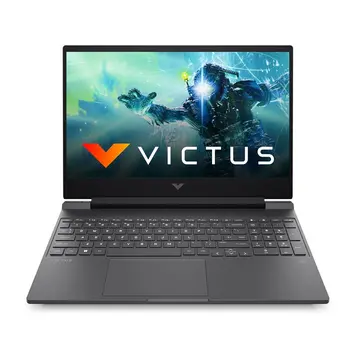
The HP Victus Gaming Laptop (AMD Ryzen 5 5600H/ 8GB/ 512GB SSD/ Win11/ 4GB Graph) is a budget gaming laptop that launched in May 2022. Even in 2026, it offers good value for gamers on a budget in India. The laptop costs ₹51,998 on Amazon and ₹52,990 on Flipkart.

This laptop has an AMD Ryzen 5 5600H processor with 6 cores and 12 threads. It comes with NVIDIA GeForce GTX 1650 graphics with 4GB memory. The 15.6-inch display has a 144Hz refresh rate, which makes games look smooth.

What makes this laptop special is its upgrade options. You can add more RAM (up to 32GB) and install a second SSD. The cooling system works well and keeps the laptop from getting too hot during gaming.

The main problems are the dim display (250 nits brightness) and poor color accuracy (45% NTSC). This means outdoor use is difficult and photo editing is not ideal. But for gaming at home, it works well.

HP Victus Gaming Laptop Quick Overview

Launch Date: May 2022

Current Price: ₹51,998

Best For: Budget gamers who play eSports titles

Key Feature: 144Hz display for smooth gaming

Overall Score: 7.8/10

Quick Summary: This laptop is good for budget gaming. It runs eSports games smoothly and you can upgrade the RAM and storage. The screen is dim and colors are not great, but the 144Hz display makes games look smooth. Good choice if you want to save money and still play games well.

Design, Build & Portability

Build Materials

The HP Victus measures 358 x 255 x 23 mm (14.09 x 10.04 x 0.93 inches). It weighs 2.37 kg (5.2 pounds). The laptop has a plastic body with some aluminum parts. It feels solid but not premium like all-metal laptops.

HP uses recycled plastic in the build, which is good for the environment. The laptop comes in two colors: Mica Silver and Performance Blue. The design is simple and works in offices or at home.

Is It Portable?

At 2.37 kg, this laptop is average weight for a 15.6-inch gaming laptop. You can carry it in a backpack, but it’s not super light. The 150W power adapter adds more weight, so carrying everything together is noticeable.

The laptop has no water resistance rating. Be careful with liquids around it, though the keyboard has some spill protection.

Build Quality

The plastic body feels sturdy. There’s minimal flex in the keyboard area. The hinge feels solid when you open and close the lid. It’s not as premium as expensive gaming laptops, but it’s well-built for the price.

Display Quality & Visual Experience

Screen Specifications

The HP Victus has a 15.6-inch IPS display. Resolution is 1920 x 1080 pixels (Full HD). The refresh rate is 144Hz, which is great for gaming. Most budget gaming laptops have 60Hz screens, so 144Hz is a big advantage.

IPS technology means good viewing angles. You can see the screen clearly from the sides. Colors don’t change much when you move your head.

Brightness Problems

The display brightness is only 250 nits. This is the laptop’s biggest weakness. For outdoor use or bright rooms, 300-400 nits is better. At 250 nits, you’ll struggle to see the screen near windows during daytime or outdoors.

The anti-glare coating helps reduce reflections but can’t fix the low brightness. For indoor gaming with controlled lighting, the brightness is okay.

Color Quality

The display covers 45% NTSC color space. This equals about 60-65% sRGB. For gaming, this is acceptable. For photo editing or video work, you need 100% sRGB minimum. The colors look okay but not accurate enough for professional work.

Gaming Display Performance

The 144Hz refresh rate is excellent for gaming. When your game runs at 100+ fps, the 144Hz screen shows every frame smoothly. This makes a big difference in fast games like CS:GO, Valorant, and Dota 2.

The screen refreshes 144 times per second, compared to 60 times on normal displays. This reduces motion blur and makes gameplay feel more responsive.

Screen Protection

The laptop has anti-glare coating and flicker-free technology. There’s no Gorilla Glass or special protection mentioned. Use a screen protector if you travel often with this laptop.

Performance & Processing Power

AMD Ryzen 5 5600H Processor

The Ryzen 5 5600H is a 6-core, 12-thread processor built on 7nm technology. It runs at 3.3 GHz base speed and boosts up to 4.2 GHz. The processor has 16 MB L3 cache.

This processor came out in January 2021. The Ryzen 5 5600H uses Zen 3 architecture, which improved performance over older Ryzen chips. Even in 2026, it still handles modern games well.

Performance

For gaming, the Ryzen 5 5600H works well with the GTX 1650 graphics. The CPU doesn’t slow down the graphics card in most games. For daily tasks like web browsing and office work, the laptop feels fast and responsive.

For content creation:

  • Video editing: 1080p editing works smoothly. Rendering takes longer than faster processors
  • Photo editing: Lightroom and Photoshop run well with some lag on complex projects
  • Programming: Code compilation is good but not super fast

The 6 cores handle multitasking well. You can game while running Discord and Chrome in the background.

RAM Configuration

The laptop has 8GB DDR4-3200 RAM in a single stick. This means single-channel mode, which is slower than dual-channel. Adding another 8GB stick gives you dual-channel mode and 10-15% better performance.

You can upgrade to 32GB total using two RAM slots. This is easy to do and doesn’t void warranty if done carefully.

Storage Speed

The 512GB NVMe SSD is fast. It uses PCIe Gen 4 technology, which means quick game loading and fast Windows startup. The laptop boots in about 10-15 seconds.

There are two M.2 SSD slots total. You can add a second SSD without removing the first one. Maximum storage is 2TB.

Graphics & Gaming Capabilities

GPU Specifications

The laptop has NVIDIA GeForce GTX 1650 graphics with 4GB GDDR6 memory. The GTX 1650 is an entry-level gaming GPU from 2019. It targets 1080p gaming at medium to high settings.

Note: Some variants have AMD Radeon RX 6500M instead. Performance is similar between both GPUs.

Gaming Performance

Based on real reviews and the GPU capabilities, here’s what to expect:

eSports Games (High frame rates):

  • CS:GO / Valorant: 100-144+ fps at high settings
  • Dota 2 / League of Legends: 120-144+ fps at max settings
  • Fortnite: 80-100 fps at competitive settings
  • Apex Legends: 70-90 fps at medium-high settings

AAA Games (Modern titles):

  • GTA V: 39 fps at very high settings, better at medium
  • Red Dead Redemption 2: 24 fps at medium, needs lower settings
  • Control: around 42 fps at medium settings
  • Cyberpunk 2077: 35-45 fps at low-medium settings

The GTX 1650 is good for eSports but struggles with heavy AAA games. You’ll need to lower graphics settings for smooth gameplay in demanding titles.

4GB VRAM Limitation

The 4GB video memory handles 1080p gaming fine in most games. Very demanding games with ultra textures might need more VRAM. For standard gaming at 1080p, 4GB is enough.

Creative Work Performance

For video editing, the GPU helps with effects and encoding. For 3D rendering, the GTX 1650 is basic. Professional creative work needs stronger graphics.

External Display Support

The laptop has HDMI 2.1 and DisplayPort through USB-C. You can connect multiple external monitors. HDMI 2.1 supports 4K at 120Hz or 8K at 60Hz.

Keyboard, Trackpad & Input Experience

Keyboard Design

The keyboard is full-size with a numeric keypad on the right. Key travel is 1.4mm, which is standard for laptops. The keys use scissor-switch mechanism.

The keyboard has LED backlighting. You can adjust the brightness. This helps when gaming in dark rooms. The layout is comfortable with good key spacing.

Gaming Features

The keyboard has anti-ghosting technology. This means multiple key presses register correctly during gaming. The keyboard also has some spill resistance, though it’s not waterproof.

Typing Experience

For everyday typing, the keyboard feels good. The 1.4mm travel gives decent feedback. The full-size layout means no cramped keys. The numeric keypad helps with number entry.

For gaming, the keyboard responds quickly. The keys don’t feel mushy. It’s not as good as mechanical keyboards, but it works well for a laptop.

Trackpad

The trackpad is smooth with multi-touch gestures. It supports Windows precision drivers, so all Windows gestures work. Palm rejection prevents accidental touches while typing.

For gaming, use an external mouse. The trackpad is fine for browsing and work, but not for gaming.

Webcam and Microphone

The laptop has a 720p HD webcam. The webcam quality is basic with no privacy shutter. Video calls work but image quality is average, especially in low light.

Dual microphones pick up your voice clearly for calls and gaming chat. Background noise reduction helps but doesn’t eliminate all noise.

Battery Life & Charging

Battery Capacity

The laptop has a 52.5 Wh battery. This is smaller than many gaming laptops that have 60-80 Wh batteries. The smaller battery means lighter weight but shorter battery life.

Expected Battery Life

Light Use (web browsing, documents):

  • Web browsing: 8-10 hours at 50% brightness
  • Video playback: 6-8 hours
  • Office work: 9-11 hours

Medium Use (multitasking):

  • Mixed tasks: 5-7 hours
  • Streaming videos: 6-8 hours

Gaming (on battery):

  • Gaming: 3-4 hours with reduced performance
  • Battery lasts about four and a half hours maximum

Gaming on battery is not recommended. The laptop limits performance to save power, so games run slower. Always plug in the power adapter for gaming.

Charging Speed

The 150W power adapter charges the battery quickly. It reaches 50% in about 30 minutes when the laptop is off or sleeping. Full charge takes 90-120 minutes from empty.

While gaming, the adapter powers the laptop and slowly charges the battery. Charge speed is slower during gaming because the laptop uses a lot of power.

Battery Tips

For better battery life:

  • Lower screen brightness when not gaming
  • Use battery saver mode for longer life
  • Close unnecessary programs
  • Keep the laptop plugged in for gaming

Ports, Connectivity & Expansion

USB Ports

The laptop has three USB ports:

  • 1x USB Type-C (5 Gbps speed) with DisplayPort for monitors
  • 2x USB Type-A (5 Gbps speed) for regular USB devices

This is enough for mouse, keyboard, and external drive. The USB-C port doesn’t charge the laptop – it uses a separate power port.

Display Outputs

For external monitors:

  • 1x HDMI 2.1 (supports 4K at 120Hz)
  • DisplayPort through USB-C

You can connect two external monitors plus the laptop screen. Perfect for multi-monitor gaming or work setups.

Audio and Storage

  • 1x 3.5mm combo jack (headphone and microphone combined)
  • SD card reader (SD, SDHC, SDXC cards)

The combo jack works with gaming headsets. For separate headphone and mic cables, you need a splitter adapter.

Network Connectivity

Wired: 1x Ethernet port (gigabit speed) – Best for gaming to avoid lag

Wireless:

  • Wi-Fi 6 (802.11ax) using MediaTek MT7921 chip
  • Bluetooth 5.3

Wi-Fi 6 is faster and more stable than older Wi-Fi 5. Good for wireless gaming when ethernet isn’t available.

Storage Expansion

You can expand storage in two ways:

  • Add a second M.2 NVMe SSD (up to 2TB total)
  • Use SD cards for extra storage

The second M.2 slot makes expansion easy without removing the original SSD.

Thermal Management & Cooling

Cooling System

The laptop has a dual-fan cooling system with two heat pipes. One fan cools the CPU and one cools the GPU. The heat pipes move heat from the chips to aluminum heat sinks, where the fans blow it out.

Temperature Performance

The cooling works well:

  • CPU temperature: Max 71°C during gaming (safe, below 95°C limit)
  • GPU temperature: Max 65°C during gaming (very good)
  • Noise level: 35 dB when idle, 45-47 dB when gaming

The laptop maintains good performance without thermal throttling. The temperatures stay safe during long gaming sessions. Some budget laptops overheat and slow down, but the HP Victus keeps cool.

Fan Noise

At 45-47 dB, the fans are audible but not too loud. It sounds like background conversation. When wearing headphones for gaming, you won’t hear the fans.

During normal use (browsing, videos), the fans are quiet at 35 dB.

Cooling Tips

For best cooling:

  • Use on hard, flat surfaces (desk or table)
  • Don’t game on soft surfaces like beds or couches
  • Clean dust from vents every few months
  • Consider a laptop cooling pad for better airflow

The laptop has bottom intake vents. Blocking these vents makes the laptop hotter and noisier.

Audio & Webcam Quality

Speaker System

The laptop has two speakers on the bottom. They’re tuned by B&O (Bang & Olufsen) and have HP Audio Boost technology.

The speakers sound okay for a laptop. The volume is loud enough for personal use. Bass is weak (normal for laptop speakers). Mids and highs are clear. Good for casual gaming and videos.

For serious gaming or movies, use headphones or external speakers. The speakers get the job done but aren’t amazing.

Microphone Quality

Two microphones with noise reduction pick up your voice clearly. They work well for:

  • Discord and game chat
  • Zoom/Teams meetings
  • Recording basic audio

The microphones are basic compared to HP’s premium laptops. They’ll pick up keyboard typing and some background noise, but voice comes through clearly.

Webcam

The 720p webcam is basic. It’s described as “blurry” and a “cost-cutting measure”. The camera works for video calls but image quality is average. In low light, the picture gets grainy.

There’s no privacy shutter. Use a webcam cover if you want privacy.

Audio Jack

The 3.5mm combo jack supports gaming headsets with built-in microphones. Make sure your headset uses the standard TRRS (4-pole) connector.

Who Should Buy HP Victus Gaming Laptop (AMD Ryzen 5 5600H/ 8GB/ 512GB SSD/ Win11/ 4GB Graph) Review?

Perfect For:

1. Budget Gamers Playing eSports

This laptop is ideal for gamers who play competitive games like CS:GO, Valorant, Dota 2, and League of Legends. The 144Hz display and GTX 1650 graphics give you 100+ fps in these games. The fast processor keeps games running smoothly.

2. Students Who Game

Students need a laptop for schoolwork and gaming. The HP Victus handles both. It runs Office programs well and plays games after homework. The 512GB SSD stores school files and several games. You can upgrade RAM and storage as needs grow.

3. First-Time PC Gamers

If you’re new to PC gaming, this laptop is a good start. It’s not too expensive and plays most games well. You learn what you like in gaming before spending more on expensive laptops.

Not Recommended For:

Photo and Video Editors: The 45% NTSC color coverage is too limited for professional work. Colors won’t look accurate.

4K Gamers: The GTX 1650 can’t handle 4K gaming. Even 1440p is difficult. This laptop targets 1080p gaming only.

All-Day Mobile Users: The 52.5 Wh battery runs out quickly. Need 10+ hours away from outlets? Look for bigger batteries.

Premium Build Seekers: The plastic body is practical but not luxurious. Want all-metal construction? Check expensive laptops.

HP Victus Gaming Laptop (AMD Ryzen 5 5600H/ 8GB/ 512GB SSD/ Win11/ 4GB Graph) Review vs Competitors

How It Compares

In the ₹50,000-₹55,000 range, the HP Victus competes with Lenovo IdeaPad Gaming 3, Acer Nitro 5, and ASUS TUF series. The Nitro 5 costs about ₹50 more with similar specs, while the IdeaPad Gaming 3 costs around ₹900.

Key Advantages

Display: Many budget laptops have 60Hz screens. The HP Victus has 144Hz, which is rare at this price. This makes gaming look much smoother.

Upgradeability: Two RAM slots (up to 32GB) and two M.2 slots (up to 2TB) beat many competitors with soldered RAM or single storage slots.

Cooling: The dual-fan system keeps temperatures at 71°C (CPU) and 65°C (GPU), which is better than many budget laptops that overheat.

Main Weaknesses

Brightness: At 250 nits, some competitors offer 300+ nits. Better for outdoor use.

RAM Setup: Ships with single 8GB stick in single-channel mode. Some competitors include 2x4GB for faster dual-channel from the start.

Color Coverage: 45% NTSC trails competitors offering 60-65% NTSC for better colors.

Compare Before Buying

Every laptop has trade-offs. Your priorities (display, battery, cooling, price) determine the best choice.

Pros and Cons Summary

Pros

144Hz Display Rare at This Price: Most budget gaming laptops have 60Hz screens. The 144Hz display makes gaming much smoother in fast-paced games. This feature usually costs ₹55,000+.

Easy to Upgrade RAM and Storage: Two RAM slots let you add up to 32GB total. Two M.2 slots let you add storage without removing the original SSD. Many competitors have soldered RAM or single storage.

Good Cooling System: Temperatures stay at 71°C (CPU) and 65°C (GPU) during gaming. Many budget laptops overheat and slow down. The HP Victus stays cool and fast.

Solid Build Quality: The plastic body feels sturdy with minimal flex. It’s not premium like metal laptops, but build quality is good. The spill-resistant keyboard adds protection.

Complete Port Selection: HDMI 2.1, USB-C with DisplayPort, three USB ports, ethernet, and SD card reader. Everything you need for gaming setup and external devices.

Fast Charging: The 150W adapter reaches 50% battery in 30 minutes. Quick top-ups between classes or gaming sessions.

Cons

Dim Display (250 Nits): Biggest problem is low brightness. Screen is hard to see outdoors or near windows. Gaming laptops should have 300-400 nits. Indoor use with controlled lighting is okay.

Poor Colors (45% NTSC): Color coverage is only 60-65% sRGB. Not accurate enough for photo editing or video work. Need 100% sRGB minimum for professional work.

Plastic Body Feels Cheap: Plastic construction is practical but doesn’t feel premium. Aluminum laptops feel more expensive and sturdy.

Single RAM Stick Slows Performance: Ships with one 8GB RAM stick in single-channel mode. This is 10-15% slower than dual-channel. Need to buy a second stick for full speed.

Small Battery (52.5 Wh): Battery is smaller than most gaming laptops. Gaming on battery gives only 3-4 hours with reduced performance. Need to stay plugged in for gaming.

No Fingerprint Scanner or Webcam Shutter: No biometric login for convenience. No physical privacy shutter for webcam. Need to use passwords or buy a webcam cover.

Frequently Asked Questions

Is HP Victus Gaming Laptop worth buying in 2026?

Yes, for budget gamers. The Ryzen 5 5600H still handles modern games well. The 144Hz display delivers smooth eSports performance. You can upgrade RAM to 32GB and storage to 2TB for future needs.

Newer 2024-2026 laptops may have RTX 4050 graphics or better displays at similar prices. The GTX 1650 is older but still capable for 1080p gaming. For latest hardware, check 2026 models. For budget value, the HP Victus is still good.

What is the battery life?

Battery life depends on use:

Web browsing: 8-10 hours
Video playback: 6-8 hours
Mixed work: 5-7 hours
Gaming: 3-4 hours (not recommended)

Gaming on battery reduces performance significantly. The laptop slows down to save power. Always plug in the power adapter for gaming. The 150W fast charger reaches 50% in 30 minutes

Is it good for gaming?

Yes, for 1080p gaming:
Excellent (100+ fps):
CS:GO, Valorant, Dota 2, League of Legends at high-max settings

Good (60-90 fps):
Fortnite, Apex Legends at medium-high settings
Older games like GTA V at high settings

Moderate (40-60 fps):
Modern AAA games at medium settings

The 144Hz display pairs well with eSports games that can reach high frame rates. The cooling prevents slowdowns during long sessions. Don't expect 1440p or 4K gaming - the GTX 1650 targets 1080p only.

Can I upgrade RAM and storage?

Yes, easily:

RAM Upgrades:
Current: 1x 8GB DDR4-3200 (single-channel)
Slots: 2 total
Maximum: 32GB (2x 16GB)
Recommended: Add 8GB stick for 16GB dual-channel (10-15% faster)

Storage Upgrades:
Current: 512GB NVMe SSD (primary slot)
Slots: 2 M.2 total
Maximum: 2TB combined
Recommended: Add 512GB-1TB in second slot

Access is through the bottom panel. Check warranty terms before opening the laptop.

What is the display quality like?

Mixed quality:

Good Points:
144Hz refresh rate for smooth gaming
IPS panel with wide viewing angles
1920x1080 sharp for 15.6 inches
Anti-glare coating reduces reflections

Problems:
Only 250 nits brightness (poor outdoors)
45% NTSC colors (not for photo editing)
No HDR support

For competitive gaming, the display is excellent. For creative work or outdoor use, the brightness and color limitations are significant.

Is it good for video editing?

Good for beginners, limited for professionals:

Can Handle:
1080p editing in DaVinci Resolve, Premiere Pro
Basic color correction and effects
4K editing using proxy files

Limitations:
Slower rendering than 8+ core processors
45% NTSC colors too limited for color grading
4GB VRAM limits complex GPU effects

Good for learning video editing or YouTube content. Professional editors need wider color displays, more CPU cores, and more VRAM.

Does it have good cooling?

Yes, cooling is effective:

System: Dual fans, two heat pipes, aluminum heat sinks
Temperatures:
CPU max: 71°C (safe, below 95°C limit)
GPU max: 65°C (very good)
Noise: 35 dB idle, 45-47 dB gaming (moderate)

No thermal throttling during gaming. Consistent performance during long sessions. Fan noise is audible but not distracting with headphones.
Game on hard surfaces for best cooling. Avoid soft surfaces that block bottom vents.

What ports does it have?

Complete connectivity:

USB Ports:
1x USB-C (5 Gbps) with DisplayPort
2x USB-A (5 Gbps)

Video:
1x HDMI 2.1 (4K at 120Hz)
DisplayPort via USB-C

Audio & Storage:
1x 3.5mm combo jack
SD card reader

Network:
Gigabit Ethernet
Wi-Fi 6 and Bluetooth 5.3

No Thunderbolt support (AMD platform). No separate headphone/mic jacks (combo only).

Is the keyboard comfortable?

Yes, comfortable for typing and gaming:

Features:
Full-size with numeric keypad
1.4mm key travel (standard)
Scissor-switch mechanism
LED backlighting (adjustable)
Anti-ghosting for gaming
Spill-resistant design

The full-size layout prevents cramped typing. The 1.4mm travel gives good feedback. Not as tactile as mechanical keyboards, but good for a laptop.

Final Verdict: Should You Buy?

7.8 /10
Good Choice

The HP Victus Gaming Laptop (AMD Ryzen 5 5600H/ 8GB/ 512GB SSD/ Win11/ 4GB Graph) delivers good value for budget gamers in 2026. The 144Hz display is rare at this price and makes gaming smooth. The Ryzen 5 5600H handles modern games well with the GTX 1650 graphics giving 100+ fps in eSports titles.

Main strengths are the 144Hz display, good cooling system, and easy upgrades. You can add more RAM and storage as needed. The laptop stays cool during long gaming sessions without slowing down.

Main weaknesses are the dim 250 nits display and poor 45% NTSC color coverage. Outdoor use is difficult and professional photo/video work isn’t practical. The single 8GB RAM stick runs in slower single-channel mode until you upgrade.

For students combining schoolwork with gaming, budget eSports players, or anyone learning video editing, this laptop works well at ₹51,998. The upgrade options extend its useful life.

Final Score: 7.8/10 – Good Value Gaming Laptop

Bottom Line: The HP Victus Gaming Laptop offers the best balance of price and gaming performance in early 2026 for budget buyers. The 144Hz display, capable processor, and upgrade options deliver competitive gaming with room to improve later. The dim display and limited colors mean outdoor use and creative work are challenging. But gamers who prioritize frame rates over color accuracy will find excellent value at ₹51,998. Buy this if you want maximum gaming performance per rupee with future upgrade options. Skip this if you need outdoor visibility, professional color work, or premium materials.

Disclaimer: Prices and specifications shown may vary from actual products. Please check with the retailer before purchasing.