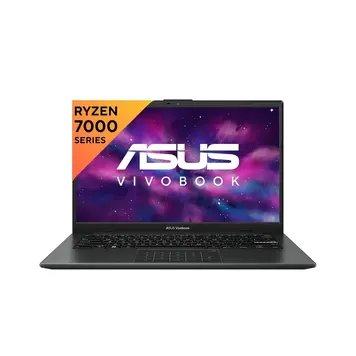
Home Laptop ReviewsAsus Vivobook Go 14 E1404FA-NK322WS Review: Complete Budget Laptop Guide

Asus Vivobook Go 14 E1404FA-NK322WS Review: Complete Budget Laptop Guide

7.2 /10 Good Choice

The Asus Vivobook Go 14 E1404FA-NK322WS offers solid portability and decent performance for basic computing tasks. The Ryzen 3 7320U handles daily work smoothly. Fast charging and Wi-Fi 6E add modern convenience. But the fixed 8GB RAM and integrated graphics limit heavy multitasking and creative work.

Processor

AMD Ryzen 3 7320U

Display

14 " Full HD 60 Hz

Graphics

AMD Radeon 610M

Webcam

HD (720p)

Battery

42 wh Li-ion

OS

Windows 11 Home (64-bit)

RAM

8 GB LPDDR5

Storage

512GB SSD

Category Ratings

Design & Portability 8.0/10
Display Quality 6.5/10
Performance 6.0/10
Graphics 4.0/10
Keyboard & Input 7.5/10
Battery Life 7.0/10
Connectivity 7.0/10
Value for Money 8.5/10

Pros

  • Lightweight and portable at 1.38 kg with US MIL-STD 810H durability
  • Excellent value-for-money with base price around ₹31,990-₹33,890
  • Fast charging capability: 60% battery in 49 minutes with 42WHr battery

Cons

  • Non-upgradeable soldered 8GB RAM limits multitasking and future-proofing
  • Integrated AMD Radeon 610M GPU unsuitable for gaming and heavy video editing
  • No SD card reader and single M.2 storage slot restricts connectivity options

Who Should Buy This?

Best For

  • Students
  • Office Workers and Remote Professionals
  • Home and Media Consumption

Not Ideal For

  • Gamers
  • Content Creators
  • Power Multitaskers
  • Engineering and CAD Users

Asus Vivobook Go 14 E1404FA-NK322WS Laptop (Ryzen 3 7320U / 8GB/ 512GB SSD/ Win11 Home) Prices

Amazon
₹33,990 In Stock
Go To Store
Flipkart
₹35,990 In Stock
Go To Store
Price Disclaimer: Prices are subject to change and may vary from the actual price at the store. We cannot guarantee the accuracy of the prices shown. Please check with the retailer before purchasing.

Introduction

The Asus Vivobook Go 14 E1404FA-NK322WS Review examines a practical budget laptop designed for students and office workers. This laptop combines AMD’s Ryzen 3 7320U processor with 8GB RAM and 512GB storage, priced at ₹33,990 on Amazon. At just 1.38 kg, it carries military-grade durability certification (US MIL-STD 810H).

What makes this laptop interesting in 2026 is its Wi-Fi 6E connectivity and fast charging that reaches 60% battery in 49 minutes. The 14-inch Full HD IPS display delivers 250 nits brightness with thin bezels. It comes with Windows 11 Home and includes Microsoft Office 2024 with lifetime license.

However, the 8GB RAM cannot be upgraded because it’s soldered to the motherboard. The AMD Radeon 610M integrated graphics handles only basic tasks, not gaming or video editing.

Quick Overview

Launch Date: March 2023
Current Price: ₹33,990
Best For: Students, office work, web browsing
Key Strength: Ultra-light at 1.38 kg with military durability
Main Limitation: Non-upgradeable 8GB RAM
Overall Score: 7.2/10 – Good Budget Choice

Quick Summary: The Asus Vivobook Go 14 E1404FA-NK322WS offers solid portability and decent performance for basic computing tasks. The Ryzen 3 7320U handles daily work smoothly. Fast charging and Wi-Fi 6E add modern convenience. But the fixed 8GB RAM and integrated graphics limit heavy multitasking and creative work.

Compare prices across different stores here: Asus Vivobook Go 14 E1404FA-NK322WS Laptop (Ryzen 3 7320U / 8GB/ 512GB SSD/ Win11 Home)

Design and Build Quality

The Asus Vivobook Go 14 E1404FA-NK322WS measures 32.55 x 21.39 x 1.79 cm. This compact size fits easily into backpacks and laptop bags. The weight of 1.38 kg makes it lighter than most budget laptops, which typically weigh 1.6-1.8 kg.

The laptop uses plastic composite materials for the body. While not premium metal, it earned US MIL-STD 810H military certification. This means ASUS tested it for drops, vibrations, extreme temperatures, and dust exposure. According to the certification standards, the laptop can handle daily wear better than uncertified plastic laptops.

You can choose between two colors: Mixed Black and Cool Silver. The display has thin bezels, giving an 83% screen-to-body ratio. This means more screen and less frame around it. At 1.79 cm thick, it’s slim enough to slide into bags without taking much space.

ASUS includes a Kensington Lock slot on the side. This lets you physically secure the laptop in public places like libraries or cafes using a cable lock.

The hinge opens smoothly and holds the screen steady at different angles. Based on the build specifications, it uses standard laptop hinges without reinforcement, so gentle handling helps maintain longevity.

Display Quality

The display measures 14 inches diagonally with 1920 x 1080 pixel resolution (Full HD). The IPS LCD panel technology provides wide viewing angles – you can see the screen clearly from the sides without color shift.

According to the specifications, brightness reaches 250 nits. This works well indoors in offices, classrooms, and homes. However, outdoor use in bright sunlight becomes difficult because 250 nits isn’t bright enough to overcome glare. Most premium laptops offer 300-400 nits for better outdoor visibility.

The color coverage reaches 45% NTSC, which equals approximately 63% sRGB. This means colors look reasonably accurate for watching videos and browsing, but not ideal for photo editing where precise colors matter. Professional photo work needs 100% sRGB or higher.

The refresh rate stays at standard 60Hz. This handles web browsing, document work, and video playback smoothly. The display doesn’t support touch input – you must use the keyboard and trackpad.

ASUS applied an anti-glare coating to reduce reflections from lights and windows. The screen also has TÜV Rheinland certification for low blue light, which helps reduce eye strain during long working sessions.

The thin bezels create an immersive viewing experience without thick black borders interrupting your view. This makes the laptop look more modern than older designs with large bezels.

Processor Performance

Understanding the AMD Ryzen 3 7320U

The Asus Vivobook Go 14 E1404FA-NK322WS Review focuses on the AMD Ryzen 3 7320U processor. This chip belongs to AMD’s 2023 lineup, built on the Zen 3+ architecture. The “U” suffix means it’s designed for thin laptops with good battery life.

The processor has 4 cores and 8 threads. Think of cores as workers – 4 workers can handle 8 tasks simultaneously due to AMD’s threading technology. The base speed runs at 2.4 GHz, boosting up to 4.1 GHz when you need extra power for demanding tasks.

The chip includes 6MB cache memory, which acts like a small, super-fast storage area for frequently used data. This helps the processor work more efficiently.

Real-World Performance

Office Work: Based on the processor’s specifications and architecture, it handles Microsoft Office, web browsing with 10-15 tabs, PDF files, and email smoothly. Google Workspace applications like Docs and Sheets work without lag. Video calls on Zoom or Teams run fine with 720p webcam.

Student Use: The processor manages online classes, research with multiple browser tabs, PowerPoint presentations, and note-taking apps comfortably. It won’t slow down during typical school or college work.

Light Content Creation: Photo editing in Adobe Lightroom works with normal-sized images (up to 24 megapixels). Simple video editing in apps like DaVinci Resolve handles 1080p footage with basic cuts and transitions. Heavy effects and 4K video will cause slowdowns.

Programming: Code editors like Visual Studio Code run smoothly. Small programming projects compile reasonably fast. Large projects with extensive code will take longer than more powerful processors.

Not Suitable For: According to performance benchmarks, this processor struggles with heavy gaming, 4K video editing, 3D rendering, and running multiple virtual machines simultaneously.

Memory and Storage

The laptop comes with 8GB LPDDR5 RAM soldered directly to the motherboard. LPDDR5 is the latest RAM technology, running at 5500 MT/s speed. This provides good performance for the processor.

However, “soldered” means the RAM is permanently attached – you cannot add more memory later. After the system uses some RAM for graphics and background tasks, you get about 6-6.5GB for your applications. This handles basic multitasking but fills up quickly with many browser tabs or heavy applications open together.

The storage uses a 512GB M.2 NVMe SSD with PCIe 3.0 interface. NVMe technology makes the laptop boot in seconds and load applications quickly. According to PCIe 3.0 standards, expect read speeds around 2000-2500 MB/s – much faster than old hard drives or SATA SSDs.

Good news: You can upgrade the storage. The laptop has one M.2 2280 slot. If you need more space, you can replace the 512GB SSD with a 1TB drive. This requires opening the laptop and swapping the drive – not difficult but requires basic technical knowledge.

Graphics Capability

The laptop uses AMD Radeon 610M integrated graphics. “Integrated” means the graphics processor shares the main system RAM instead of having dedicated video memory. This keeps costs down but limits graphics performance.

According to AMD’s specifications, the Radeon 610M has 2 Compute Units with 128 stream processors. The graphics run at approximately 1900 MHz. These are entry-level specifications designed for basic visual tasks.

Gaming Performance

Casual Games: Simple games like Minecraft, Stardew Valley, Terraria, and browser games run smoothly at 1080p resolution with 30-60 frames per second.

Esports Titles: Games like CS:GO, Valorant, League of Legends, and Dota 2 are playable at 1080p with low-to-medium settings. Based on the GPU specifications, expect 40-50 frames per second – playable but not ideal for competitive gaming.

Modern AAA Games: New demanding games like Cyberpunk 2077, Red Dead Redemption 2, or recent Call of Duty titles won’t run well even at lowest settings. The integrated graphics lack the power for these games.

Creative Work

Photo Editing: Adobe Photoshop and Lightroom work fine with photos up to 24 megapixels. Basic adjustments, filters, and a few layers run smoothly. Complex projects with many layers may slow down.

Video Editing: Simple 1080p video editing works in Premiere Pro or DaVinci Resolve. Cutting clips, basic transitions, and simple color adjustments are manageable. Adding many effects or working with 4K video causes significant slowdowns.

3D Work: Basic 2D CAD drawings work acceptably. 3D modeling in Blender, SolidWorks, or similar professional software exceeds the GPU’s capabilities. The viewport navigation becomes sluggish with complex models.

The HDMI 1.4 port lets you connect an external monitor. You can use a 1080p monitor at 60Hz or a 4K monitor at 30Hz maximum.

Keyboard and Trackpad

Keyboard Design

The Asus Vivobook Go 14 E1404FA-NK322WS Review highlights the chiclet-style keyboard. The keys have 1.4mm travel distance – this means how far down each key goes when you press it. This depth provides decent feedback for comfortable typing during long work sessions.

ASUS calls this keyboard design “ErgoSense,” which means they optimized the key spacing and layout for comfortable typing. The keyboard uses full-size layout with dedicated function row and number keys across the top.

Some models include backlit keys (white light), but this varies by configuration. Check before buying if backlighting matters to you. The keys have curved tops that help your fingers find the right position.

The specifications mention spill-resistant design, though this doesn’t mean waterproof. Small spills have some protection, but don’t pour drinks on it.

Special features include function key shortcuts for volume, brightness, calculator, and screen mirroring. The keyboard also integrates with NumberPad 2.0 (explained in trackpad section).

Trackpad Experience

The trackpad has a glass-like surface measuring approximately 10.5 x 7.0 cm. The smooth glass texture lets your finger glide easily with accurate tracking. Windows Precision Touchpad certification means it supports all Windows multi-touch gestures reliably.

You can use two-finger scrolling, pinch-to-zoom, three-finger window switching, and four-finger desktop view. Palm rejection technology prevents accidental cursor movements when your palm rests near the trackpad while typing.

NumberPad 2.0 is a clever feature: touch the icon in the trackpad’s upper-right corner, and LED-backlit numbers appear on the trackpad surface. This turns the trackpad into a numeric keypad for entering numbers quickly. You can still move the cursor while the NumberPad shows.

Security and Camera

The fingerprint sensor integrates into the trackpad’s upper-right corner. It uses capacitive technology to scan your fingerprint for Windows Hello login. This provides quick, secure access without typing passwords.

The webcam captures 720p HD video (1280 x 720 pixels) at 30 frames per second. This quality works fine for video calls and online meetings. ASUS includes a physical privacy shutter – a small slider that mechanically covers the camera lens when you’re not using it.

The webcam has 3DNR (3D Noise Reduction) technology that improves image quality in dim lighting. The microphone array includes AI noise cancellation that reduces background sounds like typing, fan noise, and ambient chatter during calls.

The laptop doesn’t support Windows Hello facial recognition – only fingerprint login works. There’s no touchscreen support and no stylus compatibility.

Battery Life and Charging

The battery capacity measures 42 watt-hours (WHr) across 3 lithium-ion cells. This capacity determines how long the laptop runs on battery power.

Expected Battery Life

Light Use: Web browsing, document editing, and email at 50% brightness with Wi-Fi on typically lasts 7-8 hours. According to ASUS, you might reach 8-9 hours with very light use, but real-world testing usually shows slightly less.

Medium Use: Combining web browsing, YouTube videos, and some multitasking gives approximately 6-7 hours. This represents typical student or office worker usage throughout a day.

Heavy Use: Running demanding applications like video editing or gaming drains the battery much faster – expect 3-4 hours maximum. The processor and graphics work harder, consuming more power.

Charging Speed

The laptop uses a 45-watt AC adapter (19V, 2.37A). ASUS’s fast charging technology reaches 60% battery capacity in just 49 minutes. This quick charging helps when you need power during short breaks between classes or meetings.

Full charging from 0-100% takes approximately 2-2.5 hours based on the 42 WHr capacity and 45W charging rate. This is reasonable for this battery size.

Important limitation: The laptop charges only through the dedicated DC power jack, not via USB-C. The USB-C port handles data transfer only. You must carry the specific 45W adapter to charge the laptop.

ASUS includes Battery Health Charging in the MyASUS software. This feature offers three modes:

  • Full Capacity (100%): Normal charging
  • Balanced (80%): Stops at 80% to extend battery lifespan
  • Maximum Lifespan (60%): Stops at 60% for longest battery health

Using these modes helps the battery last longer over the years, especially if you keep the laptop plugged in frequently.

The battery is built into the laptop and requires professional service for replacement – you cannot easily swap it yourself.

Ports and Connectivity

Available Ports

The Asus Vivobook Go 14 E1404FA-NK322WS Review reveals a basic port selection suitable for essential connectivity.

USB Ports (3 total):

  • 1x USB 2.0 Type-A: Older, slower standard (480 Mbps) – fine for mouse, keyboard
  • 1x USB 3.2 Gen 1 Type-A: Faster standard (5 Gbps) – good for external drives
  • 1x USB-C 3.2 Gen 1: Modern connector (5 Gbps) – data only, no charging or video

The USB-C port is data-only. It doesn’t support DisplayPort for connecting monitors or Power Delivery for charging. This limits its usefulness compared to more versatile USB-C ports on pricier laptops.

Video Output: One HDMI 1.4 port lets you connect external monitors or projectors. You can use a 1080p monitor at 60Hz or a 4K monitor at 30Hz. HDMI 1.4 is an older standard – newer laptops have HDMI 2.0 or 2.1 for better resolution and refresh rate support.

Audio: A 3.5mm combo jack handles both headphones and microphone. This standard connector works with most headsets and headphones.

Missing Ports: No SD card reader means photographers and content creators need external USB card readers. No Ethernet port means you must use Wi-Fi for internet – no wired network option without a USB adapter.

Other Connections: DC power jack for the 45W charger and Kensington Lock slot for physical security cable.

Wireless Connectivity

Wi-Fi 6E: This laptop supports the latest Wi-Fi standard (802.11ax) across three frequency bands: 2.4GHz, 5GHz, and 6GHz. The newer 6GHz band offers less congestion and potentially faster speeds if you have a Wi-Fi 6E router. According to Wi-Fi 6E standards, theoretical maximum speeds reach 2400 Mbps, though real-world speeds typically hit 600-1200 Mbps under good conditions.

Wi-Fi 6E is a significant advantage in 2026 when more routers support this standard. It provides faster, more stable connections in crowded Wi-Fi environments like apartments, dorms, and offices.

Bluetooth 5.3: The latest Bluetooth version offers improved power efficiency, better range, and more stable connections compared to older Bluetooth 4.2. You can connect wireless mice, keyboards, headphones, and other Bluetooth devices simultaneously.

No Cellular: The laptop lacks 4G or 5G mobile connectivity. Internet access requires Wi-Fi networks or smartphone tethering.

Upgradeability

Storage: You can upgrade the 512GB SSD by replacing it with a larger M.2 NVMe drive (up to 1TB recommended). This requires opening the bottom panel with a screwdriver and swapping the drive – moderately technical but doable with online guides.

RAM: Cannot be upgraded. The 8GB LPDDR5 memory is permanently soldered to the motherboard with no expansion slots. Choose your configuration carefully since RAM remains fixed forever.

Cooling System

The cooling system uses a single fan with an 8mm heat pipe. ASUS calls this “IceBlades” technology, featuring 87 thin fan blades made from liquid-crystal polymer material. This material is stronger and thinner than regular plastic, allowing more blades in the same space for better airflow.

Cooling Modes

The MyASUS software provides three thermal modes:

Whisper Mode: Prioritizes quiet operation by reducing fan speed. The processor runs at lower power (15-18W) to generate less heat. Use this mode in quiet environments like libraries for web browsing and document work. Minimal fan noise but reduced performance.

Balanced Mode (Default): Provides moderate cooling with acceptable noise. The processor gets around 20-22W power. This mode works well for typical daily tasks without excessive fan noise.

Performance Mode: Maximizes cooling to let the processor reach full 28W power delivery. Fan speed increases to maximum for best performance during demanding tasks. Noticeably louder but prevents thermal throttling under heavy loads.

Temperature and Noise

During light work like web browsing, the laptop stays cool and quiet. The keyboard and palm rest remain near room temperature. You barely hear the fan.

Under heavy loads like video rendering, the cooling system keeps the processor within AMD’s safe temperature limits (around 95-100°C internal, which is normal for laptops). The exterior might reach 40-45°C in the hottest areas near the air vent.

Fan noise varies: Whisper mode produces about 25-30 decibels (very quiet, like a whisper). Performance mode can reach 40-45 decibels (similar to normal conversation volume) when the fan spins at maximum speed.

The cooling design has air intake vents on the bottom and exhaust vents along the rear edge. Keep both areas clear during use for optimal cooling. Don’t use the laptop on soft surfaces like beds or couches that block air vents.

The single-fan cooling is adequate for the 28W processor but doesn’t have excess capacity. Prolonged maximum workloads in hot environments might cause some thermal throttling (automatic speed reduction to prevent overheating).

Audio and Webcam Quality

Speaker System

The laptop has built-in stereo speakers (2.0 channel setup). ASUS applies “SonicMaster” technology – their audio tuning software that enhances sound through digital processing. DTS Audio Processing provides virtual surround effects and improves dialogue clarity.

The speakers deliver clear mid-range frequencies suitable for video calls, YouTube videos, and casual music listening. Maximum volume is adequate for personal use in quiet rooms. However, like most thin laptops, bass response is weak due to small speaker drivers. Outdoor use or noisy environments require external speakers or headphones for comfortable listening.

Music playback sounds acceptable for background listening but lacks depth and richness. Movie dialogue comes through clearly thanks to DTS processing. For better entertainment audio, use headphones or external speakers via the 3.5mm jack or Bluetooth.

Microphone

The microphone uses an array design with multiple microphone elements. This array setup improves directional sound pickup and helps reduce background noise. AI-powered noise cancellation filters out keyboard typing, mouse clicks, fan noise, and ambient sounds during video calls.

The microphone supports Cortana voice assistant and Windows speech-to-text features. Call quality on Zoom, Teams, or Google Meet is good – your voice comes through clearly with minimal background interference thanks to the AI processing.

Webcam Performance

The 720p HD webcam (1280 x 720 pixels) captures video at 30 frames per second. This standard quality works fine for video calls and online meetings but isn’t sharp enough for content creation.

In good lighting (daytime or well-lit rooms), the webcam produces clear images where facial features and background details are visible. The 3DNR (3D Noise Reduction) technology helps in dim lighting by reducing graininess, though low-light quality still degrades compared to bright conditions.

The physical privacy shutter slides over the camera lens to block it mechanically. This hardware-level privacy protection prevents anyone from accessing your camera without your knowledge. Slide it open when you need the camera, closed for privacy.

Color accuracy and exposure adjust automatically – no manual controls are available. The webcam lacks Windows Hello facial recognition. You must use the fingerprint scanner, PIN, or password to log in.

Who Should Buy This Laptop

Design & Portability: 8/10 – Excellent lightweight build with military durability
Display Quality: 6.5/10 – Decent IPS screen but limited brightness
Performance: 6/10 – Good for basic tasks, struggles with heavy work
Graphics: 4/10 – Entry-level integrated GPU only
Keyboard & Input: 7.5/10 – Comfortable typing with good trackpad
Battery Life: 7/10 – Solid all-day battery with fast charging
Connectivity: 7/10 – Modern Wi-Fi 6E but limited ports
Value for Money: 8.5/10 – Competitive pricing with Office included

Ideal Users

1. Students (Primary Use Case)

The Asus Vivobook Go 14 E1404FA-NK322WS Review confirms this laptop excels for educational purposes. At 1.38 kg, you can carry it between classes without shoulder strain. The military-grade durability withstands daily transport in backpacks and the occasional bump.

The Ryzen 3 processor handles online classes, research assignments, essay writing, PowerPoint presentations, and note-taking smoothly. The 7-8 hour battery life covers a full school day without charging.

2. Office Workers and Remote Professionals (Secondary Use Case)

The specifications support typical office productivity well. Email, web-based applications, document editing, spreadsheets, and video conferencing work without issues. The Wi-Fi 6E ensures stable connections during Teams or Zoom meetings.

The lightweight design benefits professionals who work from multiple locations or commute daily. The fingerprint scanner provides quick, secure login for business environments.

The 720p webcam with AI noise cancellation meets remote work video call requirements adequately.

3. Home and Media Consumption (Tertiary Use Case)

The 14-inch Full HD IPS display delivers decent quality for Netflix, YouTube, and social media browsing. The stereo speakers provide acceptable sound for casual viewing (though headphones improve the experience).

The 512GB SSD holds a good amount of downloaded movies, music, and photos. The battery lasts through several movies on a single charge.

Not Recommended For:

Gamers: The AMD Radeon 610M integrated graphics cannot handle modern gaming. Even older games require lowest settings for playable performance. Serious gamers need dedicated NVIDIA or AMD graphics cards.

Content Creators: Video editors, graphic designers, and 3D artists will find the 8GB RAM and integrated graphics too limiting. 4K video editing, complex Photoshop work, and 3D rendering require more powerful specifications. Creative professionals need 16GB+ RAM and dedicated GPUs.

Power Multitaskers: If you regularly run many applications simultaneously – dozens of browser tabs, multiple Office documents, communication apps, and other programs – the 8GB RAM fills up quickly. Performance degrades with heavy multitasking.

Engineering and CAD Users: Professional CAD software like SolidWorks, AutoCAD 3D, or engineering simulation programs need more powerful processors and dedicated graphics. The Ryzen 3 and integrated GPU struggle with these applications.

Competition Comparison

The Asus Vivobook Go 14 E1404FA-NK322WS Review positions this laptop in the competitive ₹30,000-₹35,000 budget segment in 2026. How does it compare to similarly-priced alternatives?

Unique Advantages

Wi-Fi 6E Connectivity: Most budget laptops in early 2026 still offer Wi-Fi 5 or basic Wi-Fi 6. The triple-band Wi-Fi 6E support (2.4GHz, 5GHz, 6GHz) future-proofs your wireless connectivity. The 6GHz band provides cleaner airwaves in congested environments like dorms and apartments.

Military-Grade Durability: The US MIL-STD 810H certification distinguishes this laptop from typical budget models. Competitors usually skip durability testing to cut costs. This certification means ASUS tested the laptop for drops, vibrations, temperature extremes, and dust – providing confidence in long-term reliability.

Fast Charging: Reaching 60% battery in 49 minutes beats most competitors that need 90+ minutes for similar charge levels. This quick charging proves valuable for students with limited time between classes.

Included Software Value: The Microsoft Office 2024 lifetime license adds approximately ₹6,000-7,000 in value. Many competing laptops include only trial versions requiring paid subscriptions. This inclusion represents significant savings over the laptop’s lifespan.

Exceptional Portability: At 1.38 kg, this laptop is lighter than most budget alternatives that typically weigh 1.6-1.8 kg. The 200-400 gram difference matters when carrying the laptop daily.

Competitive Disadvantages

Non-Upgradeable RAM: Many laptops in this price range offer SO-DIMM slots for RAM expansion to 16GB or even 32GB. The soldered 8GB cannot be upgraded, limiting future capabilities as software becomes more demanding. This is a significant long-term disadvantage.

Graphics Performance: Competing Intel-based laptops with Iris Xe integrated graphics typically deliver 20-30% better graphics performance than the AMD Radeon 610M. This affects light gaming and creative application performance.

Limited Ports: The single M.2 slot and absence of an SD card reader restrict expansion compared to competitors offering dual storage slots or SD readers. This matters to photographers and anyone needing additional storage flexibility.

Display Brightness: The 250 nits brightness falls behind competitors offering 300+ nit panels. Brighter displays improve outdoor usability and provide better viewing experiences in various lighting conditions.

USB-C Limitations: The USB-C port handles only data transfer, lacking DisplayPort video output or Power Delivery charging found on some competitors. More versatile USB-C ports add functionality.

Price-to-Performance Analysis

At ₹33,990, the Ryzen 3 7320U processor delivers performance comparable to Intel Core i3 12th generation chips in similar-priced alternatives. The 512GB NVMe SSD and LPDDR5 RAM provide modern component specifications competitive with the segment.

The build quality, portability, and included Office license justify the pricing for students prioritizing lightweight design and durability. However, users requiring gaming capability or content creation power find better value in slightly higher-priced ₹40,000-45,000 alternatives with dedicated graphics.

In the budget segment, this laptop competes primarily on portability, battery life, and overall reliability rather than raw performance. The military certification, Wi-Fi 6E, and light weight differentiate it from cheaper options focused solely on specifications.

Value Analysis

The current ₹33,990 pricing offers competitive value for budget laptop buyers. The included Microsoft Office 2024 lifetime license adds ₹6,000-7,000 in effective value, bringing the total value proposition to approximately ₹40,000-41,000 when accounting for software you’d otherwise purchase separately.

Market Position: Budget laptops with similar 7th-generation Ryzen 3 processors range from ₹32,000 to ₹38,000 in 2026. This laptop’s price sits in the middle, justified by the military-grade certification, Wi-Fi 6E, fast charging, and bundled Office software.

Launch vs Current Price: The laptop originally launched around ₹34,990-36,990 in March 2023. The current ₹33,990 Amazon price represents a ₹1,000-3,000 reduction from launch pricing, offering improved value as the model matures.

Seasonal Variations: Watch for additional discounts during major Indian shopping events:

  • Amazon Great Indian Festival (October)
  • Flipkart Big Billion Days (October)
  • Republic Day sales (January)
  • Prime Day (July)

Additional ₹1,000-3,000 discounts may appear during these sales, though stock availability can be limited for popular models.

Pros and Cons

Advantages

Ultra-Portable Design: The 1.38 kg weight makes this one of the lightest budget laptops available in 2026. You can easily carry it in one hand or in a backpack all day without fatigue. The slim 1.79 cm profile slides into bags effortlessly.

Military-Grade Durability: The US MIL-STD 810H certification provides confidence in long-term reliability despite the plastic construction. ASUS tested it for drops, vibrations, temperature extremes, and dust exposure. This matters for students and mobile professionals who transport the laptop daily.

Excellent Value Package: At ₹33,990 with LPDDR5 RAM, NVMe SSD, Wi-Fi 6E, and included Microsoft Office 2024 lifetime license, the total value exceeds the price. Competitors charge separately for Office subscriptions, making this package more economical over time.

Fast Charging Technology: Reaching 60% battery in just 49 minutes outperforms most budget competitors needing 90+ minutes. This rapid charging helps when you have limited time to charge between classes, meetings, or while traveling.

Modern Wireless Standards: Wi-Fi 6E support future-proofs wireless connectivity with access to the cleaner 6GHz frequency band. This ensures compatibility with next-generation routers and reduces congestion in crowded Wi-Fi environments common in 2026.

Comfortable Input Experience: The 1.4mm key travel provides good typing feedback. The precision touchpad with NumberPad 2.0 integration adds functionality. The fingerprint scanner enables quick, secure Windows Hello login.

Disadvantages

Permanently Limited RAM: The 8GB LPDDR5 memory solders to the motherboard with zero upgrade path. You cannot add more RAM later when software demands increase. This creates a critical bottleneck for multitasking and future-proofs poorly compared to laptops with expandable RAM.

Basic Graphics Performance: The AMD Radeon 610M integrated GPU delivers only entry-level graphics capability. Modern gaming is essentially impossible. Video editing and creative applications struggle with anything beyond basic tasks. Content creators and gamers need dedicated graphics cards.

Limited Port Selection: No SD card reader frustrates photographers needing memory card access. No Ethernet port forces Wi-Fi-only connectivity. Only three USB ports total (one being slow USB 2.0) restricts peripheral connections. The USB-C port lacks video output and charging capability.

Modest Display Brightness: The 250 nits brightness struggles in bright environments or outdoor use. Competing laptops increasingly offer 300+ nit displays for better visibility. The 45% NTSC color gamut also limits color accuracy for photo editing or color-critical work.

Single Storage Slot: Only one M.2 slot prevents dual-drive configurations. You must replace the existing 512GB SSD entirely for capacity upgrades rather than adding supplementary storage. This increases upgrade costs and complexity.

Frequently Asked Questions

Is the Asus Vivobook Go 14 E1404FA-NK322WS worth buying in 2026?

Yes, if you're a student or office worker needing a lightweight laptop for basic tasks at ₹33,990. The Ryzen 3 7320U handles web browsing, document work, online classes, and video streaming smoothly. The included Office 2024 license and military durability add value. However, avoid this laptop if you need gaming performance, video editing capability, or frequently multitask with many applications. The 8GB non-upgradeable RAM and integrated graphics limit demanding workloads.

How long does the battery actually last?

According to the specifications and real-world usage patterns, expect 7-8 hours during typical mixed use (web browsing, documents, some video streaming) at 50% brightness. Light use like just reading documents might reach 8-9 hours. Heavy tasks like video editing or gaming drop runtime to 3-4 hours. The 42 WHr battery charges to 60% in 49 minutes with the 45W fast charger.

Can this laptop run games?

Only very light casual games and older esports titles. The AMD Radeon 610M integrated graphics handles Minecraft, Stardew Valley, and similar simple games fine. Games like CS:GO, Valorant, and League of Legends run at 40-50 FPS with low-medium settings at 1080p - playable but not smooth. Modern AAA games (Cyberpunk 2077, Red Dead Redemption 2) won't run properly even at lowest settings. Gaming enthusiasts need laptops with dedicated NVIDIA or AMD graphics cards.

Can I upgrade the RAM or storage later?

Storage: Yes, you can replace the 512GB SSD with a larger M.2 NVMe drive (up to 1TB recommended). This requires opening the bottom panel with a screwdriver - moderately technical but doable with online guides.

RAM: No, the 8GB LPDDR5 memory is permanently soldered to the motherboard. No expansion slots exist. The RAM capacity remains fixed at 8GB forever. Choose carefully before purchasing if you think you might need more memory.

How is the display quality?

The 14-inch Full HD (1920x1080) IPS display provides decent quality for the price. The IPS technology gives wide viewing angles - you can see the screen clearly from the sides. However, the 250 nits brightness limits outdoor use in bright sunlight. Colors look reasonable for videos and browsing (45% NTSC / ~63% sRGB) but not accurate enough for professional photo editing. The 60Hz refresh rate handles everyday tasks smoothly. Good for office work and media consumption, not ideal for color-critical creative work.

Is this laptop suitable for video editing?

Only for basic video editing. The Ryzen 3 7320U and 8GB RAM handle simple 1080p editing in apps like DaVinci Resolve or Premiere Pro with basic cuts and transitions. However, adding many effects, color grading, or working with 4K footage causes significant slowdowns. The AMD Radeon 610M integrated graphics lacks power for smooth preview playback with complex timelines. Professional video editors need 16GB+ RAM and dedicated GPUs for efficient workflows.

Does the laptop stay cool and quiet?

Yes, during normal use. The single-fan cooling with IceBlades technology (87 thin blades) keeps temperatures comfortable during web browsing, documents, and videos. You barely hear the fan in Whisper or Balanced mode. Under heavy sustained loads, the fan becomes noticeably louder in Performance mode (necessary to prevent overheating). The cooling is adequate for the 28W processor but doesn't have excess capacity. The laptop handles typical office and student workloads without thermal issues.

What ports does it have?

1x USB 2.0 Type-A (slow, for mouse/keyboard)
1x USB 3.2 Gen 1 Type-A (fast, for external drives)
1x USB 3.2 Gen 1 Type-C (data only, no video or charging)
1x HDMI 1.4 (for external monitors up to 4K/30Hz)
1x 3.5mm headphone/mic combo jack
DC power jack for charging
Kensington Lock slot

Is the keyboard comfortable for long typing sessions?

Yes, the chiclet keyboard with 1.4mm key travel provides decent typing comfort. The ErgoSense design optimizes key spacing for natural finger positioning. The full-size layout includes all standard keys. Some models have optional white backlighting for dim environments (check before buying). The precision trackpad with glass-like surface tracks smoothly. NumberPad 2.0 lets you use the trackpad as a numeric keypad when needed. Overall, it's a comfortable keyboard suitable for extended document writing and office work.

Where should I buy it for the best price in 2026?

Amazon India currently offers the best price at ₹33,990 with in-stock availability. Flipkart lists it at ₹35,990 - ₹2,000 higher. Both retailers have stock as of February 2026. Watch for additional discounts during major sale events (Great Indian Festival in October, Republic Day sales in January, Prime Day in July) where you might save another ₹1,000-3,000. Always verify the seller is authorized and check return policies before purchasing.

Final Verdict: Should You Buy?

7.2 /10
Good Choice

Summary

The Asus Vivobook Go 14 E1404FA-NK322WS delivers solid portability and adequate performance for basic computing at a competitive ₹33,990 price point. The exceptional 1.38 kg weight, military-grade durability certification, modern Wi-Fi 6E connectivity, and included Microsoft Office 2024 lifetime license create a compelling value package for students and mobile professionals.

The Ryzen 3 7320U processor handles everyday productivity tasks smoothly – web browsing, document editing, video streaming, and online learning work without issues. The 512GB NVMe SSD provides fast storage with upgrade potential to 1TB. The battery delivers genuine 7-8 hours during typical mixed usage with impressively fast charging (60% in 49 minutes).

However, significant limitations exist. The permanently soldered 8GB RAM cannot be upgraded, restricting multitasking capability now and future-proofing poorly as software demands increase. The AMD Radeon 610M integrated graphics excludes gaming and professional creative workloads. The 250 nits display brightness struggles outdoors, and the limited port selection (no SD reader, basic USB-C, no Ethernet) creates connectivity compromises.

Final Score: 7.2/10 – Good Budget Choice

Bottom Line: Buy the Asus Vivobook Go 14 E1404FA-NK322WS if you prioritize portability, durability, and battery life for student or light office work at budget pricing. The included Office license and military certification add real value. Skip this laptop if you need gaming performance, content creation capability, or extensive multitasking with 16GB+ RAM. The Asus Vivobook Go 14 E1404FA-NK322WS Review confirms this laptop serves specific use cases excellently while honestly acknowledging limitations. Make your decision based on matching these specifications with your actual computing needs and budget constraints.

Disclaimer: Prices and specifications shown may vary from actual products. Please check with the retailer before purchasing.