Home Laptop ReviewsSamsung Galaxy Book5 Pro Review 2026: Is This Ultraportable Worth Buying?

Samsung Galaxy Book5 Pro Review 2026: Is This Ultraportable Worth Buying?

8.2 /10 Great Value

The Samsung Galaxy Book5 Pro offers one of the best displays and battery life in any ultraportable laptop. It's perfect for people who work on the go. However, the keyboard feels shallow and may not suit everyone.

Processor

Intel Core Ultra 5 Series 2, Model 226V

Display

14 " WQXGA (2560x1600) 120 Hz

Graphics

Intel Arc 130V

Webcam

Full HD (1080p)

Battery

63.1 wh Lithium-Polymer

OS

Windows 11 Home

RAM

16 GB LPDDR5X

Storage

512GB

Category Ratings

Design & Build 8.5/10
Display Quality 9.5/10
Performance 7.5/10
Graphics 6.0/10
Keyboard & Trackpad 7.0/10
Battery Life 9.5/10
Ports 8.0/10
Value for Money 8.0/10

Pros

  • Stunning 3K AMOLED display with 120Hz refresh rate and exceptional color accuracy
  • Extremely lightweight at 1.23kg with premium all-metal build quality and ultra-thin 11.6mm profile
  • Excellent battery life up to 21 hours with fast 65W charging capability

Cons

  • Shallow keyboard key travel (~1.5mm) causes typing discomfort and occasional missed keystrokes
  • Weak 2MP webcam lacks IR camera and privacy shutter, poor for video calls
  • 512GB base storage insufficient; soldered RAM prevents future upgrades

Who Should Buy This?

Best For

  • Business travelers who need a light laptop with all-day battery life
  • Students who carry their laptop to classes every day
  • People who work in coffee shops or airports without easy access to power outlets
  • Photo editors who need accurate colors on a portable laptop
  • Anyone who watches lots of movies and wants the best display quality

Not Ideal For

  • Gamers who want to play modern games at high settings
  • Video editors working with 4K footage that needs fast rendering
  • Writers and programmers who type all day and want the best keyboard
  • People who need lots of ports for multiple devices at once

Samsung Galaxy Book 5 Pro NP940XHA Laptop Prices

Flipkart
₹1,25,199 In Stock
Go To Store
Samsung
₹1,31,990 In Stock
Go To Store
Price Disclaimer: Prices are subject to change and may vary from the actual price at the store. We cannot guarantee the accuracy of the prices shown. Please check with the retailer before purchasing.

Introduction

This Samsung Galaxy Book5 Pro Review examines a laptop that launched in January 2025 and became widely available in February 2025. It features Intel’s Core Ultra 5 or Core Ultra 7 processors, a beautiful 14-inch 3K AMOLED touchscreen, and weighs just 1.23kg (2.7 pounds). The laptop comes in both 14-inch and 16-inch sizes.

The Samsung Galaxy Book5 Pro currently sells for ₹1,25,199 on Flipkart and ₹1,31,990 on Samsung’s official store in India. In the United States, prices start at $1,449 for the 14-inch model. This laptop is designed for business professionals, students, and anyone who needs a portable computer with excellent battery life.

What makes this laptop stand out is its stunning AMOLED display, incredibly light weight, and battery that can last up to 21 hours on the 14-inch model. However, it also has some trade-offs including a shallow keyboard and limited storage in the base model. Use our Gadget Finder to compare this laptop with other options.

Samsung Galaxy Book5 Pro Quick Overview

Launch Date: February 2025 (Global)
Starting Price: ₹1,25,199 (India – Flipkart)
Best For: Business travelers, students, anyone who needs long battery life and a light laptop
Key Highlight: Stunning 3K AMOLED display, 21-hour battery life, weighs only 1.23kg
Overall Score: 8.2/10 – Great Value for the Right User
Quick Verdict: The Samsung Galaxy Book5 Pro offers one of the best displays and battery life in any ultraportable laptop. It’s perfect for people who work on the go. However, the keyboard feels shallow and may not suit everyone. Compare prices across stores here on Specs Samsung Galaxy Book5 Pro.

Design and Build Quality

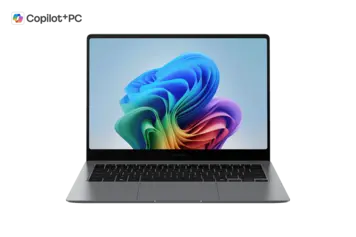
The Samsung Galaxy Book5 Pro uses an all-aluminum body. The 14-inch model measures 312.3 x 223.8 x 11.6mm and weighs just 1.23kg (2.7 pounds). This makes it one of the lightest 14-inch laptops you can buy. The 16-inch model weighs 1.56kg (3.44 pounds), which is also very light for its size.

The laptop feels solid when you pick it up. The aluminum construction gives it a premium feel, similar to a MacBook. The hinge is strong and you can open the laptop with one hand. Samsung offers the laptop in gray and silver colors, though availability varies by region.

At just 11.6mm thin, this laptop easily fits into most bags. However, reviewers note that some units have developed screen cracks without impact, suggesting potential build quality issues. The screen is protected by Corning Gorilla Glass DX with an antireflective coating.

The laptop has no official water or dust resistance rating. The keyboard is described as spill-resistant, but Samsung doesn’t provide details about this feature. Overall, the build quality is good for everyday use, but you should handle it carefully to avoid screen damage.

Display Quality - Samsung Galaxy Book5 Pro Review

The display is one of the best features of this laptop. The 14-inch screen has a resolution of 2880 x 1800 pixels, which Samsung calls 3K WQXGA+. This gives you very sharp text and images. The 16-inch model has the same resolution.

Samsung uses a Dynamic AMOLED 2X panel, the same technology found in their high end phones. This means you get perfect blacks, vibrant colors, and excellent contrast. Reviewers measured 100% sRGB color coverage, 95.9% Adobe RGB, and 98.4% DCIP3. These numbers mean the display shows colors very accurately, which is great for photo editing.

The screen refreshes at 120Hz, making scrolling smooth. It can also adjust the refresh rate automatically to save battery. The display reaches about 387-400 nits of brightness in normal mode and 500 nits when showing HDR content. This brightness is okay for indoor use, but you might struggle to see the screen clearly in bright outdoor sunlight.

The display is a touchscreen, so you can tap and swipe. However, this is not a 2-in-1 laptop – the screen doesn’t fold back. The AMOLED panel has received an Eye Care certification from SGS because it reduces blue light compared to regular LCD screens. This can help reduce eye strain during long work sessions.

Overall, this is one of the best laptop displays you can get. It beats most IPS panels in color quality and contrast. The only downside is that AMOLED screens use more power than IPS panels, which slightly reduces battery life compared to non-touch laptops.

Performance

Processor

The Samsung Galaxy Book5 Pro comes with two processor options. The base model in India (NP940XHA-LG1IN) has an Intel Core Ultra 5 226V. Higher models use the Intel Core Ultra 7 256V or 258V. These are part of Intel’s Series 2 processors, also called Lunar Lake.

The Core Ultra 5 226V has 8 cores (4 performance cores and 4 efficiency cores) with 8 threads. It runs at 2.1 GHz normally and can boost up to 4.5 GHz. The Core Ultra 7 processors are slightly faster with boost speeds up to 4.8 GHz.

For everyday tasks like browsing the web, writing documents, watching videos, and using email, this laptop feels fast and responsive. Reviewers report no slowdowns or lag when using office programs, video calls, or streaming. You can easily run 20+ browser tabs without issues.

However, these processors are not the fastest for heavy work. In benchmark, score lower than AMD Ryzen processors with more cores. This means tasks like 4K video rendering, 3D modeling, and compiling large code projects will be slower. Intel designed these chips to prioritize battery life over maximum performance.

The processor includes an NPU (Neural Processing Unit) that can handle up to 40 TOPS (Core Ultra 5) or 47 TOPS (Core Ultra 7) for AI tasks. This helps with features like Windows Studio Effects for video calls and image enhancement tools.

Memory and Storage

The laptop comes with 16GB or 32GB of RAM. The RAM is LPDDR5X running at 8533MHz, which is very fast. Unfortunately, the RAM is soldered to the motherboard. This means you cannot upgrade it later. If you think you might need 32GB in the future, you should buy that configuration now.

Storage options include 512GB or 1TB NVMe SSD. The SSD uses PCIe Gen 4.0, which is fast for loading programs and files. The good news is you can add more storage later because there is an extra M.2 slot inside the laptop. You can expand storage up to 2TB total.

The base 512GB storage might not be enough if you store lots of photos, videos, or games. Consider the 1TB model if you have large files. The laptop also has a MicroSD card reader if you need extra storage for documents or photos.

Graphics and Gaming

The laptop uses integrated Intel Arc graphics (Arc 130V or Arc 140V depending on the processor). This is not a gaming laptop. The graphics are designed for everyday tasks, not playing the latest games at high settings.

For casual games like Minecraft, older games, or simple indie games, the laptop works fine. You can also play competitive games like League of Legends, CS:GO, and Valorant at 1080p with medium or low settings.

Modern AAA games will struggle on this laptop. You would need to lower the graphics quality significantly, and even then, you might not get smooth framerates. If gaming is important to you, look for laptops with dedicated graphics cards.

For creative work, the graphics can handle photo editing in Lightroom and Photoshop. Video editing at 1080p works okay, but 4K video editing will be slow. The laptop can output to multiple monitors through its Thunderbolt 4 and HDMI 2.1 ports, supporting up to dual 4K displays or one 8K display.

 

Keyboard and Trackpad

Keyboard

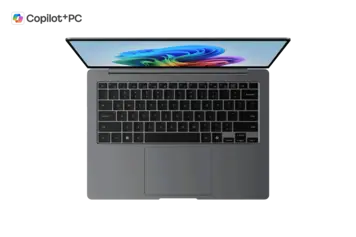
The keyboard is one of the weaker points of this laptop. It uses a chiclet-style design with white backlighting. The key travel measures only 1.5mm, which is shallow. Most people prefer keyboards with 1.8-2.0mm of travel for comfortable typing.

The 14-inch model has a standard keyboard layout without a number pad. The 16-inch model includes a full number pad on the right side. The keyboard is backlit and you can adjust the brightness. There’s also a dedicated Copilot key for quick access to Microsoft’s AI assistant.

If you type a lot every day, the shallow keyboard might bother you. Try it in a store before buying if possible. People who type lightly may not mind the shallow travel as much.

Trackpad

The trackpad is very large and smooth. It uses a glass surface with a clickpad design (the entire surface clicks). Samsung improved the trackpad after criticism of earlier models. The trackpad supports Windows Precision drivers, which means gestures work reliably.

The trackpad includes palm rejection technology that divides the palm area to reduce accidental touches while you type.

The laptop also has a fingerprint reader built into the power button for secure login. There is no facial recognition camera for Windows Hello, which some competing laptops offer.

Battery Life

Battery life is excellent and one of the main reasons to buy this laptop. Samsung claims up to 21 hours for the 14-inch model and up to 25 hours for the 16-inch model. These numbers are based on continuous video playback at low brightness.

The average user should expect 12-18 hours of normal use. The laptop charges with a 65W USB-C charger included in the box. Samsung says you can charge to 35% in 30 minutes on the 16-inch model and 41% in 30 minutes on the 14-inch model. Full charging takes about nearly 2 hours. You can also charge the laptop through the Thunderbolt 4 ports. The combination of Intel’s power-efficient Lunar Lake processor and the 63.1Wh (14-inch) or 76.1Wh (16-inch) battery gives this laptop outstanding battery life. This is one of the best features of the Samsung Galaxy Book5 Pro.

Ports and Connectivity

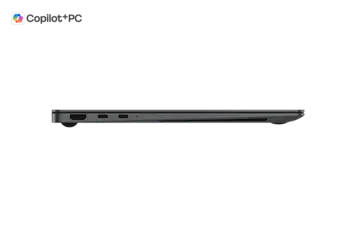
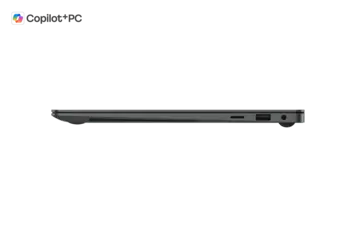
The Samsung Galaxy Book5 Pro has a good selection of ports. On the left side, you get 2 Thunderbolt 4 ports (USB-C) and 1 HDMI 2.1 port. On the right side, there’s 1 USB-A 3.2 port, a MicroSD card reader, and a 3.5mm headphone/microphone combo jack.

The Thunderbolt 4 ports can transfer data at 40Gbps, connect to external displays, and charge the laptop. You can connect two 4K monitors at 60Hz or one 8K monitor through these ports. The HDMI 2.1 port supports up to 8K at 60Hz or 4K at 120Hz.

Some people might find the port selection limiting. There’s only one USB-A port, so if you have multiple USB-A devices (mouse, keyboard, external drive), you’ll need a hub or adapter. There’s no Ethernet port, which means you need a USB-to-Ethernet adapter for wired internet.

For wireless connectivity, the laptop has Wi-Fi 7 (802.11be) and Bluetooth 5.4. Wi-Fi 7 is the newest and fastest wireless standard, though you need a Wi-Fi 7 router to take advantage of the higher speeds. Bluetooth 5.4 works with all modern wireless headphones, mice, and keyboards.

The laptop does not support cellular connectivity (4G or 5G). If you need internet everywhere, you’ll need to use your phone as a hotspot or get a separate mobile hotspot device.

Cooling and Noise

The laptop uses a dual-fan cooling system with two heat pipes. Samsung rates the maximum noise at 41.2 decibels under heavy load. This is relatively quiet compared to gaming laptops, which can reach 50+ decibels.

The Intel Lunar Lake processor is designed to use less power and produce less heat. This helps keep the laptop cool and quiet. During heavy tasks like video editing or running benchmarks, the fans will spin up, but they’re not loud or annoying.

The thin 11.6mm design does limit cooling capacity. If you push the laptop very hard with sustained heavy workloads, it might slow down slightly to prevent overheating. But for typical office work, browsing, and light creative tasks, cooling is not an issue.

Speakers and Webcam

The laptop has a quad-speaker system. The 14-inch model has two 5W woofers and two 2W tweeters. The 16-inch model has two 5W woofers and two 3.3W tweeters. The speakers support Dolby Atmos for better sound quality.

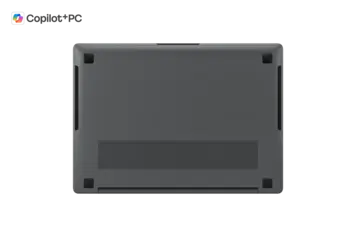
The speakers fire downward from the bottom, so sound quality depends on what surface the laptop sits on. Placing it on a soft surface like a bed can muffle the audio.

The webcam is 2MP (Full HD 1080p). Samsung says it uses “Staggered HDR” technology to improve image quality by combining multiple exposures. The webcam works fine for Zoom, Teams, and other video calls. However, it’s not as good as the 5MP cameras on premium business laptops.

The webcam does not have an IR sensor, so you cannot use facial recognition to log in. There’s also no physical privacy shutter. If you want to cover the camera, you’ll need to use tape or a webcam cover.

The laptop has a dual-array digital microphone with AI noise cancellation. This helps reduce background noise during calls.

Who Should Buy Samsung Galaxy Book5 Pro?

This Laptop is Perfect For:

• Business travelers who need a light laptop with all-day battery life
• Students who carry their laptop to classes every day
• People who work in coffee shops or airports without easy access to power outlets
• Photo editors who need accurate colors on a portable laptop
• Anyone who watches lots of movies and wants the best display quality

Not Recommended For:

• Gamers who want to play modern games at high settings
• Video editors working with 4K footage that needs fast rendering
• Writers and programmers who type all day and want the best keyboard
• People who need lots of ports for multiple devices at once

Comparison with Competitors

The Samsung Galaxy Book5 Pro competes with other premium ultraportable laptops. Its main strengths are the AMOLED display and battery life. Most competing laptops use IPS displays, which don’t have the same deep blacks and vibrant colors.

At similar prices, you can find laptops with more powerful processors. Some competitors offer AMD Ryzen processors with 12 cores instead of Intel’s 8 cores. These laptops will be faster for heavy tasks like video rendering. However, they usually don’t last as long on battery.

The 1.23kg weight is very competitive. This is lighter than most 14-inch laptops with similar features. The build quality also matches or beats many competitors, with the all aluminium construction feeling premium.

If you own other Samsung devices like a Galaxy phone or tablet, this laptop integrates very well with them through features like Multi Control and Quick Share.

Pros and Cons

Pros:

•  Stunning 3K AMOLED display with perfect blacks, vibrant colors, and 100% DCI-P3 color coverage
• Exceptional battery life – 15-21 hours of real-world use
• Very light and portable at 1.23kg (14-inch) or 1.56kg (16-inch)
• Premium all-aluminum build quality
• Runs cool and quiet during normal use
• Large, smooth trackpad with palm rejection
• Future-proof with Wi-Fi 7 and Thunderbolt 4

Cons:

• Shallow keyboard with only 1.5mm travel feels soft and may not suit heavy typists
• Basic 2MP webcam without IR sensor or privacy shutter
• 512GB base storage is limiting; soldered RAM cannot be upgraded later
• Not powerful enough for heavy video editing, 3D work, or modern gaming
• Only one USB-A port limits connectivity options

Frequently Asked Questions

Is the Samsung Galaxy Book5 Pro worth buying in 2026?

Yes, if you value display quality, battery life, and portability above all else. The AMOLED screen is one of the best on any laptop, and the 15-21 hour battery life is excellent. However, if you need maximum performance or a great keyboard for typing all day, other laptops might suit you better

Can you upgrade the RAM or storage?

The RAM is soldered and cannot be upgraded. You're stuck with 16GB or 32GB depending on which model you buy. However, storage can be upgraded because there's an extra M.2 slot inside. You can add a second SSD up to 2TB.

Is this laptop good for gaming?

No, this is not a gaming laptop. The integrated Intel Arc graphics can handle casual games and older titles, but modern AAA games will struggle even at low settings. If gaming is important, look for a laptop with a dedicated NVIDIA or AMD graphics card.

How is the keyboard for typing?

The keyboard is the weakest part of this laptop. It has only 1.5mm of key travel, which feels shallow and soft, but if you type a lot every day, you might prefer a laptop with a better keyboard.

When was the Samsung Galaxy Book5 Pro released?

The laptop launched in South Korea on January 2, 2025. It became available globally (USA,UK, Canada, France, Germany, India) starting in February 2025.

Does it work well with Samsung phones and tablets?

Yes, very well. Features like Multi Control let you use the laptop's keyboard and trackpad to control your Samsung phone or tablet. Quick Share makes it easy to transfer files between devices. You can also use your Galaxy Tab as a second screen. These features only work with Samsung Galaxy devices.

What ports does it have?

The laptop has 2 Thunderbolt 4 (USB-C) ports, 1 USB-A 3.2 port, 1 HDMI 2.1 port, 1 MicroSD card reader, and 1 headphone/microphone jack. There's no Ethernet port, so you need an adapter for wired internet.

How much does it weigh?

The 14-inch model weighs 1.23kg (2.7 pounds). The 16-inch model weighs 1.56kg (3.44 pounds). Both are very light for their screen size, making them easy to carry in a backpack or bag.

Should I buy the 14-inch or 16-inch model?

Buy the 14-inch if you want maximum portability and carry your laptop often. Buy the16-inch if you want more screen space for multitasking and don't mind the extra weight. The 16-inch also has longer battery life and includes a number pad on the keyboard.

Final Verdict: Should You Buy?

8.2 /10
Great Value
The Samsung Galaxy Book5 Pro is an excellent ultraportable laptop that excels in three key areas: display quality, battery life, and portability. The 3K AMOLED screen is stunning and among the best you can get on any laptop. The 15-21 hour battery life means you can work all day without worrying about finding a power outlet. And at just 1.23kg for the 14-inch model, it’s one of the lightest laptops in its class.
However, this laptop makes some compromises. The keyboard feels shallow and soft. The base model comes with only 512GB storage, and you cannot upgrade the RAM later. The integrated graphics are fine for office work but not for gaming or heavy video editing.
Who should buy this laptop? Business travelers who need portability and all-day battery. Students who carry their laptop between classes. Photo editors who need color accuracy. Anyone who watches lots of movies and wants the best display. People who own other Samsung devices will especially appreciate the seamless integration.
Who should skip it? Gamers, heavy video editors, and anyone doing intensive 3D work need more powerful hardware. Writers and programmers who type all day might prefer a laptop with a better keyboard. And if you need lots of ports or maximum upgradeability, there are better options.

Final Score: 8.2/10 – Highly Recommended for the Right User

Bottom Line: If display quality, battery life, and portability matter most to you, the Samsung Galaxy Book5 Pro delivers. It's one of the best ultraportable laptops you can buy in 2026. Just make sure you're okay with the shallow keyboard and understand its performance limitations.

Disclaimer: Prices and specifications shown may vary from actual products. Please check with the retailer before purchasing.